
Qt Quick 例 - シェーダーエフェクト
Qt Quick におけるシェーダー効果の使用例です。
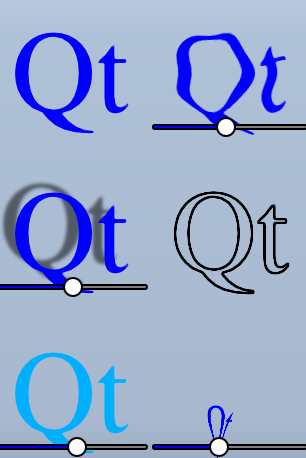
このサンプルでは、Qt Quick のシェーダーを使用して実現できるいくつかの視覚効果を紹介します。テキストと数枚の画像に、5種類の異なる効果を適用しています。詳細については、「Qt Quick の重要な概念」をご覧ください-Graphical Effects
サンプルの実行
このサンプルは、以下の手順で実行できます。
- Qt Creator
Welcome モードを開き、Examples からこのサンプルを選択します。詳細については、『Qt Creator :チュートリアル:ビルドと実行』を参照してください。
- Qt Extension for Visual Studio Code
「Command Palette 」から「Qt: Open Qt examples 」コマンドを実行し、リストからサンプルを選択します。詳細については、Qt Extension for Visual Studio Code の「チュートリアル:ビルドと実行」を参照してください。
ShaderEffectの使用
ShaderEffect 型は通常、ShaderEffectSource を使用して他の型に対して操作を行います:
ShaderEffectSource {
    id: theSource
    sourceItem: theItem
}上記のコードスニペットでは、theItem はファイル内の複雑なQMLオブジェクトのIDです。
ShaderEffectは、このShaderEffectSource をフラグメントシェーダー内のテクスチャとして使用できます:
fragmentShader: "content/shaders/wobble.frag.qsb"OpenGLだけでなく複数のグラフィックスAPIに対応するため、シェーダーのソースコードはQMLに埋め込まれていません。参照される.qsb ファイルは、シェーダーコードの複数のバリエーションを含む、事前に生成されたシェーダーパックです。 実行時に使用されるグラフィックスAPI(Vulkan、Metal、Direct3D 11、またはOpenGL)に応じて、Qt Quick が適切なシェーダーを選択します。.qsbファイルはオフラインで生成され、Qtリソースシステムを介して実行ファイルにバンドルされます。
シェーダー内では、ShaderEffect の任意のカスタムプロパティを使用できます。これにより、アニメーション付きシェーダーコードの作成が非常に簡単になります。
property variant source: theSource
property real bend
property real minimize
property real side: genieSlider.value
SequentialAnimation on bend {
    loops: Animation.Infinite
    NumberAnimation { to: 1; duration: 700; easing.type: Easing.InOutSine }
    PauseAnimation { duration: 1600 }
    NumberAnimation { to: 0; duration: 700; easing.type: Easing.InOutSine }
    PauseAnimation { duration: 1000 }
}
SequentialAnimation on minimize {
    loops: Animation.Infinite
    PauseAnimation { duration: 300 }
    NumberAnimation { to: 1; duration: 700; easing.type: Easing.InOutSine }
    PauseAnimation { duration: 1000 }
    NumberAnimation { to: 0; duration: 700; easing.type: Easing.InOutSine }
    PauseAnimation { duration: 1300 }
}ShaderEffectsには、カスタム頂点シェーダーを設定することも可能です。ShaderEffect のmeshプロパティを設定することで、操作可能な頂点数が増加し、より多くのエフェクトを実現できます。
mesh: Qt.size(10, 10)
vertexShader: "content/shaders/genie.vert.qsb"© 2026 The Qt Company Ltd. Documentation contributions included herein are the copyrights of their respective owners. The documentation provided herein is licensed under the terms of the GNU Free Documentation License version 1.3 as published by the Free Software Foundation. Qt and respective logos are trademarks of The Qt Company Ltd. in Finland and/or other countries worldwide. All other trademarks are property of their respective owners.
