
QCanvasGridPattern Class
QCanvasGridPattern은 그리드 패턴을 그리기 위한 브러시입니다. 더 보기...
| Header: | #include <QCanvasGridPattern> |
| CMake: | find_package(Qt6 REQUIRED COMPONENTS CanvasPainter)target_link_libraries(mytarget PRIVATE Qt6::CanvasPainter) |
| 이후 | Qt 6.11 |
| 상속합니다: | QCanvasBrush |
| Status: | 기술 미리보기 |
공용 함수
| QCanvasGridPattern() | |
| QCanvasGridPattern(const QRectF &rect, const QColor &lineColor = QColorConstants::White, const QColor &backgroundColor = QColorConstants::Black, float lineWidth = 1.0f, float feather = 1.0f, float angle = 0.0f) | |
| QCanvasGridPattern(float x, float y, float width, float height, const QColor &lineColor = QColorConstants::White, const QColor &backgroundColor = QColorConstants::Black, float lineWidth = 1.0f, float feather = 1.0f, float angle = 0.0f) | |
| ~QCanvasGridPattern() | |
| QColor | backgroundColor() const |
| QSizeF | cellSize() const |
| float | feather() const |
| QColor | lineColor() const |
| float | lineWidth() const |
| float | rotation() const |
| void | setBackgroundColor(const QColor &color) |
| void | setCellSize(float width, float height) |
| void | setCellSize(QSizeF size) |
| void | setFeather(float feather) |
| void | setLineColor(const QColor &color) |
| void | setLineWidth(float width) |
| void | setRotation(float rotation) |
| void | setStartPosition(float x, float y) |
| void | setStartPosition(QPointF point) |
| QPointF | startPosition() const |
| operator QVariant() const |
관련 비회원
| bool | operator!=(const QCanvasGridPattern &lhs, const QCanvasGridPattern &rhs) |
| QDataStream & | operator<<(QDataStream &stream, const QCanvasGridPattern &pattern) |
| bool | operator==(const QCanvasGridPattern &lhs, const QCanvasGridPattern &rhs) |
| QDataStream & | operator>>(QDataStream &stream, QCanvasGridPattern &pattern) |
상세 설명
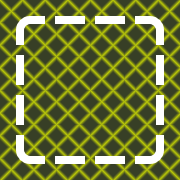
QCanvasGridPattern은 그리드 및 막대 패턴을 그리기 위한 브러시입니다.
다음은 간단한 예제입니다:
// Rotated grid into background
QRectF rect(20, 20, 180, 180);
QCanvasGridPattern gp1(rect, "#DBEB00", "#373F26");
gp1.setCellSize(16, 16);
gp1.setStartPosition(rect.topLeft());
gp1.setLineWidth(2.0f);
gp1.setRotation(M_PI / 4);
gp1.setFeather(5.0f);
painter.setFillStyle(gp1);
painter.fillRect(rect);
// Rounded rectangle, stroked with
// grid pattern for dashes.
float strokeW = 10;
QRectF rect2(40, 40, 140, 140);
QCanvasGridPattern gp2;
gp2.setLineColor(Qt::transparent);
gp2.setBackgroundColor(Qt::white);
gp2.setStartPosition(rect2.x() - strokeW,
                     rect2.y() - strokeW);
gp2.setCellSize(40, 40);
gp2.setLineWidth(strokeW);
painter.setLineWidth(8);
painter.setStrokeStyle(gp2);
painter.beginPath();
painter.roundRect(rect2, 10);
painter.stroke();
멤버 함수 문서
QCanvasGridPattern::QCanvasGridPattern()
기본 그리드 패턴을 구성합니다. 패턴 시작 위치는 (0, 0), 패턴 크기는 (100, 100)입니다. 패턴 각도는 0.0, 그리드 선 색상은 흰색, 배경 색상은 검은색입니다.
QCanvasGridPattern::QCanvasGridPattern(const QRectF &rect, const QColor &lineColor = QColorConstants::White, const QColor &backgroundColor = QColorConstants::Black, float lineWidth = 1.0f, float feather = 1.0f, float angle = 0.0f)
그리드 패턴을 구성합니다. 패턴 시작 위치 및 크기는 rect 로 정의됩니다. 그리드 선 색상은 lineColor, 배경 색상은 backgroundColor 입니다. 그리드 선 너비는 lineWidth, 페더(앤티앨리어싱)는 feather, 각도는 angle 입니다.
QCanvasGridPattern::QCanvasGridPattern(float x, float y, float width, float height, const QColor &lineColor = QColorConstants::White, const QColor &backgroundColor = QColorConstants::Black, float lineWidth = 1.0f, float feather = 1.0f, float angle = 0.0f)
격자 패턴을 구성합니다. 패턴 시작 위치는 ( x, y) 및 패턴 크기 ( width, height) 입니다. 그리드 선 색상은 lineColor, 배경 색상은 backgroundColor 입니다. 패턴 각도는 angle 입니다.
[noexcept] QCanvasGridPattern::~QCanvasGridPattern()
그리드 패턴을 파괴합니다.
QColor QCanvasGridPattern::backgroundColor() const
패턴 격자 배경색을 반환합니다.
setBackgroundColor()도 참조하세요 .
QSizeF QCanvasGridPattern::cellSize() const
단일 셀의 크기를 격자 패턴으로 반환합니다.
setCellSize()도 참조하세요 .
float QCanvasGridPattern::feather() const
패턴 페더를 픽셀 단위로 반환합니다.
setFeather()도 참조하세요 .
QColor QCanvasGridPattern::lineColor() const
패턴 격자 선 색을 반환합니다.
setLineColor()도 참조하세요 .
float QCanvasGridPattern::lineWidth() const
격자 패턴으로 획 선의 너비를 반환합니다.
setLineWidth()도 참조하세요 .
float QCanvasGridPattern::rotation() const
패턴 회전을 라디안 단위로 반환합니다.
setRotation()도 참조하세요 .
void QCanvasGridPattern::setBackgroundColor(const QColor &color)
패턴 격자 배경색을 color 으로 설정합니다. 기본값은 검은색입니다.
backgroundColor()도 참조하세요 .
void QCanvasGridPattern::setCellSize(float width, float height)
격자 패턴에서 단일 셀의 크기를 width, height 으로 설정합니다. 너비가 0 인 경우 가로 막대가 그려지지 않습니다. 높이가 0 인 경우 세로 막대가 그려지지 않습니다. 기본값은 (10, 10) 입니다.
cellSize()도 참조하세요 .
void QCanvasGridPattern::setCellSize(QSizeF size)
격자 패턴에서 단일 셀의 크기를 size 으로 설정합니다. 너비가 0 인 경우 가로 막대가 칠해지지 않습니다. 높이가 0 인 경우 세로 막대가 그려지지 않습니다. 기본값은 (10, 10) 입니다.
이 함수는 오버로드된 함수입니다.
void QCanvasGridPattern::setFeather(float feather)
패턴 페더를 픽셀 단위로 feather 로 설정합니다. 기본값은 단일 픽셀 앤티앨리어싱을 의미하는 1.0 입니다.
feather()도 참조하세요 .
void QCanvasGridPattern::setLineColor(const QColor &color)
패턴 격자선 색상을 color 으로 설정합니다. 기본값은 흰색입니다.
lineColor()도 참조하세요 .
void QCanvasGridPattern::setLineWidth(float width)
그리드 패턴에서 획 선의 너비를 width 으로 설정합니다. 기본값은 1.0 입니다.
lineWidth()도 참조하세요 .
void QCanvasGridPattern::setRotation(float rotation)
패턴 회전을 라디안 단위( rotation )로 설정합니다. 회전은 그리드 startPosition()를 중심으로 이루어집니다. 기본값은 0.0 으로 그리드가 회전되지 않습니다.
rotation()도 참조하세요 .
void QCanvasGridPattern::setStartPosition(float x, float y)
그리드 패턴의 시작점을 (x, y)로 설정합니다. 시작 위치는 패턴에서 그리드의 왼쪽 상단 모서리를 의미합니다. 그러면 여기서부터 패턴이 모든 위치로 확장됩니다. 기본값은 (0.0, 0.0) 입니다.
startPosition()도 참조하세요 .
void QCanvasGridPattern::setStartPosition(QPointF point)
그리드 패턴의 시작 지점을 point 으로 설정합니다. 시작 위치는 패턴에서 그리드의 왼쪽 상단 모서리를 의미합니다. 그러면 여기서부터 패턴이 모든 위치로 확장됩니다. 기본값은 (0.0, 0.0) 입니다.
이 함수는 오버로드된 함수입니다.
QPointF QCanvasGridPattern::startPosition() const
그리드 패턴의 시작점을 반환합니다.
setStartPosition()도 참조하세요 .
QCanvasGridPattern::operator QVariant() const
그리드 패턴을 QVariant 로 반환합니다.
관련 비회원
[noexcept] bool operator!=(const QCanvasGridPattern &lhs, const QCanvasGridPattern &rhs)
격자 패턴 lhs 이 rhs 과 다르면 true 을 반환하고, 그렇지 않으면 false 을 반환합니다.
operator==()도 참조하세요 .
QDataStream &operator<<(QDataStream &stream, const QCanvasGridPattern &pattern)
주어진 pattern 을 주어진 stream 에 쓰고 stream 에 대한 참조를 반환합니다.
Qt 데이터형 직렬화도참조하십시오 .
[noexcept] bool operator==(const QCanvasGridPattern &lhs, const QCanvasGridPattern &rhs)
격자 패턴 lhs 이 rhs 과 같으면 true 을 반환하고, 그렇지 않으면 false 을 반환합니다.
operator!=()도 참조하세요 .
QDataStream &operator>>(QDataStream &stream, QCanvasGridPattern &pattern)
주어진 stream 에서 주어진 pattern 을 읽고 stream 에 대한 참조를 반환합니다.
Qt 데이터형 직렬화도참조하십시오 .
© 2026 The Qt Company Ltd. Documentation contributions included herein are the copyrights of their respective owners. The documentation provided herein is licensed under the terms of the GNU Free Documentation License version 1.3 as published by the Free Software Foundation. Qt and respective logos are trademarks of The Qt Company Ltd. in Finland and/or other countries worldwide. All other trademarks are property of their respective owners.
