
TreeModel QML Type
간단한 트리 모델을 캡슐화합니다. 더 보기...
| Import Statement: | import Qt.labs.qmlmodels |
| Since: | Qt 6.10 |
속성
- columnCount : int
- rows : var
방법
- void appendRow(var treeRow)
- void appendRow(parent, var treeRow)
- void clear()
- variant data(index, string role)
- var getRow(rowIndex)
- QModelIndex index(list<int> treeIndex, int column)
- QModelIndex index(int row, int column, var parent)
- void insertRow(int rowIndex, object row)
(since 6.12) - void insertRow(int rowIndex, QModelIndex parent, object row)
(since 6.12) - bool moveRows(QModelIndex sourceParent, int sourceRow, int count, QModelIndex destinationParent, int destinationChild)
(since 6.12) - void removeRow(rowIndex)
- bool setData(index, variant value, string role)
- void setRow(rowIndex, var treeRow)
상세 설명
TreeModel 유형은 TreeView 과 함께 사용할 수 있는 트리 모델의 데이터로 JavaScript/JSON 객체를 저장합니다. 이 유형은 C++에서 사용자 정의 QAbstractItemModel 하위 클래스를 생성할 필요 없이 매우 간단한 모델을 지원하기 위해 고안되었습니다.
import QtQuick
import QtQuick.Controls
import Qt.labs.qmlmodels

ApplicationWindow {
    visible: true
    width: 500
    height: 500

    TreeView {
        id: treeView
        anchors.fill: parent

        selectionModel: ItemSelectionModel {}

        model: TreeModel {
            id: treeModel

            TableModelColumn {
                display: "checked"
            }
            TableModelColumn {
                display: "size"
            }
            TableModelColumn {
                display: "type"
            }
            TableModelColumn {
                display: "name"
            }
            TableModelColumn {
                display: "lastModified"
            }

            rows: [{
                    checked: false,
                    size: "—",
                    type: "folder",
                    name: "Documents",
                    lastModified: "2025-07-01",
                    rows: [{
                            checked: true,
                            size: "24 KB",
                            type: "file",
                            name: "Resume.pdf",
                            lastModified: "2025-06-20",
                        }, {
                            checked: false,
                            size: "2 MB",
                            type: "folder",
                            name: "Reports",
                            lastModified: "2025-06-10",
                            rows: [{
                                    checked: true,
                                    size: "850 KB",
                                    type: "file",
                                    name: "Q2_Report.docx",
                                    lastModified: "2025-06-15",
                                }, {
                                    checked: false,
                                    size: "1.2 MB",
                                    type: "file",
                                    name: "Q3_Plan.xlsx",
                                    lastModified: "2025-06-18",
                                }]
                        }]
                },
                {
                    checked: false,
                    size: "—",
                    type: "folder",
                    name: "Pictures",
                    lastModified: "2025-05-30",
                    rows: [{
                            checked: true,
                            size: "3.5 MB",
                            type: "file",
                            name: "Vacation.jpg",
                            lastModified: "2025-05-15",
                        }, {
                            checked: false,
                            size: "2.1 MB",
                            type: "file",
                            name: "Family.png",
                            lastModified: "2025-05-20",
                        }]
                }
            ]
        }

        delegate: TreeViewDelegate {}
    }
}
모델의 초기 데이터는 rows 속성을 사용하거나 appendRow()를 호출하여 설정됩니다. 모델의 각 열은 TableModelColumn 인스턴스를 선언하여 지정되며, 각 인스턴스의 순서가 해당 열의 인덱스를 결정합니다. 모델의 Component::completed() 신호가 발산되면 열과 역할이 확정되며, 이후 모델의 수명 기간 동안 고정됩니다.
지원되는 행 데이터 구조
각 행은 트리 내의 노드를 나타냅니다. 각 노드는 동일한 유형의 열을 가집니다. TreeModel은 JavaScript/JSON 데이터와 연동되도록 설계되었으므로, 각 행은 간단한 키-값 쌍의 목록으로 구성됩니다:
                {
                    checked: false,
                    size: "—",
                    type: "folder",
                    name: "Pictures",
                    lastModified: "2025-05-30",
                    rows: [{
                            checked: true,
                            size: "3.5 MB",
                            type: "file",
                            name: "Vacation.jpg",
                            lastModified: "2025-05-15",
                        }, {
                            checked: false,
                            size: "2.1 MB",
                            type: "file",
                            name: "Family.png",
                            lastModified: "2025-05-20",
                        }]
                }
노드에는 자식 노드가 있을 수 있으며, 이들은 “rows” 키와 연관된 배열에 저장됩니다. “rows”는 이 용도로 예약되어 있으므로, 이 키에는 자식 노드 목록만 연관되어야 합니다.
모델은 ` QModelIndices`를 통해 조작됩니다. 특정 행/노드에 접근하려면 ` getRow()` 함수를 사용할 수 있습니다. 또한 ` rows ` 속성을 통해 모델의 JavaScript 데이터에 직접 접근할 수도 있지만, 이 방법으로 모델 데이터를 수정할 수는 없습니다.
새 행을 추가하려면 appendRow()을 사용합니다. 기존 행을 수정하려면 setRow(), removeRow() 및 clear()을 사용합니다.
외부 JSON 소스와 함께 TreeModel 사용하기
TreeModel의 본래 용도는 QML 파일 내에서 JSON 데이터를 직접 정의하는 것이지만, 구조가 TreeModel에서 정의한 구조와 일치하는 한 어떤 JSON 객체라도 이 모델과 함께 사용할 수 있습니다. JSON 객체의 모든 행이 모델에서 정의한 열에 부합한다면, rows 속성을 통해 직접 할당할 수 있습니다.
JSON 객체의 소스는 파일일 수도 있습니다. 예를 들어, 모델이 다음과 같이 정의되어 있고
    TreeModel {
        id: treeModel
        objectName: "testModel"

        TableModelColumn { display: "checked" }
        TableModelColumn { display: "size" }
        TableModelColumn { display: "type" }
        TableModelColumn { display: "name" }
        TableModelColumn { display: "lastModified" }
    }
이고, 파일에 저장된 JSON 객체의 형식이 다음과 같다면
let folders = [
    {
        "checked": false,
        "size": "—",
        "type": "folder",
        "name": "Documents",
        "lastModified": "2025-07-01",
        "rows": [
            {
                "checked": true,
                "size": "24 KB",
                "type": "file",
                "name": "Resume.pdf",
                "lastModified": "2025-06-20"
            }
        ]
    },
    {
        "checked": false,
        "size": "—",
        "type": "folder",
        "name": "Pictures",
        "lastModified": "2025-05-30",
        "rows": [
            {
                "checked": true,
                "size": "3.5 MB",
                "type": "file",
                "name": "Vacation.jpg",
                "lastModified": "2025-05-15"
            }
        ]
    }
]
라면, 이 객체는 JavaScript 파일을
모듈
import "TreeData.js" as JsonData로 가져온 다음, 다음과 같이 직접 할당할 수 있습니다.
Component.onCompleted: treeView.model.rows = JsonData.folders경고: JSON 데이터가 신뢰할 수 있는 출처에서 제공되는지반드시 확인하십시오 . 모델은 입력에 따라 행을 동적으로 채우므로, 형식이 잘못되었거나 신뢰할 수 없는 JSON은 예기치 않은 동작이나 성능 문제를 일으킬 수 있습니다.
JSON 객체를 파싱하여 JavaScript 배열로 할당하는 또 다른 예제는 TableModel 을 참조하십시오.
TableModelColumn 및 TreeView도 참조하십시오 .
속성 문서
columnCount : int [read-only]
이 읽기 전용 속성은 모델의 열 수를 나타냅니다.
rows 속성이 설정되거나 appendRow()이 처음 호출된 후, 모델의 수명 기간 동안 열 수는 고정됩니다.
rows : var
이 속성은 모델 데이터를 행의 배열 형태로 저장합니다.
getRow(), setRow(), appendRow(), clear(), columnCount도 참조하십시오 .
메서드 문서
void appendRow(var treeRow)
루트 노드에 ` treeRow `를 추가합니다.
setRow() 및 removeRow()도 참조하십시오 .
void appendRow(parent, var treeRow)
treeRow 에 포함된 값(셀)을 사용하여 parent 에 새로운 treeRow를 추가합니다.
treeModel.appendRow(index, {
    checked: false,
    size: "-",
    type: "folder",
    name: "Orders",
    lastModified: "2025-07-02",
    rows: [
        {
            checked: true,
            size: "38 KB",
            type: "file",
            name: "monitors.xlsx",
            lastModified: "2025-07-02"
        },
        {
            checked: true,
            size: "54 KB",
            type: "file",
            name: "notebooks.xlsx",
            lastModified: "2025-07-02"
        }
    ]
});
parent QModelIndex 을 기반으로 하는 익명 QML 유형입니다. 이 유효하지 않은 경우, 가 루트 노드에 추가됩니다. parent treeRow
setRow() 및 removeRow()도 참조하십시오 .
void clear()
모델에서 모든 행을 제거합니다.
removeRow()도 참조하십시오 .
variant data(index, string role)
지정된 index 에 해당하는, 지정된 role 에 속하는 TreeModel 의 데이터를 반환합니다.
index QModelIndex 을 기반으로 하는 익명 QML 유형입니다.
var getRow(rowIndex)
모델에서 지정된 인덱스에 있는 treeRow를 반환합니다. ` rowIndex `는 ` QModelIndex`를 기반으로 하는 익명 QML 유형입니다.
참고: 반환된객체를 사용하여 모델의 내용을 수정할 수 없습니다. 대신 setTreeRow()를 사용하십시오.
setRow(), appendRow(), removeRow()도 참조하십시오 .
QModelIndex index(list<int> treeIndex, int column)
주어진 ` treeIndex ` 및 ` column`을 참조하는 객체를 반환합니다. 이 객체는 ` data()` 함수에 전달하여 해당 셀의 데이터를 가져오거나, ` setData()` 함수에 전달하여 해당 셀의 내용을 편집하는 데 사용할 수 있습니다.
반환된 객체는 QModelIndex 을 기반으로 하는 익명의 QML 유형입니다.
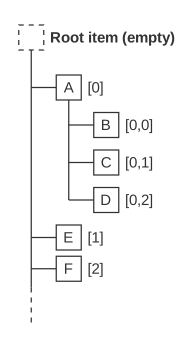
첫 번째 매개변수 treeIndex 는 루트에서 원하는 행까지 이어지는 행 번호의 경로를 나타내며, 트리 내 탐색에 사용됩니다. 이는 예제를 통해 설명하는 것이 가장 좋습니다.
 |
|
이 오버로드를 사용하면 부모 노드의 QModelIndex 를 알지 못하더라도 노드의 QModelIndex 를 얻을 수 있습니다.
지정된 목록에서 노드를 찾을 수 없는 경우, 유효하지 않은 모델 인덱스가 반환됩니다. 유효하지 않은 모델 인덱스는 노드의 루트를 참조한다는 점에 유의하십시오.
QModelIndex 및 QML의 관련 클래스와 data()도 참조하십시오 .
QModelIndex index(int row, int column, var parent)
주어진 parent 의 row 및 column 을 참조하는 객체를 반환하며, 이 객체는 data() 함수에 전달하여 해당 셀의 데이터를 가져오거나, setData()에 전달하여 해당 셀의 내용을 편집하는 데 사용할 수 있습니다.
반환되는 객체는 QModelIndex 를 기반으로 하는 익명의 QML 유형입니다.
QModelIndex 및 QML의 관련 클래스와 data()도 참조하십시오 .
[since 6.12] void insertRow(int rowIndex, object row)
rowIndex 위치의 루트 항목에 row 에 있는 값(셀)을 가진 새 행을 삽입합니다.
이 메서드는 Qt 6.12에서 도입되었습니다.
appendRow(), setRow() 및 removeRow()도 참조하십시오 .
[since 6.12] void insertRow(int rowIndex, QModelIndex parent, object row)
parent 의 rowIndex 위치에 row 에 있는 값(셀)을 사용하여 새 행을 삽입합니다.
model.insertRow(2, parentIndex, {
    checkable: true, checked: false,
    amount: 1,
    fruitType: "Pear",
    fruitName: "Williams",
    fruitPrice: 1.50,
})
이 메서드는 Qt 6.12에서 도입되었습니다.
appendRow(), setRow(), removeRow()도 참조하십시오 .
[since 6.12] bool moveRows(QModelIndex sourceParent, int sourceRow, int count, QModelIndex destinationParent, int destinationChild)
sourceRow 에서 시작하는 count 행들을 sourceParent 에서 destinationParent 로 이동시키고, destinationChild 앞에 삽입합니다.
destinationChild 는 QAbstractItemModel::beginMoveRows()과 일관되게, 이동 전 (제거 전 인덱스) destinationParent 내의 위치를 가리킵니다.
소스 및 대상 범위는 반드시 존재해야 하며, sourceParent 와 destinationParent 는 부모 노드가 자신의 자식 노드 아래로 이동되는 상황이 발생하지 않도록 중복되어서는 안 됩니다.
행이 성공적으로 이동된 경우 true 를 반환하고, 그렇지 않은 경우 false 를 반환합니다.
이 메서드는 Qt 6.12에서 도입되었습니다.
appendRow(), insertRow() 및 removeRow()도 참조하십시오 .
void removeRow(rowIndex)
rowIndex 가 참조하는 TreeRow를 모델에서 제거합니다. rowIndex 는 QModelIndex 를 기반으로 하는 익명의 QML 유형입니다.
treeModel.removeTreeRow(rowIndex)clear()도 참조하십시오 .
bool setData(index, variant value, string role)
지정된 index 에 있는 TreeRow에서 role 로 지정된 데이터 필드를 value 로 삽입하거나 업데이트합니다. 성공하면 true를, 실패하면 false를 반환합니다.
index QModelIndex 을 기반으로 하는 익명 QML 유형입니다.
void setRow(rowIndex, var treeRow)
모델 내 rowIndex 에 있는 TreeRow를 treeRow 로 대체합니다. rowIndex 는 QModelIndex 에 의해 지원되는 익명 QML 유형입니다.
자식 행이 포함된 행은 거부됩니다.
모든 열/셀은 treeRow 에 올바른 순서대로 존재해야 합니다. 해당 행의 자식 행에는 영향을 미치지 않습니다.
treeModel.setRow(rowIndex, {
    checked: true,
    size: "-",
    type: "folder",
    name: "Subtitles",
    lastModified: "2025-07-07",
    iconColor: "blue"
});appendRow()도 참조하십시오 .
© 2026 The Qt Company Ltd. Documentation contributions included herein are the copyrights of their respective owners. The documentation provided herein is licensed under the terms of the GNU Free Documentation License version 1.3 as published by the Free Software Foundation. Qt and respective logos are trademarks of The Qt Company Ltd. in Finland and/or other countries worldwide. All other trademarks are property of their respective owners.
