
AreaSeries QML Type
데이터를 영역 그래프로 표시합니다. 더 보기...
| Import Statement: | import QtGraphs |
| In C++: | QAreaSeries |
| Inherits: |
- 상속된 멤버를 포함한 모든 멤버 목록
- AreaSeries는 Qt Graphs 2D용 QML 유형의 일부입니다.
Properties
- borderColor : color
- borderWidth : real
- color : color
- gradient : ShapeGradient
(since 6.11) - lowerSeries : XYSeries
- selected : bool
- selectedBorderColor : color
- selectedColor : color
- selectedGradient : ShapeGradient
(since 6.11) - upperSeries : XYSeries
신호
- borderColorChanged(color newBorderColor)
- borderWidthChanged()
- clicked(point point)
- colorChanged(color newColor)
- doubleClicked(point point)
- gradientChanged()
(since 6.11) - lowerSeriesChanged()
- pressed(point point)
- released(point point)
- selectedBorderColorChanged(color newSelectedBorderColor)
- selectedChanged()
- selectedColorChanged(color newSelectedColor)
- selectedGradientChanged()
(since 6.11) - upperSeriesChanged()
자세한 설명
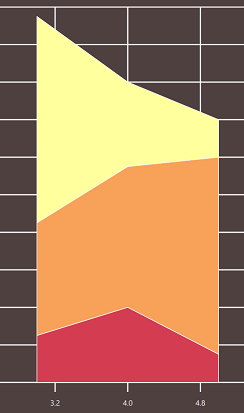
면적 그래프는 점으로 구성된 영역을 그리는 데 사용됩니다. 포인트는 upperSeries 와 lowerSeries 의 두 계열로 정의됩니다. 계열 사이의 영역이 그래프로 그려집니다. upperSeries 만 정의된 경우 면적은 그래프의 아래쪽과 위쪽 계열 사이가 됩니다.
속성 문서
borderColor : color
영역의 테두리 색상입니다. 기본값은 transparent 으로 테두리 색상은 테마에 의해 정의됩니다.
borderWidth : real
영역을 둘러싸는 선의 너비입니다. 기본값은 -1 이며, 테두리 너비는 테마에 의해 정의됩니다.
color : color
영역의 채우기 색상입니다. 기본값은 transparent 이며, 테마에 의해 색상이 정의됩니다.
참고: gradient 이 null 이 아닌 다른 값으로 설정된 경우 color 보다 우선합니다. 이 경우 color 은 무시됩니다.
gradient : ShapeGradient [since 6.11]
이 속성은 채우기 그라데이션을 정의합니다. 기본적으로 그라데이션은 활성화되지 않으며 값은 null 입니다. 이 경우 채우기는 color 속성을 기반으로 합니다.
참고: 여기서는 그라데이션 유형을 사용할 수 없습니다. 대신 LinearGradient 과 같은 고급 하위 유형 중 하나를 사용하는 것이 좋습니다.
참고: null 가 아닌 다른 것으로 설정하면 gradient 이 color 보다 우선합니다.
이 프로퍼티는 Qt 6.11에 도입되었습니다.
lowerSeries : XYSeries
영역의 하한을 설정합니다. 이 값이 null이면 그래프 하단이 하한으로 간주됩니다.
selected : bool
이 영역을 선택한 것으로 설정합니다. 기본값은 false 입니다.
selectedBorderColor : color
선택 시 영역의 테두리 색상입니다. 기본값은 transparent 이며, 선택한 테두리 색상은 테마에 의해 정의됩니다.
selectedColor : color
선택 시 영역의 채우기 색상입니다. 기본값은 transparent 이며, 선택한 색상은 테마에 의해 정의됩니다.
참고: selectedGradient 이 null 이 아닌 다른 값으로 설정된 경우 selectedColor 보다 우선합니다. 이 경우 selectedColor 은 무시됩니다.
selectedGradient : ShapeGradient [since 6.11]
이 속성은 선택 시 영역의 채우기 그라데이션을 정의합니다. 기본적으로 그라데이션은 활성화되지 않으며 값은 null 입니다. 이 경우 채우기는 selectedColor 속성을 기반으로 합니다.
참고: 여기에서는 그라데이션 유형을 사용할 수 없습니다. 대신 LinearGradient 와 같은 고급 하위 유형 중 하나를 사용하는 것이 좋습니다.
참고: null 가 아닌 다른 것으로 설정하면 selectedGradient 이 selectedColor 보다 우선합니다.
이 프로퍼티는 Qt 6.11에 도입되었습니다.
upperSeries : XYSeries
영역의 위쪽 경계를 설정합니다. 이 값이 null이면 영역이 그려지지 않습니다.
신호 문서
borderColorChanged(color newBorderColor)
이 신호는 영역 테두리 색상이 newBorderColor 로 변경될 때 발생합니다.
참고: 해당 핸들러는 onBorderColorChanged 입니다.
borderWidthChanged()
이 신호는 영역 테두리 너비가 변경될 때 발생합니다.
참고: 해당 핸들러는 onBorderWidthChanged 입니다.
clicked(point point)
이 신호는 사용자가 영역 그래프를 클릭하거나 탭할 때 발생합니다. point 은 이벤트가 트리거된 위치를 지정합니다.
참고: 해당 핸들러는 onClicked 입니다.
colorChanged(color newColor)
이 신호는 color 영역이 newColor 으로 변경될 때 발생합니다.
참고: 해당 핸들러는 onColorChanged 입니다.
doubleClicked(point point)
이 신호는 사용자가 영역 그래프를 두 번 클릭하거나 두 번 탭할 때 발생합니다. point 은 이벤트가 트리거되는 위치를 지정합니다. 이 신호는 항상 clicked 이후에 발생합니다.
참고: 해당 핸들러는 onDoubleClicked 입니다.
[since 6.11] gradientChanged()
이 신호는 그라데이션이 변경될 때 방출됩니다.
참고: 해당 핸들러는 onGradientChanged 입니다.
이 신호는 Qt 6.11에 도입되었습니다.
lowerSeriesChanged()
이 신호는 하위 계열이 변경될 때 방출됩니다.
참고: 해당 핸들러는 onLowerSeriesChanged 입니다.
pressed(point point)
이 신호는 사용자가 영역 그래프를 클릭하거나 탭하고 마우스 버튼 또는 제스처를 누르고 있을 때 발생합니다. point 은 이벤트가 트리거된 위치를 지정합니다.
참고: 해당 핸들러는 onPressed 입니다.
released(point point)
이 신호는 사용자가 클릭 또는 탭을 눌렀다가 놓을 때 발생합니다. point 은 이벤트가 트리거된 위치를 지정합니다.
참고: 해당 핸들러는 onReleased 입니다.
selectedBorderColorChanged(color newSelectedBorderColor)
이 신호는 선택한 영역의 테두리 색상이 newSelectedBorderColor 로 변경될 때 발생합니다.
참고: 해당 핸들러는 onSelectedBorderColorChanged 입니다.
selectedChanged()
이 신호는 현재 영역이 선택되면 방출됩니다.
참고: 해당 핸들러는 onSelectedChanged 입니다.
selectedColorChanged(color newSelectedColor)
이 신호는 선택한 영역의 색상이 newSelectedColor 로 변경될 때 발생합니다.
참고: 해당 핸들러는 onSelectedColorChanged 입니다.
[since 6.11] selectedGradientChanged()
이 신호는 선택한 영역의 그라데이션이 변경될 때 발산됩니다.
참고: 해당 핸들러는 onSelectedGradientChanged 입니다.
이 신호는 Qt 6.11에 도입되었습니다.
upperSeriesChanged()
이 신호는 상위 계열이 변경될 때 방출됩니다.
참고: 해당 핸들러는 onUpperSeriesChanged 입니다.
© 2026 The Qt Company Ltd. Documentation contributions included herein are the copyrights of their respective owners. The documentation provided herein is licensed under the terms of the GNU Free Documentation License version 1.3 as published by the Free Software Foundation. Qt and respective logos are trademarks of The Qt Company Ltd. in Finland and/or other countries worldwide. All other trademarks are property of their respective owners.
