
Qt Quick 3D - 간단한 RuntimeLoader 예제
런타임에 3D 에셋을 불러오고 해당 에셋의 씬 오브젝트를 조회하는 방법을 보여줍니다.
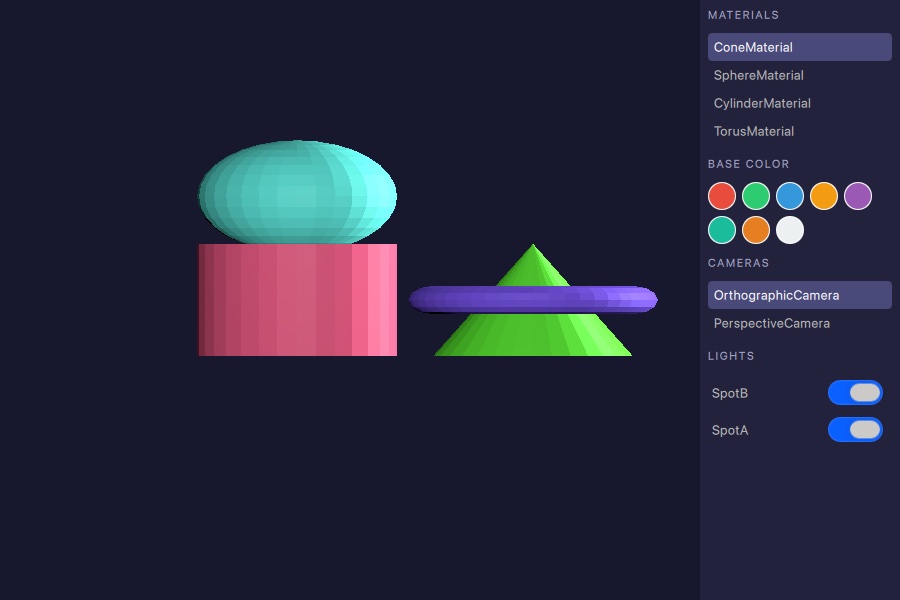
이 예제는 런타임에 3D 에셋을 로드하기 위해 ` RuntimeLoader `를 사용하는 방법과, 로드된 씬에 포함된 머티리얼, 카메라, 조명을 확인하기 위해 ` query ` 함수를 사용하는 방법을 보여줍니다.
애셋 불러오기
RuntimeLoader 항목은 glTF 2.0 에셋을 로드하고, 이에 상응하는 Qt Quick 3D 객체를 자식 노드로 생성합니다. source 속성은 에셋 파일을 가리킵니다:
RuntimeLoader {
    id: loader
    source: "torus_and_cone.glb"

    onStatusChanged: {
        if (status !== RuntimeLoader.Success)
            return
        root.sceneMaterials = loader.queryAll(RuntimeLoader.Materials)
        root.sceneCameras = loader.queryAll(RuntimeLoader.Cameras)
        root.sceneLights = loader.queryAll(RuntimeLoader.Lights)
        if (root.sceneCameras.length > 0)
            view3d.camera = root.sceneCameras[0]
        if (root.sceneMaterials.length > 0)
            root.selectedMaterial = root.sceneMaterials[0]
    }
}
status 가 RuntimeLoader.Success 로 변경되면 씬이 준비된 것이며, 쿼리 함수를 호출할 수 있습니다.
씬 객체 쿼리
로딩이 성공적으로 완료되면, ` queryAll()`는 주어진 ` QueryFilter`와 일치하는 모든 씬 오브젝트의 목록을 반환합니다. 다음 예제는 머티리얼, 카메라, 조명을 한 번에 가져옵니다:
root.sceneMaterials = loader.queryAll(RuntimeLoader.Materials)
root.sceneCameras = loader.queryAll(RuntimeLoader.Cameras)
root.sceneLights = loader.queryAll(RuntimeLoader.Lights)
반환된 목록은 QQuick3DObject 참조로 구성된 일반 JavaScript 배열입니다. 이 목록은 ListView model 에 직접 할당하거나, View3D.camera 와 같은 활성 장면 속성을 설정하는 데 사용할 수 있습니다.
씬 객체와의 상호작용
머티리얼
머티리얼 목록의 각 항목을 선택하여 색상 견본 중 하나를 적용할 수 있습니다. 헬퍼 함수는 색상 속성에 값을 할당하기 전에 반환된 객체를 올바른 머티리얼 유형으로 형변환합니다:
function applyColorToSelected(color) {
    if (!root.selectedMaterial)
        return
    if (root.selectedMaterial instanceof PrincipledMaterial)
        (root.selectedMaterial as PrincipledMaterial).baseColor = color
    else if (root.selectedMaterial instanceof SpecularGlossyMaterial)
        (root.selectedMaterial as SpecularGlossyMaterial).albedoColor = color
}
카메라
사이드 패널에서 카메라 항목을 클릭하면 해당 카메라가 ` View3D.camera`에 할당되어 활성 시점이 즉시 전환됩니다.
조명
사이드 패널의 각 조명에는 ' visible ' 속성을 설정하는 토글이 있어, 씬에서 조명을 제거하지 않고도 조명을 켜거나 끌 수 있습니다:
Switch {
    checked: modelData.visible
    onToggled: modelData.visible = checked
}© 2026 The Qt Company Ltd. Documentation contributions included herein are the copyrights of their respective owners. The documentation provided herein is licensed under the terms of the GNU Free Documentation License version 1.3 as published by the Free Software Foundation. Qt and respective logos are trademarks of The Qt Company Ltd. in Finland and/or other countries worldwide. All other trademarks are property of their respective owners.
