
Qt 中的 Java 风格迭代器
Java 风格的迭代器
对于每个容器类,都有两种 Java 风格的迭代器数据类型:一种提供只读访问,另一种提供读写访问。
注意:新代码 应使用STL 风格的迭代器,因为它们效率更高,并且可以与 Qt XML 和 STL 的 `generic algorithms` 配合使用。
| 容器 | 只读迭代器 | 读写迭代器 |
|---|---|---|
| QList<T>,QQueue<T>,QStack<T>, | QListIterator<T> | QMutableListIterator<T> |
| QSet<T> | QSetIterator<T> | QMutableSetIterator<T> |
| QMap<Key, T>,QMultiMap<Key, T> | QMapIterator<Key, T> | QMutableMapIterator<Key, T> |
| QHash<Key, T>,QMultiHash<Key, T> | QHashIterator<Key, T> | QMutableHashIterator<Key, T> |
在本节讨论中,我们将重点关注QList 和QMap 。QSet 的迭代器类型与QList 中的迭代器具有完全相同的接口;同样,QHash 的迭代器类型也与QMap 中的迭代器具有相同的接口。
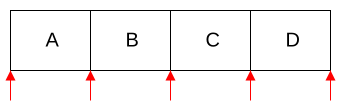
与STL 风格的迭代器不同,Java 风格的迭代器指向元素之间,而非直接指向元素本身。因此,它们要么指向容器的最前端(第一个元素之前),要么指向容器的末尾(最后一个元素之后),要么位于两个元素之间。 下图用红色箭头标出了一个包含四个元素的列表中有效的迭代器位置:
以下是一个按顺序遍历QList<QString>中所有元素的典型循环:
QList<QString> list = {"A", "B", "C", "D"};

QListIterator<QString> i(list);
while (i.hasNext())
QString s = i.next();其工作原理如下:待遍历的QList 对象被传递给QListIterator 构造函数。此时,迭代器位于列表中第一个元素的正前方(即元素“A”之前)。 随后,我们调用hasNext()来检查迭代器之后是否还有元素。如果有,则调用next()跳过该元素。next()函数会返回被跳过的元素。对于QList<QString>,该元素的类型为QString 。
以下是在QList 中向后迭代的方法:
QListIterator<QString> i(list);
i.toBack();
while (i.hasPrevious())
QString s = i.previous();该代码与正向迭代对称,唯一的区别在于我们首先调用toBack() 将迭代器移动到列表的最后一个元素之后。
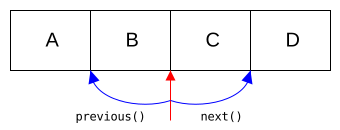
下图说明了对迭代器调用 `next()` 和 `previous()` 的效果:
下表总结了QListIterator API:
| 函数 | 行为 |
|---|---|
| toFront() | 将迭代器移至列表开头(第一个元素之前) |
| toBack() | 将迭代器移至列表末尾(最后一个元素之后) |
| hasNext() | 如果迭代器不在列表末尾,则返回true |
| next() | 返回下一个元素,并将迭代器向前移动一个位置 |
| peekNext() | 返回下一个元素,但不移动迭代器 |
| hasPrevious() | 如果迭代器不在列表最前端,则返回true |
| previous() | 返回前一个元素,并将迭代器向后移动一个位置 |
| peekPrevious() | 返回前一个元素,但不移动迭代器 |
QListIterator 在迭代过程中,该实现不提供向列表中插入或移除元素的功能。要实现此操作,必须使用 `QMutableListIterator`。以下是一个示例,演示如何使用 `QMutableListIterator` 从 `QList<int>` 中移除所有奇数:
QMutableListIterator<int> i(list);
while (i.hasNext()) {
    if (i.next() % 2 != 0)
        i.remove();
}
循环中的 next() 调用每次都会执行,它会跳过列表中的下一个元素。remove() 函数会从列表中移除我们刚刚跳过的最后一个元素。调用remove() 不会使迭代器失效,因此可以安全地继续使用它。向后迭代时,这种方法同样有效:
QMutableListIterator<int> i(list);
i.toBack();
while (i.hasPrevious()) {
    if (i.previous() % 2 != 0)
        i.remove();
}如果我们只想修改现有元素的值,可以使用setValue()。在下面的代码中,我们将所有大于 128 的值替换为 128:
QMutableListIterator<int> i(list);
while (i.hasNext()) {
    if (i.next() > 128)
        i.setValue(128);
}与remove() 类似,setValue() 作用于我们跳过的上一个元素。如果正向迭代,这是位于迭代器前面的元素;如果反向迭代,这是位于迭代器后面的元素。
next() 函数返回列表中该元素的一个非 const 引用。对于简单的操作,我们甚至不需要使用setValue():
QMutableListIterator<int> i(list);
while (i.hasNext())
i.next() *= 2;如上所述,QSet 的迭代器类与QList 的迭代器类具有完全相同的 API。现在我们将转向QMapIterator ,它有所不同,因为它是基于 (key, value) 对进行迭代的。
与QListIterator 类似,QMapIterator 提供了toFront()、toBack()、hasNext()、next()、peekNext()、hasPrevious()、previous() 和peekPrevious()。通过在 next()、peekNext()、previous() 或 peekPrevious() 返回的对象上调用key() 和value(),可以提取键和值。
以下示例移除了所有首都名称以“City”结尾的 (首都, 国家) 配对:
QMap<QString, QString> map = {
    {"Paris", "France"},
    {"Guatemala City", "Guatemala"},
    {"Mexico City", "Mexico"},
    {"Moscow", "Russia"}
};
//...

QMutableMapIterator<QString, QString> i(map);
while (i.hasNext()) {
    if (i.next().key().endsWith("City"))
        i.remove();
}
QMapIterator 还提供了key() 和value() 函数,这些函数直接作用于迭代器,并返回迭代器跳过的前一个项的键和值。例如,以下代码将QMap 的内容复制到QHash 中:
QMap<int, QWidget *> map;
QHash<int, QWidget *> hash;

QMapIterator<int, QWidget *> i(map);
while (i.hasNext()) {
    i.next();
    hash.insert(i.key(), i.value());
}如果要遍历所有值相同的项,可以使用findNext() 或findPrevious()。以下是一个移除所有具有特定值的项的示例:
QMutableMapIterator<int, QWidget *> i(map);
while (i.findNext(widget))
i.remove();© 2026 The Qt Company Ltd. Documentation contributions included herein are the copyrights of their respective owners. The documentation provided herein is licensed under the terms of the GNU Free Documentation License version 1.3 as published by the Free Software Foundation. Qt and respective logos are trademarks of The Qt Company Ltd. in Finland and/or other countries worldwide. All other trademarks are property of their respective owners.
