
macOS 版 Qt - Qt 的其他安装方法
概述
您可以通过以下来源在 macOS 上安装 Qt 框架、设计和开发工具:
- 使用 Qt Online Installer (推荐)。
- 可让您在发布当天获取最新版本的 Qt。
- 允许您在新版本之外并行安装旧版本的 Qt。
- 包含所有 Qt 模块,包括仅限商业使用的模块。
- 在Qt Creator 和Qt Design Studio 中预配置 Qt 版本。
- 允许您在本地浏览 Qt 文档和示例。
Qt Online Installer 功能齐全、灵活,并完全支持商业应用场景。它也是获得 The Qt Company 和 The Qt Project 支持最完善的一个版本。如果您计划使用 Qt 进行开发,或将 Qt 作为应用程序的一部分进行捆绑,我们推荐您选择此版本。
- 使用 Homebrew 包管理器。
- 无需 Qt 账户。
- 安装 Qt 6 的较新版本(但未必总是最新版本)。
- 允许您安装大多数(但并非全部)Qt 模块。
- 不提供 Qt 文档或示例的本地版本。
- 允许您与其他库和应用程序共享第三方模块。
Homebrew 轻量且适合自动化操作。如果您需要将 Qt 作为 macOS 应用程序的依赖项进行安装,但并不打算亲自使用 Qt 进行开发,也不需要特殊或仅限商业使用的 Qt 模块,那么 Homebrew 是一个绝佳的选择。
使用Qt Online Installer
有关如何使用Qt Online Installer 的信息,请参阅《通过Qt Online Installer 获取并安装 Qt》。
使用 Homebrew 安装 Qt
若要通过 Homebrew 安装 Qt、Qt Creator 和Qt Design Studio ,请先使用安装命令安装 Homebrew。然后在终端中运行以下命令:
brew install qt
brew install --cask qt-creator
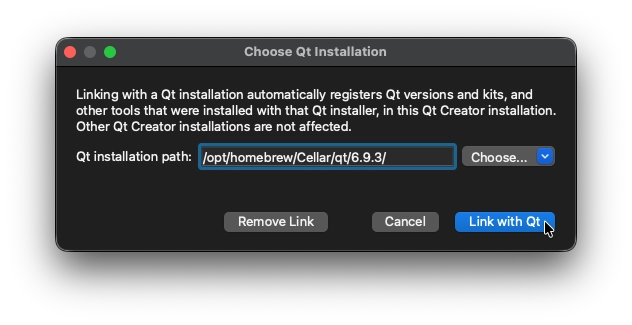
brew install --cask qt-design-studio启动Qt Creator 、Qt Extension for Visual Studio Code 或Qt Design Studio 时,需要设置指向由 Homebrew 安装的 Qt 版本的路径。默认情况下,Homebrew 将 Qt 安装在/opt/homebrew/Cellar/qt/<version>/ 目录中。
有关配置 Qt Kit 的更多信息:
- 关于Qt Creator ,请参阅Qt Creator :添加 Qt 版本。
- 关于Qt Extension for Visual Studio Code ,请参阅Qt Extension for Visual Studio Code :注册 Qt 安装。
© 2026 The Qt Company Ltd. Documentation contributions included herein are the copyrights of their respective owners. The documentation provided herein is licensed under the terms of the GNU Free Documentation License version 1.3 as published by the Free Software Foundation. Qt and respective logos are trademarks of The Qt Company Ltd. in Finland and/or other countries worldwide. All other trademarks are property of their respective owners.
