
QCanvasImage Class
QCanvasImage 是QCanvasPainter 中的图像类。更多内容...
| 头文件: | #include <QCanvasImage> |
| CMake: | find_package(Qt6 REQUIRED COMPONENTS CanvasPainter) target_link_libraries(mytarget PRIVATE Qt6::CanvasPainter) |
| 自: | Qt 6.11 |
公共函数
| QCanvasImage() | |
| QCanvasImage(const QCanvasImage &image) | |
| QCanvasImage(QCanvasImage &&other) | |
| ~QCanvasImage() | |
| qreal | devicePixelRatio() const |
| int | height() const |
| int | id() const |
| bool | isNull() const |
| void | setTintColor(QColor color) |
| QSize | size() const |
| qsizetype | sizeInBytes() const |
| void | swap(QCanvasImage &other) |
| QColor | tintColor() const |
| int | width() const |
| operator QVariant() const | |
| QCanvasImage & | operator=(QCanvasImage &&other) |
| QCanvasImage & | operator=(const QCanvasImage &image) |
相关的非成员
| bool | operator!=(const QCanvasImage &lhs, const QCanvasImage &rhs) |
| bool | operator==(const QCanvasImage &lhs, const QCanvasImage &rhs) |
详细描述
QCanvasImage 是QCanvasPainter 所使用的图像类。要绘制图像,首先需要通过例如QCanvasPainter::addImage() 将其加载。然后,可以使用QCanvasPainter::drawImage() 直接绘制图像,或配合QCanvasImagePattern 画笔进行填充/描边。
以下是一个简单示例:
static QImage logoImage(":/qtlogo.png");
// Paint an image pattern.
QCanvasImage bg = painter.addImage(logoImage,
             QCanvasPainter::ImageFlag::Repeat |
             QCanvasPainter::ImageFlag::GenerateMipmaps);
QCanvasImagePattern ip(bg, 0, 0, 44, 32);
painter.setFillStyle(ip);
painter.fillRect(50, 50, 320, 230);
// Paint a single image, with tint color.
QCanvasImage logo = painter.addImage(logoImage);
logo.setTintColor("#2cde85");
painter.drawImage(logo, 100, 80);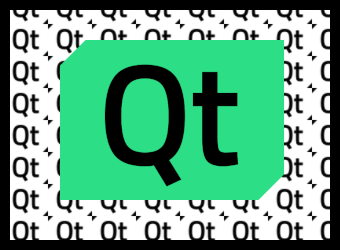
在上例中,QImage 是静态的,每次重绘时都会调用addImage()。这并不成问题,因为当图像和标志保持不变时,addImage()会从缓存中获取图像,而不是将其作为纹理重新上传。 但更常见的方法是将 QCanvasImage 变量作为类成员,并在QCanvasPainterItemRenderer::initializeResources() 等方法中调用QCanvasPainter::addImage()。
与QCanvasBrush 和QCanvasOffscreenCanvas 类似,QCanvasImage 是显式共享的。详情请参阅《隐式数据共享》和QSharedDataPointer 。
注意: QCanvasImage对象 仅包含对图形资源(如纹理)的句柄。即使发生分离,实际资源(即底层纹理及其中的图像数据)也绝不会被实际复制或复制。 真实图形资源(例如QRhiTexture )的实际所有者是通过addImage()方法分配QCanvasImage的QCanvasPainter 。
一个 QCanvasImage 始终属于创建它的QCanvasPainter 。手动移除图像需通过调用removeImage() 实现。不过,在大多数情况下这并不必要,因为绘图器会在自身销毁时自动销毁所有图像。
成员函数文档
QCanvasImage::QCanvasImage()
构建一张默认图像。
QCanvasImage::QCanvasImage(const QCanvasImage &image)
构建一个图像,该图像为给定的image 的副本。
[constexpr noexcept default] QCanvasImage::QCanvasImage(QCanvasImage &&other)
从other 创建一个新的 QCanvasImage 对象。
[noexcept] QCanvasImage::~QCanvasImage()
破坏了图像。
qreal QCanvasImage::devicePixelRatio() const
返回图像的设备像素比。这是设备像素与设备独立像素之间的比率。
当QCanvasImage 的设备像素比大于1时,使用该图像时会应用该缩放因子。例如,drawImage(image, 0, 0) 此时等同于drawImage(image, 0, 0, image.width() / image.devicePixelRatio(), image.height() / image.devicePixelRatio()) 。
默认值为 1.0。
该值由创建QCanvasImage 所依据的QImage 继承而来。由纹理或offscreen canvas 创建的QCanvasImage ,其设备像素比始终为1。
另请参阅 QImage 。
int QCanvasImage::height() const
返回该图像以像素为单位的高度;
int QCanvasImage::id() const
返回该图像的纹理 ID。如果该图像尚未被分配,则返回 0。
另请参阅 isNull()。
bool QCanvasImage::isNull() const
如果图像尚未被分配,则返回 true。详情请参阅QCanvasPainter::addImage()。
void QCanvasImage::setTintColor(QColor color)
设置图像的色调color 。该颜色将与图像颜色相乘,从而为图像着色。例如,这可用于突出显示图标,或根据主题调整图像。
另请参阅 tintColor()。
QSize QCanvasImage::size() const
返回该图像的大小(宽度和高度),单位为像素。
qsizetype QCanvasImage::sizeInBytes() const
返回该图像的大小(以字节为单位)。
QCanvasPainter 在addImage()返回后,不会保留CPU端QImage 数据的副本。如果源是offscreen canvas ,那么CPU端原本就不存在图像数据。因此,该函数的结果是对底层纹理所占用的GPU内存大小的近似值。
注意:该值 仅是基于图像格式和尺寸的估计值。Qt 无法获知纹理数据在 GPU 端内存中的具体存储方式和布局。
注意:此 函数未考虑微贴图(mipmap)或多采样(multisample)数据。
[noexcept] void QCanvasImage::swap(QCanvasImage &other)
将此图片与other 互换。此操作非常快,且从未失败。
QColor QCanvasImage::tintColor() const
返回图像的色调颜色。默认值为Qt::white 。
另请参阅 setTintColor()。
int QCanvasImage::width() const
返回该图像的宽度(以像素为单位)。
QCanvasImage::operator QVariant() const
将图像作为QVariant 返回。
[noexcept] QCanvasImage &QCanvasImage::operator=(QCanvasImage &&other)
将other 通过move-assign操作赋值给此QCanvasImage 实例。
QCanvasImage &QCanvasImage::operator=(const QCanvasImage &image)
将给定的image 分配给该图像,并返回对该图像的引用。
相关的非成员
[noexcept] bool operator!=(const QCanvasImage &lhs, const QCanvasImage &rhs)
如果图像句柄lhs 与rhs 不一致,则返回true ;否则返回false 。
另请参阅 operator==()。
[noexcept] bool operator==(const QCanvasImage &lhs, const QCanvasImage &rhs)
如果图像句柄lhs 与rhs 相等,则返回true ;否则返回false 。
注意:相等 意味着这两个图像对象引用的是同一图形资源,且色调颜色相同。内容(像素数据)不进行比较。
另请参阅 operator!=()。
© 2026 The Qt Company Ltd. Documentation contributions included herein are the copyrights of their respective owners. The documentation provided herein is licensed under the terms of the GNU Free Documentation License version 1.3 as published by the Free Software Foundation. Qt and respective logos are trademarks of The Qt Company Ltd. in Finland and/or other countries worldwide. All other trademarks are property of their respective owners.
