
QColorDialog Class
QColorDialog 类提供了一个用于指定颜色的对话框控件。更多内容...
| 头文件: | #include <QColorDialog> |
| CMake: | find_package(Qt6 REQUIRED COMPONENTS Widgets) target_link_libraries(mytarget PRIVATE Qt6::Widgets) |
| qmake: | QT += widgets |
| 继承自: | QDialog |
- 所有成员列表(包括继承的成员)
- QColorDialog 属于“标准对话框”类。
公共类型
| enum | ColorDialogOption { ShowAlphaChannel, NoButtons, NoEyeDropperButton, DontUseNativeDialog } |
| flags | ColorDialogOptions |
属性
- currentColor : QColor
- options : ColorDialogOptions
公共函数
| QColorDialog(QWidget *parent = nullptr) | |
| QColorDialog(const QColor &initial, QWidget *parent = nullptr) | |
| virtual | ~QColorDialog() |
| QColor | currentColor() const |
| void | open(QObject *receiver, const char *member) |
| QColorDialog::ColorDialogOptions | options() const |
| QColor | selectedColor() const |
| void | setCurrentColor(const QColor &color) |
| void | setOption(QColorDialog::ColorDialogOption option, bool on = true) |
| void | setOptions(QColorDialog::ColorDialogOptions options) |
| bool | testOption(QColorDialog::ColorDialogOption option) const |
重新实现的公共函数
| virtual void | setVisible(bool visible) override |
信号
| void | colorSelected(const QColor &color) |
| void | currentColorChanged(const QColor &color) |
静态公共成员
| QColor | customColor(int index) |
| int | customCount() |
| QColor | getColor(const QColor &initial = Qt::white, QWidget *parent = nullptr, const QString &title = QString(), QColorDialog::ColorDialogOptions options = ColorDialogOptions()) |
| void | setCustomColor(int index, QColor color) |
| void | setStandardColor(int index, QColor color) |
| QColor | standardColor(int index) |
重新实现的受保护函数
| virtual void | changeEvent(QEvent *e) override |
| virtual void | done(int result) override |
详细说明
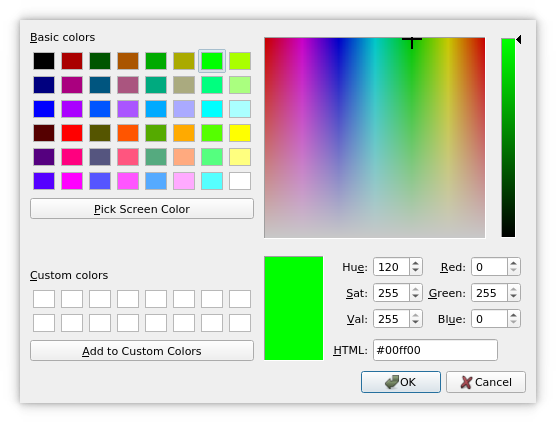
颜色对话框的功能是允许用户选择颜色。例如,您可以在绘图程序中使用它,让用户设置画笔颜色。
静态函数提供模态颜色对话框。
静态函数getColor() 用于显示对话框,并允许用户指定颜色。该函数还可用于让用户选择具有透明度的颜色:只需将ShowAlphaChannel 选项作为额外参数传递即可。
用户可以在customCount()中存储不同的自定义颜色。这些自定义颜色在所有颜色对话框中共享,并在程序执行期间被记住。使用setCustomColor()设置自定义颜色,使用customColor()获取它们。
按下“选择屏幕颜色”按钮时,光标会变为十字光标,并开始扫描屏幕上的颜色。用户可以通过单击鼠标或按下 Enter 键来选择一种颜色。按下 Escape 键将恢复进入此模式前最后选定的颜色。
“标准对话框”示例演示了如何使用 QColorDialog 以及其他内置的 Qt 对话框。
另请参阅 QColor 、QFileDialog 、QFontDialog 以及“标准对话框”示例。
成员类型文档
enum QColorDialog::ColorDialogOption
flags QColorDialog::ColorDialogOptions
此枚举指定了影响颜色对话框外观和风格的各种选项。
| 常量 | 值 | 描述 |
|---|---|---|
QColorDialog::ShowAlphaChannel | 0x00000001 | 允许用户选择颜色的透明度成分。 |
QColorDialog::NoButtons | 0x00000002 | 不显示“OK ”和“Cancel ”按钮。(适用于“实时对话框”。) |
QColorDialog::NoEyeDropperButton | 0x00000008 | 隐藏“Eye Dropper ”按钮。此值在 Qt 6.6 中新增。 |
QColorDialog::DontUseNativeDialog | 0x00000004 | 使用 Qt 的标准颜色对话框,而非操作系统的原生颜色对话框。 |
ColorDialogOptions 类型是QFlags<ColorDialogOption> 的 typedef。它存储 ColorDialogOption 值的按“或”运算组合。
另请参阅 options 、setOption()、testOption() 以及windowModality()。
属性文档
currentColor : QColor
该属性保存对话框中当前选定的颜色
访问函数:
| QColor | currentColor() const |
| void | setCurrentColor(const QColor &color) |
通知信号:
| void | currentColorChanged(const QColor &color) |
options : ColorDialogOptions
该属性包含影响对话框外观和风格的各种选项
默认情况下,所有选项均处于禁用状态。
应在显示对话框之前设置这些选项。在对话框可见时进行设置,无法保证会立即对对话框产生影响(具体取决于选项和平台)。
访问函数:
| QColorDialog::ColorDialogOptions | options() const |
| void | setOptions(QColorDialog::ColorDialogOptions options) |
另请参阅 setOption() 和testOption()。
成员函数文档
[explicit] QColorDialog::QColorDialog(QWidget *parent = nullptr)
根据给定的parent 创建一个颜色对话框。
[explicit] QColorDialog::QColorDialog(const QColor &initial, QWidget *parent = nullptr)
根据给定的parent 和指定的initial 颜色,构建一个颜色对话框。
[virtual noexcept] QColorDialog::~QColorDialog()
关闭颜色对话框。
[override virtual protected] void QColorDialog::changeEvent(QEvent *e)
重写了:QWidget::changeEvent(QEvent *event)。
[signal] void QColorDialog::colorSelected(const QColor &color)
当用户点击OK 选择要使用的颜色后,系统会立即触发此信号。所选颜色由color 指定。
另请参阅 color和currentColorChanged()。
[signal] void QColorDialog::currentColorChanged(const QColor &color)
每当对话框中的当前颜色发生变化时,都会触发此信号。当前颜色由color 指定。
注意: 这是属性 `currentColor`的通知 信号。
另请参阅 color和colorSelected()。
[static] QColor QColorDialog::customColor(int index)
返回位于指定index 处的自定义颜色,其值为QColor 。
另请参阅 setCustomColor()。
[static] int QColorDialog::customCount()
返回QColorDialog 支持的自定义颜色数量。所有颜色对话框共享相同的自定义颜色。
[override virtual protected] void QColorDialog::done(int result)
重写:QDialog::done(int r)。
关闭对话框,并将结果代码设置为result 。如果该对话框是通过exec()显示的,则done()会导致本地事件循环结束,并使exec()返回result 。
另请参阅 QDialog::done()。
[static] QColor QColorDialog::getColor(const QColor &initial = Qt::white, QWidget *parent = nullptr, const QString &title = QString(), QColorDialog::ColorDialogOptions options = ColorDialogOptions())
弹出一个模态颜色对话框,其窗口title (若未指定则默认为“Select Color”),允许用户选择颜色,并返回该颜色。颜色初始值设为initial 。该对话框是parent 的子窗口。如果用户取消对话框,则返回一个无效的颜色(参见QColor::isValid())。
通过options 参数,您可以自定义该对话框。
void QColorDialog::open(QObject *receiver, const char *member)
打开对话框,并将该对话框的colorSelected()信号连接到由receiver 和member 指定的槽。
当对话框关闭时,该信号将与该槽断开连接。
QColor QColorDialog::selectedColor() const
返回用户通过单击OK 或等效按钮所选定的颜色。
注意:此 颜色不一定与currentColor 属性所存储的颜色相同,因为用户在最终确定要使用的颜色之前,可能会选择不同的颜色。
[static] void QColorDialog::setCustomColor(int index, QColor color)
将index 中的自定义颜色设置为QColor color 的值。
注意:此 函数不适用于 macOS 平台上的“原生颜色对话框”。若仍需使用此功能,请使用QColorDialog::DontUseNativeDialog 选项。
另请参阅 customColor()。
void QColorDialog::setOption(QColorDialog::ColorDialogOption option, bool on = true)
如果on 为真,则启用给定的option ;否则,清除给定的option 。
另请参阅 options 和testOption()。
[static] void QColorDialog::setStandardColor(int index, QColor color)
将“index ”中的标准颜色设置为“QColor ”的color 值。
注意:此 函数不适用于 macOS 平台上的“原生颜色”对话框。若仍需使用此功能,请使用QColorDialog::DontUseNativeDialog 选项。
另请参阅 standardColor()。
[override virtual] void QColorDialog::setVisible(bool visible)
重写:QDialog::setVisible (bool visible)。
更改对话框的可见性。如果visible 为 true,则显示对话框;否则,则隐藏对话框。
[static] QColor QColorDialog::standardColor(int index)
返回给定坐标index 处标准颜色的QColor 值。
另请参阅 setStandardColor()。
bool QColorDialog::testOption(QColorDialog::ColorDialogOption option) const
如果给定的option 已启用,则返回true ;否则,返回false。
© 2026 The Qt Company Ltd. Documentation contributions included herein are the copyrights of their respective owners. The documentation provided herein is licensed under the terms of the GNU Free Documentation License version 1.3 as published by the Free Software Foundation. Qt and respective logos are trademarks of The Qt Company Ltd. in Finland and/or other countries worldwide. All other trademarks are property of their respective owners.
