
PathArc QML Type
定义一个半径为给定值的圆弧。更多...
| Import Statement: | import QtQuick |
属性
- direction : enumeration
- radiusX : real
- radiusY : real
- relativeX : real
- relativeY : real
- useLargeArc : bool
- x : real
- xAxisRotation : real
- y : real
详细说明
PathArc 提供了一种简单的方法,用于指定一个以给定位置为终点且使用指定半径的弧。它仿照了 SVG 的椭圆弧命令。
以下 QML 代码将生成如下所示的路径:
|
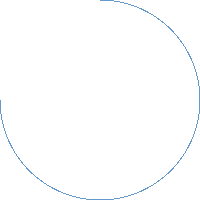
请注意,单个 PathArc 无法用于指定一个圆。相反,您可以使用两个 PathArc 元素,每个元素分别指定圆的一半。
另请参阅 Path 、PathLine 、PathQuad 、PathCubic 、PathAngleArc 、PathCurve 以及PathSvg 。
属性文档
direction : enumeration
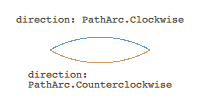
定义弧线的方向。可能的取值为PathArc.Clockwise(默认)和PathArc.Counterclockwise。
通过更改 direction 的值,以下 QML 代码可以生成下图所示的任意一条弧线。
另请参阅 useLargeArc 。
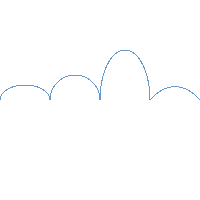
定义弧的半径。
以下 QML 代码演示了如何通过不同的半径值来改变弧的形状:
|
定义了相对于起点的弧的终点。
如果为单个轴同时指定了相对和绝对的终点位置,则将使用相对位置。
相对位置和绝对位置可以混合使用,例如,设置相对的 x 位置和绝对的 y 位置是有效的。
useLargeArc : bool
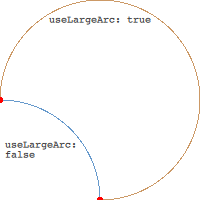
是否使用由弧点定义的大弧。
给定固定的起始和结束位置、半径以及方向,有两种可能的弧形可以匹配数据。useLargeArc 用于区分这两种情况。例如,通过更改 useLargeArc 的值,以下 QML 代码可以生成下图所示的两种弧形中的任意一种。
|
默认值为 false。
定义弧线的端点。
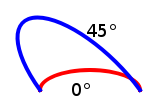
xAxisRotation : real
定义弧的旋转角度(单位为度)。默认值为 0。
弧是圆或椭圆的一部分。给定半径以及起始点和终点,有两条椭圆曲线连接这些点。此属性定义了这些椭圆曲线相对于 X 轴的旋转角度。
注意:该值 仅在 x 半径与 y 半径不同时才有效,即当弧线为椭圆的截段时。
以下 QML 代码演示了如何通过不同的半径值来改变弧的形状:
© 2026 The Qt Company Ltd. Documentation contributions included herein are the copyrights of their respective owners. The documentation provided herein is licensed under the terms of the GNU Free Documentation License version 1.3 as published by the Free Software Foundation. Qt and respective logos are trademarks of The Qt Company Ltd. in Finland and/or other countries worldwide. All other trademarks are property of their respective owners.
