
QStatusTipEvent Class
QStatusTipEvent 类提供了一个用于在状态栏中显示消息的事件。更多内容...
| 头文件: | #include <QStatusTipEvent> |
| CMake: | find_package(Qt6 REQUIRED COMPONENTS Gui) target_link_libraries(mytarget PRIVATE Qt6::Gui) |
| qmake: | QT += gui |
| 继承自: | QEvent |
- 所有成员列表,包括继承的成员
- QStatusTipEvent 属于“事件类”和“帮助系统”。
公共函数
| QStatusTipEvent(const QString &tip) | |
| QString | tip() const |
受保护函数
| QStatusTipEvent(QStatusTipEvent &&) | |
| QStatusTipEvent & | operator=(QStatusTipEvent &&) |
| QStatusTipEvent & | operator=(const QStatusTipEvent &other) |
详细说明
可以使用QWidget::setStatusTip()函数在控件上设置状态提示。当鼠标光标进入控件时,这些提示会显示在状态栏中。例如:
|
|
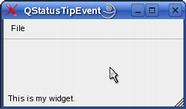
还可以使用QAction::setStatusTip() 函数在操作上设置状态提示:
|
|
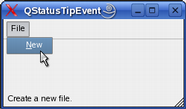
最后,通过Qt::StatusTipRole 枚举值,项目视图类也支持状态提示。
另请参阅 QStatusBar 、QHelpEvent 和QWhatsThisClickedEvent 。
成员函数文档
[explicit] QStatusTipEvent::QStatusTipEvent(const QString &tip)
创建一个状态提示事件,其文本由tip 指定。
另请参阅 tip()。
[protected delete] QStatusTipEvent::QStatusTipEvent(QStatusTipEvent &&)
通过移动构造创建一个QStatusTipEvent 的实例。该函数已被删除。
QString QStatusTipEvent::tip() const
返回要在状态栏中显示的消息。
另请参阅 QStatusBar::showMessage()。
[protected delete] QStatusTipEvent &QStatusTipEvent::operator=(QStatusTipEvent &&)
将other 按移动赋值的方式赋值给此QStatusTipEvent 实例。该函数已被删除。
[noexcept protected default] QStatusTipEvent &QStatusTipEvent::operator=(const QStatusTipEvent &other)
将other 复制并赋值给该QStatusTipEvent 实例。
© 2026 The Qt Company Ltd. Documentation contributions included herein are the copyrights of their respective owners. The documentation provided herein is licensed under the terms of the GNU Free Documentation License version 1.3 as published by the Free Software Foundation. Qt and respective logos are trademarks of The Qt Company Ltd. in Finland and/or other countries worldwide. All other trademarks are property of their respective owners.
