
Qt Canvas Painter - 紧凑型健康示例
演示了在QWindow 中使用QCanvasPainter 的方法。
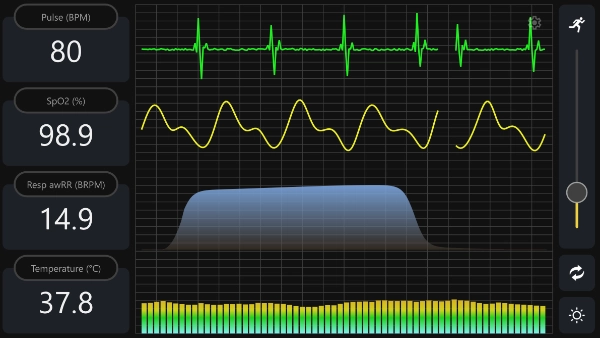
本示例演示了如何在纯QWindow 应用程序中使用Qt Canvas Painter。该 Qt Quick 和 Qt Widgets 堆栈均未使用。
该应用程序通过QRhi 后端并配合QCanvasPainter 渲染所有内容。渲染以及QCanvasPainter 与QRhi 的集成由QCanvasRhiPaintDriver 管理。这意味着,对于所选后端,只要条件允许,就会使用硬件加速。
注意: QRhi 属于 Qt GUI Private 的一部分。因此,其兼容性保证有限。对于这些类,不提供源代码或二进制兼容性保证,这意味着该 API 仅保证与应用程序开发时所基于的 Qt 版本兼容。
本示例演示的内容
- 在QWindow 中渲染完全自定义的用户界面。
- 创建和管理QRhi 、交换链以及深度-模板资源。
- 通过QCanvasPainter 和QCanvasRhiPaintDriver 记录绘制命令。
- 使用QWindow::requestUpdate()驱动连续动画。
操作指南
该应用程序默认会根据平台选择渲染 API。您也可以通过命令行参数指定特定的后端:
--null--opengl--vulkan--d3d11--d3d12--metal
如果后端创建失败,该示例会在可用时尝试回退到 OpenGL ES 2。
intmain(intargc, char *argv[])
{
    QGuiApplication app(argc,argv);
    app.setAttribute(Qt::AA_SynthesizeTouchForUnhandledMouseEvents);

    QRhi::Implementation graphicsApi;
#if defined(Q_OS_WIN)
    graphicsApi=QRhi::D3D11;
#elif QT_CONFIG(metal)
    graphicsApi=QRhi::Metal;
#elif QT_CONFIG(vulkan)
    graphicsApi=QRhi::Vulkan;
#else
    graphicsApi=QRhi::OpenGLES2;
#endif

    QCommandLineParser cmdLineParser;
    cmdLineParser.addHelpOption();
    QCommandLineOption nullOption({"n", "null"},QLatin1String("Null"));
    cmdLineParser.addOption(nullOption);
    QCommandLineOption glOption({"g", "opengl"},QLatin1String("OpenGL"));
    cmdLineParser.addOption(glOption);
    QCommandLineOption vkOption({"v", "vulkan"},QLatin1String("Vulkan"));
    cmdLineParser.addOption(vkOption);
    QCommandLineOption d3d11Option({"d", "d3d11"},QLatin1String("Direct3D 11"));
    cmdLineParser.addOption(d3d11Option);
    QCommandLineOption d3d12Option({"D", "d3d12"},QLatin1String("Direct3D 12"));
    cmdLineParser.addOption(d3d12Option);
    QCommandLineOption mtlOption({"m", "metal"},QLatin1String("Metal"));
    cmdLineParser.addOption(mtlOption);

    cmdLineParser.process(app);

   if(cmdLineParser.isSet(nullOption))
        graphicsApi=QRhi::Null;
    if(cmdLineParser.isSet(glOption))
        graphicsApi=QRhi::OpenGLES2;
    if(cmdLineParser.isSet(vkOption))
        graphicsApi=QRhi::Vulkan;
    if(cmdLineParser.isSet(d3d11Option))
        graphicsApi=QRhi::D3D11;
    如果(cmdLineParser.isSet(d3d12Option))
        图形API=QRhi::D3D12;
    if(cmdLineParser.isSet(mtlOption))
        graphicsApi=QRhi::Metal;

#if QT_CONFIG(opengl)
    QSurfaceFormat fmt;
    fmt.setDepthBufferSize(24);
    fmt.setStencilBufferSize(8);
#  ifdef Q_OS_MACOS
    fmt.setVersion(4, 1);
    fmt.setProfile(QSurfaceFormat::CoreProfile);
#  endif
    QSurfaceFormat::setDefaultFormat(fmt);
#endif

#if QT_CONFIG(vulkan)
    QVulkanInstance vulkanInstance;
    if(graphicsApi==QRhi::Vulkan) {
        vulkanInstance.setExtensions(QRhiVulkanInitParams::preferredInstanceExtensions());
        if(!vulkanInstance.create()) {
#if QT_CONFIG(opengl)
            qWarning("Vulkan is not usable, falling back to OpenGL");
            graphicsApi=QRhi::OpenGLES2;
#else
            qWarning("Vulkan is not usable, falling back to the null backend");
            graphicsApi=QRhi::Null;
#endif
        }
    }
#endif

    MainWindow window(graphicsApi);

#if QT_CONFIG(vulkan)
    if(graphicsApi==QRhi::Vulkan)
        window.setVulkanInstance(&vulkanInstance);
#endif

    window.resize(1920 / 2, 1080 / 2);
    window.show();

    returnapp.exec();
}
MainWindow 是PainterWindow 的子类,而 属于QWindow 。PainterWindow 实现了一个窗口,用于显示通过Qt图形抽象层QRhi 渲染的内容。它在窗口被暴露时初始化一个QRhi 实例,管理交换链和深度-模板缓冲区,处理调整大小事件,并调用由MainWindow 实现的虚拟函数paint() 。
为了更好地理解PainterWindow 的实现,建议参考RHI窗口示例,因为它本质上与该示例中的RhiWindow 类非常相似。
QCanvasPainter 特有的一个步骤是,在QRhi 初始化完成后,获取一个QCanvasPainterFactory 实例:
if (!m_factory) {
    m_factory = new QCanvasPainterFactory;
    m_factory->create(m_rhi.get());
}新帧的渲染在render() 函数中进行,该函数会在窗口显示、调整大小时被调用,也会在响应通过requestUpdate()调度的更新请求时被调用。
与“RHI 窗口示例”不同,我们不会通过QRhi API 创建顶点缓冲区、统一缓冲区或图形管道,也不会直接发出绘制调用。相反,我们将使用QCanvasRhiPaintDriver 来记录由QCanvasPainter 生成的渲染过程。
voidPainterWindow::render()
{
    if(!m_factory|| !m_factory->isValid()|| !m_rhi|| !m_sc)
        return;

    if(!m_hasSwapChain||m_notExposed)
        return;

   if(m_sc->currentPixelSize()!= m_sc->surfacePixelSize()||m_newlyExposed) {
        resizeSwapChain();
       if(!m_hasSwapChain)
            return;
        m_newlyExposed= false;
    }

    QRhi::FrameOpResult r= m_rhi->beginFrame(m_sc.get());
    if(r==QRhi::FrameOpSwapChainOutOfDate) {
        resizeSwapChain();
        if(!m_hasSwapChain)
            return;
        r= m_rhi->beginFrame(m_sc.get());
    }
    if(r!=QRhi::FrameOpSuccess) {
        qDebug("beginFrame failed with %d, retry", r);
        requestUpdate();
        return;
    }

    QRhiCommandBuffer*cb = m_sc->currentFrameCommandBuffer();
    QRhiRenderTarget*rt = m_sc->currentFrameRenderTarget();

    QCanvasRhiPaintDriver*pd = m_factory->paintDriver();
    QCanvasPainter*painter = m_factory->painter();

    pd->resetForNewFrame();
    pd->beginPaint(cb,rt,m_fillColor,size(), float(devicePixelRatio()));
    paint(painter);
    pd->endPaint();

    m_rhi->endFrame(m_sc.get());
}
MainWindow 类的 `paint() ` 实现使用了 `QCanvasPainter ` API,因此无需直接处理低级 `QRhi ` 的细节。
首先,如果尚未完成,它会加载并注册图像:
void MainWindow::paint(QCanvasPainter *p)
{
    if (!m_initialized) {
        auto flags = QCanvasPainter::ImageFlag::GenerateMipmaps;
        m_b1ImageLight = p->addImage(QImage(":/images/icon_random_light.png"), flags);
        m_b1ImageDark = p->addImage(QImage(":/images/icon_random_dark.png"), flags);
        m_b2ImageLight = p->addImage(QImage(":/images/icon_theme_light.png"), flags);
        m_b2ImageDark = p->addImage(QImage(":/images/icon_theme_dark.png"), flags);
        m_b3ImageLight = p->addImage(QImage(":/images/icon_settings_light.png"), flags);
        m_b3ImageDark = p->addImage(QImage(":/images/icon_settings_dark.png"), flags);
        m_sImageLight = p->addImage(QImage(":/images/icon_run_light.png"), flags);
        m_sImageDark = p->addImage(QImage(":/images/icon_run_dark.png"), flags);
        m_initialized = true;
    }
随后进行实际绘制,包括路径的填充和描边、文本的渲染以及图像的绘制。例如:
// Highlight pressed button
if (m_selectedButton) {
    p->beginPath();
    p->roundRect(m_views[m_selectedButton].rect, viewRadius);
    p->setLineWidth(2.0f * m_px);
    p->setStrokeStyle(m_theme.highlight());
    p->stroke();
}
QCanvasPainter 绘制命令在内部通过几何体、状态和QRhi draw进行绘制准备工作。当在PainterWindow::render() 中调用endPaint()时,命令流会被刷新。此时,渲染通道会被记录到关联的QRhiCommandBuffer 上。
在返回之前,MainWindow::paint() 会调用requestUpdate()——这是一个QWindow 函数,用于请求与显示器刷新率同步的新帧。这确保了内容能够持续更新以实现动画效果。
有关实现细节,请参阅完整的示例源代码。
© 2026 The Qt Company Ltd. Documentation contributions included herein are the copyrights of their respective owners. The documentation provided herein is licensed under the terms of the GNU Free Documentation License version 1.3 as published by the Free Software Foundation. Qt and respective logos are trademarks of The Qt Company Ltd. in Finland and/or other countries worldwide. All other trademarks are property of their respective owners.
