
Qt Canvas Painter - 图库示例
在Qt Quick 应用程序中演示QCanvasPainter 的功能。
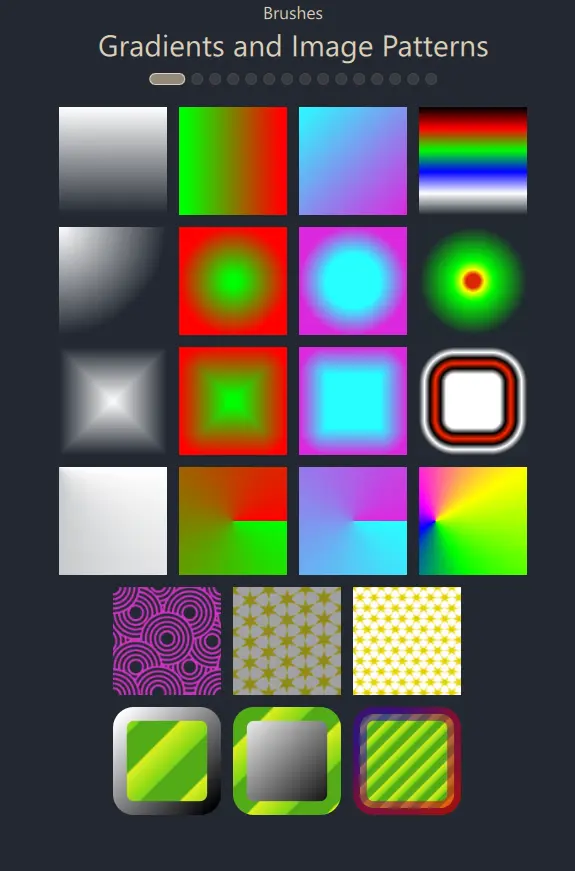
画廊示例是一个Qt Quick 应用程序,展示了QCanvasPainter 提供的丰富功能。
用户界面本质上是一个ListView ,其中委托类是GalleryItem ——这是一个用C++实现并暴露给QML的类型。
class GalleryItem : public QCanvasPainterItem
{
    Q_OBJECT
    QML_NAMED_ELEMENT(GalleryItem)
    Q_PROPERTY(int galleryView READ galleryView WRITE setGalleryView NOTIFY galleryViewChanged)
    Q_PROPERTY(float animationTime READ animationTime WRITE setAnimationTime NOTIFY animationTimeChanged)
    Q_PROPERTY(float animationSine READ animationSine WRITE setAnimationSine NOTIFY animationSineChanged)
    Q_PROPERTY(float animState READ animState WRITE setAnimState NOTIFY animStateChanged)
在 Qt 5 和 OpenGL 环境下,GalleryItem 本可以作为QQuickPaintedItem 的子类实现。而在 Qt 6 和 Canvas Painter 环境下,我们将继承QCanvasPainterItem 类,该类通过QCanvasPainter 提供加速渲染,而非使用QQuickPaintedItem 和QPainter 的普通软件渲染。
GalleryItem 的实现很简单。通过重写虚拟函数createItemRenderer(),我们创建了一个 GalleryItemRenderer 的实例,该类继承自QCanvasPainterItemRenderer 。
GalleryItem::GalleryItem(QQuickItem *parent)
:  QCanvasPainterItem(parent)
{
}

QCanvasPainterItemRenderer* GalleryItem::createItemRenderer() const
{
    return new GalleryItemRenderer();
}
实际的绘制逻辑实现于该类中:
class GalleryItemRenderer : public QCanvasPainterItemRenderer
{
public:
    explicit GalleryItemRenderer();
    ~GalleryItemRenderer();

    void initializeResources(QCanvasPainter *painter) override;
    void synchronizeData(QCanvasPainterItem *item) override;
    void paint(QCanvasPainter *painter) override;
initializeResources() 方法会注册通过QImage 加载的图像,以及自定义画笔所需的着色器。
void GalleryItemRenderer::initializeResources(QCanvasPainter *painter)
{
    QCanvasPainter::ImageFlags flags = QCanvasPainter::ImageFlag::Repeat | QCanvasPainter::ImageFlag::GenerateMipmaps;
    m_patternImage = painter->addImage(QImage(":/images/pattern1.png"), flags);
    m_patternImage2 = painter->addImage(QImage(":/images/pattern2.png"), flags);
    m_patternImage3 = painter->addImage(QImage(":/images/pattern3.png"), flags);
    m_testImage = painter->addImage(QImage(":/images/qt_development_white.png"));
    m_gradientImage1 = painter->addImage(QImage(":/images/gradient1.png"));
    m_gradientImage2 = painter->addImage(QImage(":/images/gradient2.png"));
    m_gradientImage3 = painter->addImage(QImage(":/images/gradient3.png"));
    image3Gray = painter->addImage(QImage(":/images/face-smile-bw.png"));
    image3Plain = painter->addImage(QImage(":/images/pattern2.png"));
    image3Nearest = painter->addImage(QImage(":/images/pattern2.png"),
                                        QCanvasPainter::ImageFlag::Nearest);
    image3Mips = painter->addImage(QImage(":/images/pattern2.png"),
                                     QCanvasPainter::ImageFlag::GenerateMipmaps);
    image3NearestMips = painter->addImage(QImage(":/images/pattern2.png"),
                                            QCanvasPainter::ImageFlag::Nearest | QCanvasPainter::ImageFlag::GenerateMipmaps);
    m_customBrush.setFragmentShader(":/qcgalleryexample/brush1.frag.qsb");
    m_customBrush2.setFragmentShader(":/qcgalleryexample/brush2.frag.qsb");
    m_customBrush3.setFragmentShader(":/qcgalleryexample/brush3.frag.qsb");
    m_customBrush3.setVertexShader(":/qcgalleryexample/brush3.vert.qsb");
    m_customBrush4.setFragmentShader(":/qcgalleryexample/brush4.frag.qsb");
    // Enable iTime animations
    m_customBrush.setAnimationRunning(true);
    m_customBrush2.setAnimationRunning(true);
    m_customBrush3.setAnimationRunning(true);
    m_customBrush4.setAnimationRunning(true);
}
`synchronizeData()` 负责复制 GalleryItem 数据,以便后续能在Qt Quick 场景图的渲染线程上安全地访问这些数据:
void GalleryItemRenderer::synchronizeData(QCanvasPainterItem *item)
{
    // Setting values here synchronized
    GalleryItem *realItem = static_cast<GalleryItem*>(item);
    if (realItem) {
        m_animationTime = realItem->animationTime();
        m_animationSine = realItem->animationSine();
        m_animState = realItem->animState();
        m_viewIndex = realItem->galleryView();
        if (!qFuzzyCompare(m_previousWidth, width()) ||
            !qFuzzyCompare(m_previousHeight, height())) {
            m_sizeChanged = true;
            m_previousWidth = width();
            m_previousHeight = height();
        } else {
            m_sizeChanged = false;
        }
        loadTigerPath();
    }

}
paint() 方法的实现通过QCanvasPainter 进行渲染,具体取决于ListView 提供的当前索引:
void GalleryItemRenderer::paint(QCanvasPainter *painter)
{
    Q_UNUSED(painter)

    // Views not currently centered to have reduced
    // alpha and saturation.
    m_viewAlpha = 0.2 + 0.8 * m_animState;
    m_viewSaturation = m_animState;
    painter->setGlobalAlpha(m_viewAlpha);
    painter->setGlobalSaturation(m_viewSaturation);
    m_topMargin = height() * 0.02f;
    switch (m_viewIndex) {
    case 0:
        drawRectsWithLinearGradient();
        drawRectsWithRadialGradient();
        drawRectsWithBoxGradient();
        drawRectsWithConicalGradients();
        drawRectsWithImagePattern();
        drawRectsWithBrushStroke();
        break;
    case 1:
        drawImages();
        break;
    case 2:
        drawGridPatterns();
break;在此处调用的函数使用QCanvasPainter API 进行渲染。例如:
void GalleryItemRenderer::drawRectsWithBrushStroke()
{
    int rects = 3;
    float margin = width()*0.02f;
    float border = margin + margin * m_animationSine;
    float w = (width() - margin) / (rects+2) - margin;
    float w2 = w - border;
    float posX = w + 2 * margin + border/2;
    float posY = m_topMargin + 5*(w+margin) + border/2;

    QRectF rect1(posX,posY,w2,w2);
    painter()->setLineWidth(border);
    painter()->setFillStyle(QCanvasImagePattern(m_patternImage3));
    QCanvasLinearGradient g1(posX, posY, posX+w2, posY+w2);
    g1.setStartColor("#ffffff");
    g1.setEndColor("#000000");
    painter()->setStrokeStyle(g1);
    painter()->beginPath();
    painter()->roundRect(rect1, border);
    painter()->fill();
    painter()->stroke();
    posX += w + margin;
详情请参阅下方链接中的完整示例源代码。
© 2026 The Qt Company Ltd. Documentation contributions included herein are the copyrights of their respective owners. The documentation provided herein is licensed under the terms of the GNU Free Documentation License version 1.3 as published by the Free Software Foundation. Qt and respective logos are trademarks of The Qt Company Ltd. in Finland and/or other countries worldwide. All other trademarks are property of their respective owners.
