
创建样条图
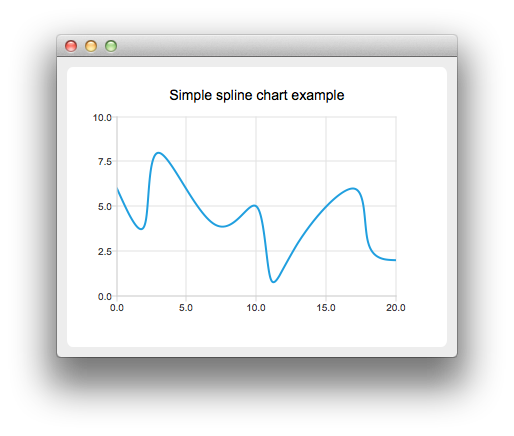
要创建样条图,我们需要将数据放入 QSplineSeries 中。QSplineSeries 会自动计算绘制样条曲线所需的样条段控制点。
auto series = new QSplineSeries;
series->setName("Spline");
现在,让我们向该数据系列中添加一些数据点。
series->append(0, 6);
series->append(2, 4);
series->append(3, 8);
series->append(7, 4);
series->append(10, 5);
*series << QPointF(11, 1) << QPointF(13, 3) << QPointF(17, 6) << QPointF(18, 3) << QPointF(20, 2);
数据序列已填充完毕。要将其显示在图表上,我们需要创建一个 QChart 对象并将数据序列添加到其中。同时,我们还设置了标题和 y 轴的数值范围,以便更好地展示图表。
auto chart = new QChart;
chart->legend()->hide();
chart->addSeries(series);
chart->setTitle("Simple Spline Chart");
chart->createDefaultAxes();
chart->axes(Qt::Vertical).first()->setRange(0, 10);
然后,我们创建一个以 QChart 为参数的 QChartView 对象。这样,我们就不需要自己创建QGraphicsView 场景了。
createDefaultChartView(chart);© 2026 The Qt Company Ltd. Documentation contributions included herein are the copyrights of their respective owners. The documentation provided herein is licensed under the terms of the GNU Free Documentation License version 1.3 as published by the Free Software Foundation. Qt and respective logos are trademarks of The Qt Company Ltd. in Finland and/or other countries worldwide. All other trademarks are property of their respective owners.
