
媒体播放器
使用Qt Quick 播放音频和视频。

本示例演示了一个 QML 应用程序,该应用程序可以使用各种编解码器播放音频和视频文件。
运行示例
您可以通过以下方式运行该示例:
- Qt Creator
打开Welcome 模式,并从Examples 中选择该示例。有关更多信息,请参阅Qt Creator :教程:构建和运行。
- Qt Extension for Visual Studio Code
在Command Palette 中运行Qt: Open Qt examples 命令,并从列表中选择该示例。有关更多信息,请参阅Qt Extension for Visual Studio Code :教程:构建和运行。
项目结构
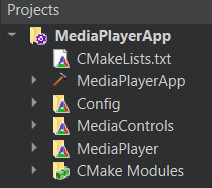
该应用程序的架构由三个自定义 QML 模块组成:
MediaControlMediaPlayerConfig
这一点在顶级CMakeLists.txt 文件中也有体现:
add_subdirectory(MediaPlayer)

target_link_libraries(MediaPlayerApp PRIVATE
    Qt6::Core
    Qt6::Svg
    Qt6::Quick
    Qt6::Multimedia
    MediaControlsplugin
    MediaPlayerplugin
    Configplugin
每个 QML 模块都是使用qt_add_qml_module宏创建的,例如,请参见 Config 模块的创建方式。
qt_add_library(Config STATIC)

set_source_files_properties(Config.qml
    PROPERTIES
        QT_QML_SINGLETON_TYPE true
)

qt_add_qml_module(Config
    URI "Config"
    OUTPUT_DIRECTORY Config
    QML_FILES
        "Config.qml"
)
Qt Quick 应用程序
从核心来看,这是一个 QML 应用程序,有关具体信息,请参阅《Qt Quick 编程入门:闹钟应用程序》。本文档重点介绍该示例如何利用 Qt Multimedia QML Types。
自定义的 Config QML 模块
此类模块根据目标操作系统控制应用程序的主题和布局。
首先,我们将其声明为单例,因为我们只需实例化它一次,而创建副本会浪费资源。
为此,我们在Config.qml
pragma Singleton然后在Config 目录下创建一个名为qmldir 的qmldir文件,内容如下:
module Config
singleton Config 1.0 Config.qml现在要在应用程序中使用它,请查看MediaPlayer 目录下的Main.qml文件中是如何引用它的:
color: Config.mainColor自定义的 MediaControls QML 模块
该模块包含用于定义应用程序控件的所有类型,包括:

- AudioControl.qml
- ControlImages.qml
- CustomButton.qml
- CustomRadioButton.qml
- CustomSlider.qml
- PlaybackControl.qml
- PlaybackRateControl.qml
- PlaybackSeekControl.qml
有关这些控件的具体实现细节,请参阅各具体类型的定义文件。它们是“QML 媒体播放器示例”中控件的进一步发展。
自定义MediaPlayer QML模块
该模块包含 Main.qml 文件,该文件声明了应用程序中大部分顶级类型的使用位置,最重要的是,还声明了Qt Multimedia 、MediaPlayer 和VideoOutput 这三个 QML 类型。
    MediaPlayer {
        id: mediaPlayer

        playbackRate: playbackControl.playbackRate
        videoOutput: videoOutput
        audioOutput: AudioOutput {
            id: audio
            volume: playbackControl.volume
        }
        source: new URL("https://download.qt.io/learning/videos/media-player-example/Qt_LogoMergeEffect.mp4")

        function updateMetadata() {
            root.metadataInfo.clear()
            root.metadataInfo.read(mediaPlayer.metaData)
        }

        onMetaDataChanged: updateMetadata()
        onActiveTracksChanged: updateMetadata()
        onErrorOccurred: {
            errorPopup.errorMsg = mediaPlayer.errorString
            errorPopup.open()
        }
        onTracksChanged: {
            settingsInfo.tracksInfo.selectedAudioTrack = mediaPlayer.activeAudioTrack
            settingsInfo.tracksInfo.selectedVideoTrack = mediaPlayer.activeVideoTrack
            settingsInfo.tracksInfo.selectedSubtitleTrack = mediaPlayer.activeSubtitleTrack
            updateMetadata()
        }

        onMediaStatusChanged: {
            if ((MediaPlayer.EndOfMedia === mediaStatus && mediaPlayer.loops !== MediaPlayer.Infinite) &&
                    ((root.currentFile < playlistInfo.mediaCount - 1) || playlistInfo.isShuffled)) {
                if (!playlistInfo.isShuffled) {
                    ++root.currentFile
                }
                root.playMedia()
            } else if (MediaPlayer.EndOfMedia === mediaStatus && root.playlistLooped && playlistInfo.mediaCount) {
                root.currentFile = 0
                root.playMedia()
            }
        }
    }

    VideoOutput {
        id: videoOutput

        anchors.top: fullScreen || Config.isMobileTarget ? parent.top : menuBar.bottom
        anchors.bottom: fullScreen ? parent.bottom : playbackControl.top
        anchors.left: parent.left
        anchors.right: parent.right
        anchors.leftMargin: fullScreen ? 0 : 20
        anchors.rightMargin: fullScreen ? 0 : 20
        visible: mediaPlayer.hasVideo

        property bool fullScreen: false

        TapHandler {
            onDoubleTapped: {
                if (parent.fullScreen) {
                    root.showNormal()
                } else {
                    root.showFullScreen()
                }
                parent.fullScreen = !parent.fullScreen
            }
            onTapped: {
                root.closeOverlays()
            }
        }
    }
该模块还包含其他自定义类型,用于检索和显示文件信息,以及调用文件选择器。
- ErrorPopup.qml
- Images.qml
- MetadataInfo.qml
- PlayerMenuBar.qml
- PlaylistInfo.qml
- SettingsInfo.qml
- ThemeInfo.qml
- TouchMenu.qml
- 曲目信息.qml
- 曲目选项.qml
- UrlPopup.qml
有关各具体类型的实现细节,请参阅相应类型的定义文件。其中一些是基于QML 媒体播放器示例中现有类型的演变。
新功能
本示例应用程序通过类型实现了若干新功能,例如PlaylistInfo 和ThemeInfo 。有关这些功能的具体实现方式,请参阅相应的.qml文件。
源文件
另请参阅 所有 Qt 示例、Qt Quick 示例与教程,以及Qt Multimedia 示例。
© 2026 The Qt Company Ltd. Documentation contributions included herein are the copyrights of their respective owners. The documentation provided herein is licensed under the terms of the GNU Free Documentation License version 1.3 as published by the Free Software Foundation. Qt and respective logos are trademarks of The Qt Company Ltd. in Finland and/or other countries worldwide. All other trademarks are property of their respective owners.
