
Troll 打印示例
为后续版本更新翻译内容。
Troll Print 是一个示例应用程序,允许用户选择打印机设置。它有两个版本:英语版和葡萄牙语版。
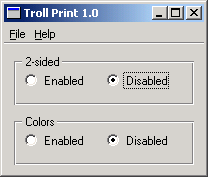
我们提供了一个翻译文件trollprint_pt.ts ,其中包含该示例的一些葡萄牙语翻译。
我们将以同一应用程序的两个版本为例:Troll Print 1.0 和 1.1。我们将学习如何在后续版本中复用为某个版本创建的翻译。(在本教程中,您需要编辑一些源文件。最好将所有文件复制到一个新的临时目录中,并在该目录下进行操作。)
有关 Qt 应用程序翻译的更多信息,请参阅《Qt Linguist 手册》。
逐行演示
PrintPanel 类定义在printpanel.h 中。
class PrintPanel : public QWidget
{
    Q_OBJECT
PrintPanel 是一个 `QWidget`。它需要宏 `Q_OBJECT `,才能使 `tr() ` 正常工作。
实现文件为printpanel.cpp 。
PrintPanel::PrintPanel(QWidget *parent)
    : QWidget(parent)
{
/*
    QLabel *label = new QLabel(tr("<b>TROLL PRINT</b>"));
    label->setAlignment(Qt::AlignCenter);
*/
在 Troll Print 1.0 中,部分代码已被注释掉;你将在后续开发 Troll Print 1.1 时取消这些注释。
    twoSidedGroupBox = new QGroupBox(tr("2-sided"));
    twoSidedEnabledRadio = new QRadioButton(tr("Enabled"));
    twoSidedDisabledRadio = new QRadioButton(tr("Disabled"));
    twoSidedDisabledRadio->setChecked(true);

    colorsGroupBox = new QGroupBox(tr("Colors"));
    colorsEnabledRadio = new QRadioButton(tr("Enabled"));
    colorsDisabledRadio = new QRadioButton(tr("Disabled"));
请注意 PrintPanel 中有两处tr("Enabled") 和tr("Disabled") 。由于“Enabled”和“Disabled”都出现在同一上下文中 Qt Linguist 将仅显示其中一次,并为未显示的重复项使用相同的翻译。虽然这能有效节省时间,但在某些语言(如葡萄牙语)中,第二次出现的内容需要单独翻译。我们将探讨如何 Qt Linguist 让系统显示所有实例以便分别翻译。
MainWindow 的头文件mainwindow.h 内容十分简单。在实现文件mainwindow.cpp 中,有一些用户可见的源文本必须标记为待翻译。
setWindowTitle(tr("Troll Print %1").arg(version));我们必须翻译窗口标题。
void MainWindow::createActions()
{
    exitAct = new QAction(tr("E&xit"), this);
    exitAct->setShortcut(tr("Ctrl+Q", "Quit"));
    connect(exitAct, &QAction::triggered, this, &MainWindow::close);

    aboutAct = new QAction(tr("&About"), this);
    aboutAct->setShortcut(Qt::Key_F1);
    connect(aboutAct, &QAction::triggered, this, &MainWindow::about);

    aboutQtAct = new QAction(tr("About &Qt"), this);
    connect(aboutQtAct, &QAction::triggered, qApp, &QApplication::aboutQt);
}

void MainWindow::createMenus()
{
    QMenu *fileMenu = menuBar()->addMenu(tr("&File"));
    fileMenu->addAction(exitAct);

    menuBar()->addSeparator();

    QMenu *helpMenu = menuBar()->addMenu(tr("&Help"));
    helpMenu->addAction(aboutAct);
    helpMenu->addAction(aboutQtAct);
}我们还需要翻译操作项和菜单。请注意,tr() 的两个参数形式用于键盘快捷键“Ctrl+Q”,因为第二个参数是翻译者唯一能用来判断该快捷键将执行何种功能的线索。
    QTranslator translator;
    if (translator.load(locale, u"trollprint"_s, u"_"_s))
        app.installTranslator(&translator);
main.cpp 中的main() 函数与“ArrowPad”示例中的函数相同。特别是,它会根据当前区域设置选择相应的翻译文件。
以英语和葡萄牙语运行 Troll Print 1.0
我们将使用提供的trollprint_pt.ts 文件中的翻译内容。
将LANG 环境变量设置为pt ,然后运行trollprint 。此时您应该仍会看到英文版本。现在运行lrelease (例如lrelease trollprint.pro ),然后再次运行该示例。此时您应该会看到葡萄牙语版本(Troll Imprimir 1.0):
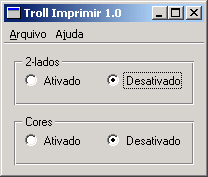
虽然翻译显示正确,但实际上是错误的。在正确的葡萄牙语中,第二次出现的“Enabled”应为“Ativadas”,而非“Ativado”,而“Disabled”的第二次翻译结尾也必须相应地进行修改。
trollprint_pt.ts 如果你使用 Qt Linguist,你会发现翻译源文件中“Enabled”和“Disabled”各只出现一次,尽管源代码中它们各有两次。这是因为 Qt Linguist 会通过为重复的源文本使用相同的翻译来尽量减少翻译者的工作量。在像这种情况一样,相同的翻译是错误的,程序员必须消除重复项的歧义。这可以通过使用tr() 的双参数形式轻松实现。
我们可以轻松确定需要修改的文件,因为翻译者的“上下文”实际上就是包含待修改文本的类的类名。在此情况下,该文件为printpanel.cpp ,其中有四行需要修改。在针对第一对单选按钮的相应tr() 调用中,添加第二个参数“two-sided”:
twoSidedEnabledRadio = new QRadioButton(tr("Enabled", "two-sided"));
twoSidedDisabledRadio = new QRadioButton(tr("Disabled", "two-sided"));并在tr() 中针对第二对单选按钮的相应调用中添加第二个参数“colors”:
colorsEnabledRadio = new QRadioButton(tr("Enabled", "colors"), colors);
colorsDisabledRadio = new QRadioButton(tr("Disabled", "colors"), colors);
trollprint_pt.ts 现在重新编译,运行lupdate ,并使用 Qt Linguist。此时你应该会看到两处变化。
首先,翻译源文件现在包含三组“Enabled”、“Disabled”对。第一组被标记为“(obs.)”,表示它们已过时。这是因为这些文本出现在tr() 调用中,而这些调用已被带有两个参数的新调用所取代。 第二组配对的注释为“two-sided”,第三组配对的注释为“colors”。这些注释显示在Source text and comments 区域中 Qt Linguistxml-ph-0001@deepl.internal区域中显示。
其次,翻译文本“Ativado”和“Desativado”已被自动用作新文本“Enabled”和“Disabled”的翻译,这同样是为了最大限度地减少译者的工作量。当然,在这种情况下,这些翻译对于每个单词的第二次出现并不正确,但它们提供了一个很好的起点。
将第二个“Ativado”改为“Ativadas”,将第二个“Desativado”改为“Desativadas”,然后保存并退出。运行lrelease 以获取最新的二进制trollprint_pt.qm 文件,并运行 Troll Print(或更准确地说,Troll Imprimir)。
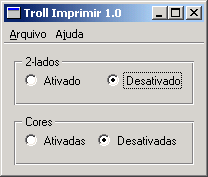
tr() 的第二个参数,在 Qt Linguist中称为“comments”,用于区分出现在相同上下文(类)中的相同源文本。它们在其他情况下也有助于为翻译者提供线索;而在涉及 Ctrl 键快捷键时,这是向翻译者传达该快捷键所执行功能的唯一途径。
另一种帮助译者的方法是提供有关如何导航至应用程序中包含待译源文本的特定部分的信息。这有助于译者了解翻译出现的上下文,也有助于他们查找和测试翻译结果。这可以通过在源代码中使用TRANSLATOR 注释来实现:
/*
   TRANSLATOR MainWindow

   In this application the whole application is a MainWindow.
   Choose Help|About from the menu bar to see some text
   belonging to MainWindow.

   ...
*/请尝试在某些源文件中(特别是对话框类中)添加这些注释,说明访问对话框所需的导航路径。您也可以将它们添加到示例文件中,例如mainwindow.cpp 和printpanel.cpp 就是合适的文件。运行lupdate ,然后在 Qt Linguist 并加载trollprint_pt.ts 。当您浏览源文本列表时,应该会在Source text and comments 区域中看到这些注释。
有时,特别是对于大型程序,翻译人员可能难以找到自己的翻译内容并检查其正确性。提供良好导航信息的注释可以为他们节省时间:
/*
   TRANSLATOR ZClientErrorDialog

   Choose Client|Edit to reach the Client Edit dialog, then choose
   Client Specification from the drop down list at the top and pick
   client Bartel Leendert van der Waerden. Now check the Profile
   checkbox and then click the Start Processing button. You should
   now see a pop up window with the text "Error: Name too long!".
   This window is a ZClientErrorDialog.
*/
Troll Print 1.1
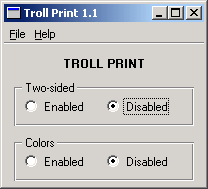
现在我们将准备 Troll Print 的 1.1 版本。请启动您常用的文本编辑器,并按照以下步骤操作:
- 在
printpanel.cpp文件中,取消注释那两行用于生成包含文本“<b>TROLL PRINT</b>”的QLabel 的代码。 - 文字整理:在
printpanel.cpp文件中,将“2-sided”替换为“Two-sided”。 - 将
mainwindow.cpp中所有出现的“1.0”替换为“1.1”。 - 在
mainwindow.cpp中将版权年份更新为 1999-2000。
(当然,在实际应用中,版本号和版权年份通常会作为常量或 #define 定义。)
trollprint_pt.ts 完成后,运行lupdate ,然后在 Qt Linguist。以下项目值得特别关注:
PrintPanel- 双面 - 标有“(obs.)”,已废弃
- <b>TROLL PRINT</b> —— 未标记,即未翻译
- 双面 - 未标记,即未翻译。
为了便于修订,请不要使用 tr("Troll Print 1.0"),而应使用 tr("Troll Print %1").arg("1.0") 或类似形式,以避免在每次发布时都必须更新该字符串。
请检查MainWindow 中的翻译,并将这些标记为“已完成”。 将“<b>TROLL PRINT</b>”翻译为“<b>TROLL IMPRIMIR</b>”。翻译“Two-sided”时,请点击Guess Again 按钮进行翻译,但将“2”改为“Dois”。
保存并退出,然后运行lrelease 。葡萄牙语版本应如下所示:
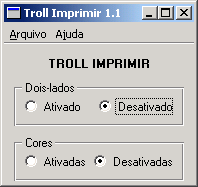
选择“Ajuda|Sobre ”(Help|About )以查看“关于”对话框。
如果您选择“Ajuda|Sobre Qt ”(Help|About Qt ),将出现一个英文对话框。哎呀!Qt 本身也需要翻译。详情请参阅《Qt 国际化》。
现在将“LANG=en ”设置为“原始英文版”:
© 2026 The Qt Company Ltd. Documentation contributions included herein are the copyrights of their respective owners. The documentation provided herein is licensed under the terms of the GNU Free Documentation License version 1.3 as published by the Free Software Foundation. Qt and respective logos are trademarks of The Qt Company Ltd. in Finland and/or other countries worldwide. All other trademarks are property of their respective owners.
