
屏幕截图示例
捕获屏幕或窗口。
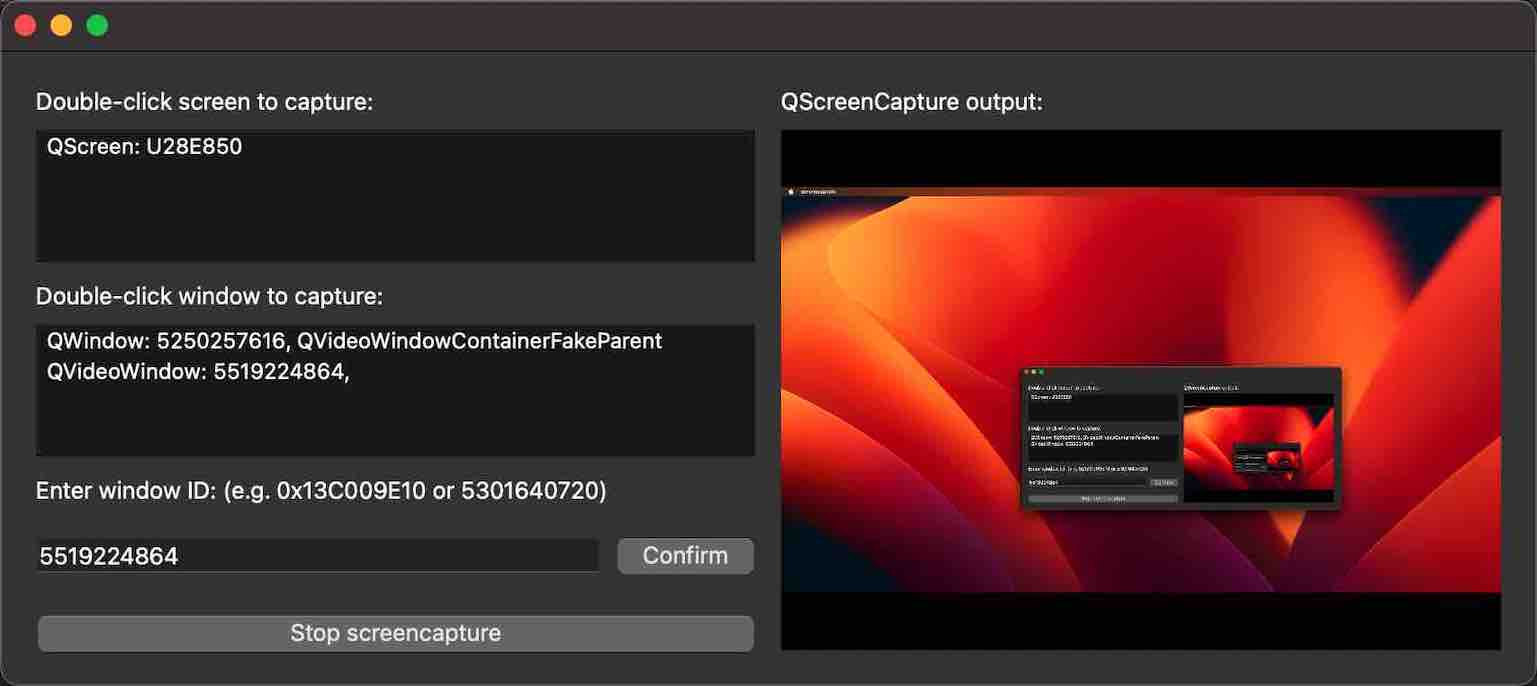
“屏幕截图”示例演示了如何使用QScreenCapture 和QWindowCapture 捕获屏幕或窗口。该示例列出了屏幕和窗口的列表,并通过QMediaCaptureSession 和QVideoWidget 显示所选项的实时预览。可通过button 启动或停止捕获操作。
运行示例
您可以通过以下方式运行该示例:
- Qt Creator
打开Welcome 模式,并从Examples 中选择该示例。有关更多信息,请参阅Qt Creator :教程:构建和运行。
- Qt Extension for Visual Studio Code
在“Command Palette ”中运行Qt: Open Qt examples 命令,并从列表中选择该示例。有关更多信息,请参阅Qt Extension for Visual Studio Code :教程:构建和运行。
应用程序结构
该示例由三个自定义类组成。 用户界面和所有屏幕截图功能都在 ScreenCapturePreview 类中实现。ScreenListModel 和 WindowListModel 类仅作为两个QListView 控件背后的模型。main 函数创建一个 ScreenCapturePreview 对象,该对象进而创建QScreenCapture 和QWindowCapture 的实例,以及QMediaCaptureSession 和QVideoWidget 的实例,此外还创建所有用户界面控件。
屏幕和窗口模型分别由QGuiApplication::screens()和QWindowCapture::capturableWindows()的返回值填充。
当选中一个列表项时,它会通过setScreen() 连接到QScreenCapture 对象,或通过setWindow() 连接到QWindowCapture 对象。捕获对象分别通过setScreenCapture() 和setWindowCapture() 连接到QMediaCaptureSession 对象。 该捕获会话又通过setVideoOutput() 连接到QVideoWidget 对象。因此,捕获的输出内容会在用户界面右侧的视频控件中进行预览。
开始/停止按钮会调用QScreenCapture::start()和QScreenCapture::stop(),或者QWindowCapture::start()和QWindowCapture::stop()。
如果触发了errorOccurred 信号,则会弹出一个QMessageBox 对话框。
© 2026 The Qt Company Ltd. Documentation contributions included herein are the copyrights of their respective owners. The documentation provided herein is licensed under the terms of the GNU Free Documentation License version 1.3 as published by the Free Software Foundation. Qt and respective logos are trademarks of The Qt Company Ltd. in Finland and/or other countries worldwide. All other trademarks are property of their respective owners.
