
QMessageBox Class
QMessageBox 类提供了一个模态对话框,用于向用户显示信息或向用户提问并接收回答。更多内容...
| 标题: | #include <QMessageBox> |
| CMake: | find_package(Qt6 REQUIRED COMPONENTS Widgets) target_link_libraries(mytarget PRIVATE Qt6::Widgets) |
| qmake: | QT += widgets |
| 继承自: | QDialog |
- 所有成员的列表,包括继承的成员
- 已弃用的成员
- QMessageBox 属于“标准对话框”组件。
公共类型
| enum | ButtonRole { InvalidRole, AcceptRole, RejectRole, DestructiveRole, ActionRole, …, ResetRole } |
| enum | Icon { NoIcon, Question, Information, Warning, Critical } |
(since 6.6) enum class | Option { DontUseNativeDialog } |
| flags | Options |
| enum | StandardButton { Ok, Open, Save, Cancel, Close, …, ButtonMask } |
| flags | StandardButtons |
属性
|
|
公共函数
| QMessageBox(QWidget *parent = nullptr) | |
| QMessageBox(QMessageBox::Icon icon, const QString &title, const QString &text, QMessageBox::StandardButtons buttons = NoButton, QWidget *parent = nullptr, Qt::WindowFlags f = Qt::Dialog | Qt::MSWindowsFixedSizeDialogHint) | |
| virtual | ~QMessageBox() |
| void | addButton(QAbstractButton *button, QMessageBox::ButtonRole role) |
| QPushButton * | addButton(QMessageBox::StandardButton button) |
| QPushButton * | addButton(const QString &text, QMessageBox::ButtonRole role) |
| QAbstractButton * | button(QMessageBox::StandardButton which) const |
| QMessageBox::ButtonRole | buttonRole(QAbstractButton *button) const |
| QList<QAbstractButton *> | buttons() const |
| QCheckBox * | checkBox() const |
| QAbstractButton * | clickedButton() const |
| QPushButton * | defaultButton() const |
| QString | detailedText() const |
| QAbstractButton * | escapeButton() const |
| QMessageBox::Icon | icon() const |
| QPixmap | iconPixmap() const |
| QString | informativeText() const |
| void | open(QObject *receiver, const char *member) |
| QMessageBox::Options | options() const |
| void | removeButton(QAbstractButton *button) |
| void | setCheckBox(QCheckBox *cb) |
| void | setDefaultButton(QMessageBox::StandardButton button) |
| void | setDefaultButton(QPushButton *button) |
| void | setDetailedText(const QString &text) |
| void | setEscapeButton(QAbstractButton *button) |
| void | setEscapeButton(QMessageBox::StandardButton button) |
| void | setIcon(QMessageBox::Icon) |
| void | setIconPixmap(const QPixmap &pixmap) |
| void | setInformativeText(const QString &text) |
(since 6.6) void | setOption(QMessageBox::Option option, bool on = true) |
| void | setOptions(QMessageBox::Options options) |
| void | setStandardButtons(QMessageBox::StandardButtons buttons) |
| void | setText(const QString &text) |
| void | setTextFormat(Qt::TextFormat format) |
| void | setTextInteractionFlags(Qt::TextInteractionFlags flags) |
| void | setWindowModality(Qt::WindowModality windowModality) |
| void | setWindowTitle(const QString &title) |
| QMessageBox::StandardButton | standardButton(QAbstractButton *button) const |
| QMessageBox::StandardButtons | standardButtons() const |
(since 6.6) bool | testOption(QMessageBox::Option option) const |
| QString | text() const |
| Qt::TextFormat | textFormat() const |
| Qt::TextInteractionFlags | textInteractionFlags() const |
公共槽位
| virtual int | exec() override |
信号
| void | buttonClicked(QAbstractButton *button) |
静态公共成员
| void | about(QWidget *parent, const QString &title, const QString &text) |
| void | aboutQt(QWidget *parent, const QString &title = QString()) |
| QMessageBox::StandardButton | critical(QWidget *parent, const QString &title, const QString &text, QMessageBox::StandardButtons buttons = Ok, QMessageBox::StandardButton defaultButton = NoButton) |
| QMessageBox::StandardButton | information(QWidget *parent, const QString &title, const QString &text, QMessageBox::StandardButtons buttons = Ok, QMessageBox::StandardButton defaultButton = NoButton) |
| QMessageBox::StandardButton | question(QWidget *parent, const QString &title, const QString &text, QMessageBox::StandardButtons buttons = StandardButtons(Yes | No), QMessageBox::StandardButton defaultButton = NoButton) |
| QMessageBox::StandardButton | warning(QWidget *parent, const QString &title, const QString &text, QMessageBox::StandardButtons buttons = Ok, QMessageBox::StandardButton defaultButton = NoButton) |
重新实现的受保护函数
| virtual void | changeEvent(QEvent *ev) override |
| virtual void | closeEvent(QCloseEvent *e) override |
| virtual bool | event(QEvent *e) override |
| virtual void | keyPressEvent(QKeyEvent *e) override |
| virtual void | resizeEvent(QResizeEvent *event) override |
| virtual void | showEvent(QShowEvent *e) override |
宏
| QT_REQUIRE_VERSION(int argc, char **argv, const char *version) |
详细说明
消息框会显示一个主要text 来提醒用户注意某种情况,一个informative text 来进一步解释该情况,以及一个可选的detailed text ,用于在用户请求时提供更多数据。
消息框还可以显示icon 和standard buttons ,以接受用户的响应。
虽然 parent 参数是可选的,但指定它会向窗口管理器提供提示,从而由其负责定位并保持对话框窗口的正确堆叠顺序。
提供了两种使用 QMessageBox 的 API:基于属性的 API 和静态函数。调用其中一个静态函数是更简单的方法,但它不如使用基于属性的 API 灵活,且返回的结果信息量较少。建议使用基于属性的 API。
基于属性的 API
要使用基于属性的 API,需创建一个 QMessageBox 实例,设置所需属性,然后调用exec() 来显示消息。最简单的配置是仅设置message text 属性。
QMessageBox msgBox(this);
msgBox.setText("The document has been modified.");
msgBox.exec();用户必须单击OK 按钮才能关闭消息框。在消息框关闭之前,GUI 的其余部分将被阻塞。
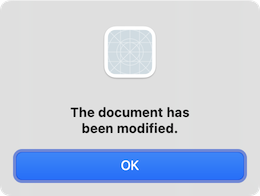
比起仅仅向用户发出事件提醒,更好的做法是同时询问用户该如何处理。
将standard buttons 属性设置为作为用户响应选项的按钮集合。这些按钮通过使用位或(bitwise OR)运算符组合StandardButtons 中的值来指定。按钮的显示顺序取决于平台。例如,在Windows上,“Save ”显示在“Cancel ”左侧,而在macOS上,顺序则相反。请将其中一个标准按钮标记为default button 。
informative text 属性可用于添加额外上下文信息,以帮助用户选择适当的操作。
QMessageBox msgBox(this);
msgBox.setText("The document has been modified.");
msgBox.setInformativeText("Do you want to save your changes?");
msgBox.setStandardButtons(QMessageBox::Save | QMessageBox::Discard | QMessageBox::Cancel);
msgBox.setDefaultButton(QMessageBox::Save);
int ret = msgBox.exec();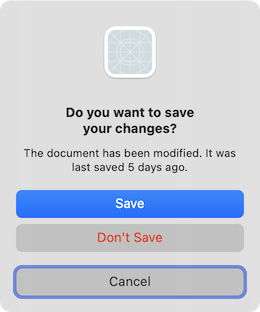
exec() 槽会返回被点击按钮的StandardButtons 值。
switch (ret) {
    case QMessageBox::Save:
        // Save was clicked
        break;
    case QMessageBox::Discard:
        // Don't Save was clicked
        break;
    case QMessageBox::Cancel:
        // Cancel was clicked
        break;
    default:
        // should never be reached
        break;
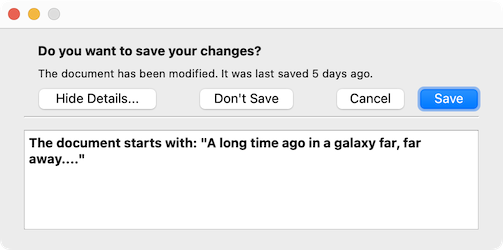
}为向用户提供更多信息以帮助其选择适当的操作,请设置detailed text 属性。根据平台不同,detailed text 可能需要用户点击Show Details... 按钮才能显示。
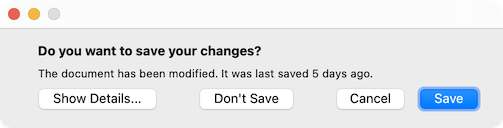
点击Show Details... 按钮将显示详细文本。
富文本与“Text Format”属性
detailed text 属性始终被解释为纯文本。main text 和informative text 属性可以是纯文本,也可以是富文本。这些字符串的解释取决于text format 属性的设置。默认设置为auto-text 。
请注意,对于某些包含 XML 元字符的纯文本字符串,自动文本处理rich text detection test 可能会失败,导致您的纯文本字符串被错误地解释为富文本。在这些罕见的情况下,请使用Qt::convertFromPlainText() 将您的纯文本字符串转换为视觉上等效的富文本字符串,或者显式地通过setTextFormat() 设置text format 属性。
严重性级别与 Icon 和 Pixmap 属性
QMessageBox 支持四种预定义的消息严重性级别(或消息类型),它们的区别仅在于各自显示的预定义图标。通过将icon 属性设置为predefined icons 中的一个值,指定这四种预定义消息类型之一。以下规则仅供参考:
| Question | 用于在正常运行期间提出问题。 |
| Information | 用于报告有关正常运行的信息。 |
| Warning | 用于报告非关键性错误。 |
| Critical | 用于报告严重错误。 |


Predefined icons 并非由 QMessageBox 定义,而是由样式提供的。 默认值为No Icon 。除此之外,所有情况下的消息框均相同。使用标准图标时,请使用表格中推荐的图标,或使用您所在平台的样式指南中推荐的图标。如果标准图标中没有适合您消息框的,您可以通过设置icon pixmap 属性(而不是设置icon 属性)来使用自定义图标。
总而言之,要设置图标,请使用setIcon()来选择标准图标之一,或 使用 setIconPixmap()来使用自定义图标。
静态函数 API
虽然使用静态函数 API 构建消息框很方便,但其灵活性不如基于属性的 API,因为静态函数的签名中缺少用于设置informative text 和detailed text 属性的参数。对此的一种变通方法是将title 参数用作消息框的主文本,将text 参数用作消息框的说明性文本。 由于这种做法的明显缺点是会降低消息框的可读性,因此平台指南并不推荐此方法。Microsoft Windows 用户界面指南建议将 `application name ` 用作 `window's title`,这意味着如果除了主文本外还有说明性文本,则必须将其与 `text ` 参数拼接在一起。
请注意,静态函数的签名在按钮参数方面已发生变化,这些参数现在用于设置standard buttons 和default button 。
提供静态函数用于创建information()、question()、warning() 和critical() 消息框。
int ret = QMessageBox::warning(this, tr("My Application"),
                               tr("The document has been modified.\n"
                                  "Do you want to save your changes?"),
                               QMessageBox::Save | QMessageBox::Discard
                               | QMessageBox::Cancel,
QMessageBox::Save);“标准对话框”示例演示了如何使用 QMessageBox 以及其他内置的 Qt 对话框。
高级用法
如果standard buttons 对您的消息框来说不够灵活,您可以使用addButton()重载方法,该方法接受文本和ButtonRole 参数,用于添加自定义按钮。QMessageBox会使用ButtonRole 来确定屏幕上按钮的排列顺序(该顺序因平台而异)。您可以在调用exec()后测试clickedButton()的值。例如,
QMessageBox msgBox(this);
QPushButton *connectButton = msgBox.addButton(tr("Connect"), QMessageBox::ActionRole);
QPushButton *abortButton = msgBox.addButton(QMessageBox::Abort);

msgBox.exec();

if (msgBox.clickedButton() == connectButton) {
    // connect
} else if (msgBox.clickedButton() == abortButton) {
    // abort
}
默认键和Escape键
默认按钮(即按下Enter 时激活的按钮)可通过setDefaultButton()进行指定。如果未指定默认按钮,QMessageBox会根据消息框中使用的按钮的button roles 来尝试确定默认按钮。
Escape 按钮(即按下Esc 时被激活的按钮)可通过setEscapeButton() 指定。如果未指定 Escape 按钮,QMessageBox 将尝试根据以下规则查找一个:
- 如果只有一个按钮,则该按钮即为按下Esc 时被激活的按钮。
- 如果存在Cancel 按钮,则该按钮即为按下Esc 时被激活的按钮。
- 如果恰好有一个按钮具有the Reject role 或the No role 之一,则该按钮即为按下Esc 时被激活的按钮。
当无法通过这些规则确定逃生按钮时,按下Esc 将没有任何效果。
另请参阅《 QDialogButtonBox 》 和《标准对话框示例》。
成员类型文档
enum QMessageBox::ButtonRole
此枚举描述了可用于描述按钮框中按钮的角色。这些角色的组合作为标志,用于描述按钮行为的不同方面。
| 常量 | 值 | 描述 |
|---|---|---|
QMessageBox::InvalidRole | -1 | 该按钮无效。 |
QMessageBox::AcceptRole | 0 | 单击该按钮将导致对话框被接受(例如“确定”)。 |
QMessageBox::RejectRole | 1 | 单击该按钮将导致对话框被拒绝(例如“取消”)。 |
QMessageBox::DestructiveRole | 2 | 单击该按钮会引起破坏性更改(例如“丢弃更改”),并关闭对话框。 |
QMessageBox::ActionRole | 3 | 单击该按钮将对对话框中的元素进行更改。 |
QMessageBox::HelpRole | 4 | 单击该按钮可请求帮助。 |
QMessageBox::YesRole | 5 | 该按钮是一个类似“是”的按钮。 |
QMessageBox::NoRole | 6 | 该按钮是类似“否”的按钮。 |
QMessageBox::ApplyRole | 8 | 该按钮将应用当前的更改。 |
QMessageBox::ResetRole | 7 | 该按钮将对话框中的字段重置为默认值。 |
另请参阅 StandardButton 。
enum QMessageBox::Icon
该枚举包含以下值:
| 常量 | 值 | 描述 |
|---|---|---|
QMessageBox::NoIcon | 0 | 消息框没有图标。 |
QMessageBox::Question | 4 | 表示该消息是在提问的图标。 |
QMessageBox::Information | 1 | 表示该消息属于常规情况的图标。 |
QMessageBox::Warning | 2 | 表示该消息为警告,但可以处理的图标。 |
QMessageBox::Critical | 3 | 一个图标,用于表示该消息涉及严重问题。 |
[since 6.6] enum class QMessageBox::Option
flags QMessageBox::Options
| 常数 | 值 | 描述 |
|---|---|---|
QMessageBox::Option::DontUseNativeDialog | 0x00000001 | 请勿使用原生消息对话框。 |
该枚举类型在 Qt 6.6 中引入。
Options 类型是QFlags<Option> 的 typedef 定义。它存储 Option 值的按“或”运算组合。
enum QMessageBox::StandardButton
flags QMessageBox::StandardButtons
这些枚举描述了标准按钮的标志。每个按钮都有一个定义好的ButtonRole 。
| 常量 | 值 | 描述 |
|---|---|---|
QMessageBox::Ok | 0x00000400 | 使用AcceptRole 定义的“确定”按钮。 |
QMessageBox::Open | 0x00002000 | 使用AcceptRole 定义的“打开”按钮。 |
QMessageBox::Save | 0x00000800 | 使用AcceptRole 定义的“保存”按钮。 |
QMessageBox::Cancel | 0x00400000 | 使用RejectRole 定义的“Cancel”按钮。 |
QMessageBox::Close | 0x00200000 | 使用RejectRole 定义的“关闭”按钮。 |
QMessageBox::Discard | 0x00800000 | 一个“放弃”或“不保存”按钮(视平台而定),使用DestructiveRole 定义。 |
QMessageBox::Apply | 0x02000000 | 使用ApplyRole 定义的“应用”按钮。 |
QMessageBox::Reset | 0x04000000 | 使用ResetRole 定义的“重置”按钮。 |
QMessageBox::RestoreDefaults | 0x08000000 | 使用ResetRole 定义的“恢复默认值”按钮。 |
QMessageBox::Help | 0x01000000 | 使用HelpRole 定义的“帮助”按钮。 |
QMessageBox::SaveAll | 0x00001000 | 使用AcceptRole 定义的“全部保存”按钮。 |
QMessageBox::Yes | 0x00004000 | 使用YesRole 定义的“是”按钮。 |
QMessageBox::YesToAll | 0x00008000 | 使用YesRole 定义的“全部是”按钮。 |
QMessageBox::No | 0x00010000 | 使用NoRole 定义的“否”按钮。 |
QMessageBox::NoToAll | 0x00020000 | 使用NoRole 定义的“全部否”按钮。 |
QMessageBox::Abort | 0x00040000 | 使用RejectRole 定义的“中止”按钮。 |
QMessageBox::Retry | 0x00080000 | 使用AcceptRole 定义的“重试”按钮。 |
QMessageBox::Ignore | 0x00100000 | 使用AcceptRole 定义的“忽略”按钮。 |
QMessageBox::NoButton | 0x00000000 | 一个无效的按钮。 |
以下值已弃用:
| 常量 | 值 | 描述 |
|---|---|---|
QMessageBox::YesAll | YesToAll | 请改用 YesToAll。 |
QMessageBox::NoAll | NoToAll | 请改用 NoToAll。 |
QMessageBox::Default | 0x00000100 | 请改用information()、warning() 等函数的defaultButton 参数,或调用setDefaultButton()。 |
QMessageBox::Escape | 0x00000200 | 请改用setEscapeButton()。 |
QMessageBox::FlagMask | 0x00000300 | |
QMessageBox::ButtonMask | ~FlagMask |
StandardButtons 类型是QFlags<StandardButton> 的 typedef。它存储 StandardButton 值的“或”组合。
另请参阅 ButtonRole 和standardButtons 。
属性文档
detailedText : QString
该属性用于存储要在详细信息区域中显示的文本。
该文本将被解释为纯文本。
默认情况下,该属性包含一个空字符串。
访问函数:
| QString | detailedText() const |
| void | setDetailedText(const QString &text) |
另请参阅 QMessageBox::text 和QMessageBox::informativeText 。
icon : Icon
此属性用于指定消息框的图标
消息框的图标可以使用以下值之一进行指定:
- QMessageBox::NoIcon
- QMessageBox::Question
- QMessageBox::Information
- QMessageBox::Warning
- QMessageBox::Critical
默认值为QMessageBox::NoIcon 。
用于显示实际图标的位图取决于当前的GUI style 。您还可以通过设置icon pixmap 属性为图标指定自定义位图。
Access 函数:
| QMessageBox::Icon | icon() const |
| void | setIcon(QMessageBox::Icon) |
另请参阅 iconPixmap 。
iconPixmap : QPixmap
该属性存储当前图标
消息框当前使用的图标。请注意,通常很难绘制一张在所有 GUI 样式中都看起来合适的位图;您可能需要为每个平台提供不同的位图。
默认情况下,此属性未定义。
访问函数:
| QPixmap | iconPixmap() const |
| void | setIconPixmap(const QPixmap &pixmap) |
另请参阅 icon 。
informativeText : QString
该属性包含说明性文本,用于对消息提供更详细的描述
说明性文本可用于扩展text(),向用户提供更多信息,例如描述当前情况的后果,或建议替代解决方案。
该文本将被解释为纯文本或富文本,具体取决于文本格式设置(QMessageBox::textFormat )。默认设置为Qt::AutoText ,即消息框将尝试自动检测文本的格式。
默认情况下,此属性包含一个空字符串。
访问函数:
| QString | informativeText() const |
| void | setInformativeText(const QString &text) |
另请参阅 textFormat 、QMessageBox::text 和QMessageBox::detailedText 。
[since 6.6] options : Options
影响对话框外观和风格的选项。
默认情况下,这些选项处于禁用状态。
在更改对话框属性或显示对话框之前,应先设置Option::DontUseNativeDialog 选项。
在对话框显示期间设置选项,不能保证会立即对对话框产生影响。
在更改其他属性后设置选项可能会导致这些值不起作用。
该枚举在 Qt 6.6 中引入。
访问函数:
| QMessageBox::Options | options() const |
| void | setOptions(QMessageBox::Options options) |
另请参见 setOption() 和testOption()。
standardButtons : StandardButtons
消息框中的标准按钮集合
此属性控制消息框使用哪些标准按钮。
默认情况下,此属性不包含任何标准按钮。
Access 函数:
| QMessageBox::StandardButtons | standardButtons() const |
| void | setStandardButtons(QMessageBox::StandardButtons buttons) |
另请参阅 addButton()。
text : QString
此属性用于存储要显示的消息框文本。
该文本应为简短的句子或短语,用于描述当前情况,最好以中立的陈述句或带有行动号召的提问形式表述。
该文本将被解释为纯文本或富文本,具体取决于文本格式设置(QMessageBox::textFormat )。默认设置为Qt::AutoText ,即消息框将尝试自动检测文本的格式。
该属性的默认值为空字符串。
访问函数:
| QString | text() const |
| void | setText(const QString &text) |
另请参阅 textFormat 、QMessageBox::informativeText 以及QMessageBox::detailedText 。
textFormat : Qt::TextFormat
该属性用于指定消息框中显示的文本格式
消息框当前使用的文本格式。有关可用选项的说明,请参阅Qt::TextFormat 枚举。
默认格式为Qt::AutoText 。
访问函数:
| Qt::TextFormat | textFormat() const |
| void | setTextFormat(Qt::TextFormat format) |
另请参阅 setText()。
textInteractionFlags : Qt::TextInteractionFlags
指定消息框的标签应如何与用户输入进行交互。
默认值取决于样式。
Access 函数:
| Qt::TextInteractionFlags | textInteractionFlags() const |
| void | setTextInteractionFlags(Qt::TextInteractionFlags flags) |
成员函数文档
[explicit] QMessageBox::QMessageBox(QWidget *parent = nullptr)
创建一个不包含文本和按钮的application modal 消息框。将parent 作为参数传递给QDialog 构造函数。
可以在调用show() 之前,通过setWindowModality() 重写窗口的模态性。
parent在 macOS 上,若希望消息框以“非模态对话框”(Qt::Sheet )形式显示,请将消息框的window modality 属性设置为Qt::WindowModal ,或使用open() 函数。否则,消息框将作为标准对话框显示。
另请参阅 setWindowTitle()、setText()、setIcon()、setStandardButtons() 和setWindowModality()。
QMessageBox::QMessageBox(QMessageBox::Icon icon, const QString &title, const QString &text, QMessageBox::StandardButtons buttons = NoButton, QWidget *parent = nullptr, Qt::WindowFlags f = Qt::Dialog | Qt::MSWindowsFixedSizeDialogHint)
创建一个application modal 消息框,其中包含给定的icon 、title 、text 以及标准的buttons 。可随时使用addButton()添加标准或自定义按钮。parent 和f 参数将传递给QDialog 构造函数。
在调用show() 之前,可通过setWindowModality() 覆盖窗口模态。
在 macOS 上,如果parent 不是nullptr ,且您希望消息框作为其父窗口的Qt::Sheet 显示,请将消息框的window modality 设置为Qt::WindowModal (默认值)。否则,消息框将作为标准对话框显示。
另请参阅 setWindowTitle()、setText()、setIcon()、setStandardButtons() 以及setWindowModality()。
[virtual noexcept] QMessageBox::~QMessageBox()
关闭该消息框。
[static] void QMessageBox::about(QWidget *parent, const QString &title, const QString &text)
显示一个简单的“关于”对话框,标题为“title ”,内容为“text ”。该“关于”对话框的父元素是parent 。
about() 会在四个位置中查找合适的图标:
- 如果存在parent->icon(),则优先使用该图标。
- 如果不存在,则尝试从包含parent 的顶级小部件中获取。
- 如果仍失败,则尝试active window.
- 作为最后手段,它将使用“信息”图标。
“关于”对话框中只有一个标有“确定”的按钮。
在 macOS 上,“关于”对话框以非模态窗口的形式弹出;在其他平台上,它目前是应用程序模态窗口。
另请参阅 QWidget::windowIcon() 和QApplication::activeWindow()。
[static] void QMessageBox::aboutQt(QWidget *parent, const QString &title = QString())
显示一个关于 Qt 的简单消息框,其title 参数由用户指定,并居中显示在parent 上(如果parent 不是nullptr )。该消息包含应用程序所使用的 Qt 版本号。
这对于将其包含在应用程序的Help 菜单中非常有用,如“菜单”示例中所示。
QApplication 通过一个槽提供了此功能。
在 macOS 上,aboutQt 对话框以非模态窗口的形式弹出;在其他平台上,它目前是应用程序模态的。
另请参阅 QApplication::aboutQt()。
void QMessageBox::addButton(QAbstractButton *button, QMessageBox::ButtonRole role)
将给定的button 添加到指定role 的消息框中。
另请参阅 removeButton()、button()、以及setStandardButtons()。
QPushButton *QMessageBox::addButton(QMessageBox::StandardButton button)
如果操作有效,则向消息框添加一个标准的button ,并返回该按钮。
这是一个重载函数。
另请参阅 setStandardButtons()。
QPushButton *QMessageBox::addButton(const QString &text, QMessageBox::ButtonRole role)
创建一个具有给定text 的按钮,将其添加到指定role 的消息框中,并返回该按钮。
这是一个重载函数。
QAbstractButton *QMessageBox::button(QMessageBox::StandardButton which) const
返回一个对应于标准按钮which 的指针;如果该标准按钮在此消息框中不存在,则返回nullptr 。
注意:修改 返回的按钮的属性可能不会反映在消息对话框的原生实现中。若要自定义对话框按钮,请改用custom button 或button title ,或者设置Option::DontUseNativeDialog 选项。
另请参阅 standardButtons 和standardButton()。
[signal] void QMessageBox::buttonClicked(QAbstractButton *button)
每当在QMessageBox 内部点击按钮时,都会触发此信号。被点击的按钮会在button 中返回。
QMessageBox::ButtonRole QMessageBox::buttonRole(QAbstractButton *button) const
返回指定button 的按钮角色。如果button 的nullptr 为真,或者该对象尚未被添加到消息框中,则该函数返回InvalidRole 。
QList<QAbstractButton *> QMessageBox::buttons() const
返回已添加到消息框中的所有按钮的列表。
另请参阅 buttonRole()、addButton() 和removeButton()。
[override virtual protected] void QMessageBox::changeEvent(QEvent *ev)
重写了:QWidget::changeEvent(QEvent *event)。
QCheckBox *QMessageBox::checkBox() const
返回对话框中显示的复选框。如果未设置复选框,则返回nullptr 。
另请参阅 setCheckBox()。
QAbstractButton *QMessageBox::clickedButton() const
返回用户点击的按钮;如果用户按下了Esc 键且未设置escape button ,则返回nullptr 。
如果尚未调用exec(),则返回nullptr。
示例:
QMessageBox messageBox(this);
QAbstractButton *disconnectButton =
      messageBox.addButton(tr("Disconnect"), QMessageBox::ActionRole);
//...
messageBox.exec();
if (messageBox.clickedButton() == disconnectButton) {
    //...
}
另请参阅 standardButton() 和button()。
[override virtual protected] void QMessageBox::closeEvent(QCloseEvent *e)
重写了:QDialog::closeEvent(QCloseEvent *e)。
[static] QMessageBox::StandardButton QMessageBox::critical(QWidget *parent, const QString &title, const QString &text, QMessageBox::StandardButtons buttons = Ok, QMessageBox::StandardButton defaultButton = NoButton)
在指定的parent 控件前方,打开一个包含给定title 和text 的严重级别消息框。
消息框中会自动包含标准buttons 。defaultButton 指定在按下Enter 时使用的按钮。defaultButton 必须引用在buttons 中指定的按钮。如果defaultButton 为QMessageBox::NoButton ,QMessageBox 会自动选择一个合适的默认选项。
返回被点击的标准按钮的标识。如果点击的是Esc ,则返回escape button 。
该消息框是一个application modal 对话框。
警告:请 勿在对话框执行期间删除parent 。若需执行此操作,应使用QMessageBox 的构造函数之一自行创建对话框。
另请参阅 question()、warning() 和information()。
QPushButton *QMessageBox::defaultButton() const
返回应作为消息框default button 的按钮。如果未设置默认按钮,则返回nullptr。
另请参阅 setDefaultButton()、addButton() 和QPushButton::setDefault()。
QAbstractButton *QMessageBox::escapeButton() const
返回按下 Esc 键时被激活的按钮。
默认情况下,QMessageBox 会按以下方式尝试自动检测 Esc 键:
- 如果只有一个按钮,则将其设为“Escape”按钮。
- 如果存在一个Cancel 按钮,则将其设为Escape按钮。
- 仅在 macOS 上,如果恰好有一个按钮具有“QMessageBox::RejectRole ”角色,则将其设为“escape”按钮。
当无法自动检测到退出按钮时,按下 `Esc ` 将无任何效果。
另请参阅 setEscapeButton() 和addButton()。
[override virtual protected] bool QMessageBox::event(QEvent *e)
重写了:QWidget::event(QEvent *event)。
[override virtual slot] int QMessageBox::exec()
重写了:QDialog::exec()。
将消息框作为modal dialog 显示,并阻塞程序执行,直到用户将其关闭。
当使用带有标准按钮的QMessageBox 时,此函数返回StandardButton 值,该值表示被点击的标准按钮。当使用带有自定义按钮的QMessageBox 时,此函数返回一个不透明值;请使用clickedButton()来确定哪个按钮被点击。
注意: result() 函数返回的也是StandardButton 值,而非QDialog::DialogCode 。
在用户通过点击按钮或使用窗口系统提供的机制关闭对话框之前,无法与同一应用程序中的任何其他窗口进行交互。
[static] QMessageBox::StandardButton QMessageBox::information(QWidget *parent, const QString &title, const QString &text, QMessageBox::StandardButtons buttons = Ok, QMessageBox::StandardButton defaultButton = NoButton)
在指定的parent 控件前方,打开一个包含给定title 和text 的提示框。
消息框中会自动包含标准buttons 。defaultButton 指定在按下Enter 时使用的按钮。defaultButton 必须指向在buttons 中指定的按钮。如果defaultButton 为QMessageBox::NoButton ,QMessageBox 将自动选择合适的默认值。
返回被点击的标准按钮的标识符。如果点击的是Esc ,则返回escape button 。
该消息框是一个application modal 对话框。
警告:请 勿在对话框执行期间删除parent 。若需执行此操作,应使用QMessageBox 的构造函数之一自行创建对话框。
另请参阅 question()、warning() 和critical()。
[override virtual protected] void QMessageBox::keyPressEvent(QKeyEvent *e)
重写了:QDialog::keyPressEvent(QKeyEvent *e)。
void QMessageBox::open(QObject *receiver, const char *member)
打开对话框,并将该对话框的finished()或buttonClicked()信号连接到由receiver 和member 指定的槽。如果member 中指定的槽将其第一个参数设为指针,则连接至buttonClicked();否则,连接至finished()。
当对话框关闭时,该信号将与该插槽断开连接。
[static] QMessageBox::StandardButton QMessageBox::question(QWidget *parent, const QString &title, const QString &text, QMessageBox::StandardButtons buttons = StandardButtons(Yes | No), QMessageBox::StandardButton defaultButton = NoButton)
在指定的parent 控件前方,打开一个包含给定title 和text 的提示框。
消息框中会自动包含标准buttons 。defaultButton 指定在按下Enter 时使用的按钮。defaultButton 必须指向在buttons 中指定的按钮。如果defaultButton 为QMessageBox::NoButton ,QMessageBox 会自动选择合适的默认值。
返回被点击的标准按钮的标识。如果点击的是Esc ,则返回escape button 。
该消息框是一个application modal 对话框。
警告:请 勿在对话框执行期间删除parent 。若需执行此操作,应使用QMessageBox 的构造函数之一自行创建对话框。
另请参阅 information()、warning() 和critical()。
void QMessageBox::removeButton(QAbstractButton *button)
将button 从按钮框中移除,但不删除该对象。
另请参阅 addButton() 和setStandardButtons()。
[override virtual protected] void QMessageBox::resizeEvent(QResizeEvent *event)
重写了:QDialog::resizeEvent (QResizeEvent *)。
void QMessageBox::setCheckBox(QCheckBox *cb)
设置消息对话框中的复选框cb 。消息框将拥有该复选框的所有权。参数cb 可以设置为nullptr ,以从消息框中移除现有的复选框。
另请参阅 checkBox()。
void QMessageBox::setDefaultButton(QMessageBox::StandardButton button)
将消息框的default button 属性设置为button 。
另请参阅 defaultButton()、addButton() 和QPushButton::setDefault()。
void QMessageBox::setDefaultButton(QPushButton *button)
将消息框的default button 属性设置为button 。
另请参阅 addButton() 和QPushButton::setDefault()。
void QMessageBox::setEscapeButton(QAbstractButton *button)
将按下Escape 键时触发的按钮设置为button 。
另请参阅 escapeButton()、addButton() 和clickedButton()。
void QMessageBox::setEscapeButton(QMessageBox::StandardButton button)
将按下Escape 键时触发的按钮设置为button 。
另请参阅 addButton() 和clickedButton()。
[since 6.6] void QMessageBox::setOption(QMessageBox::Option option, bool on = true)
如果on 为true,则启用指定的option ;否则,清除指定的option 。
应在显示对话框之前设置各项选项(特别是Option::DontUseNativeDialog 选项)。
在对话框显示期间设置选项,不能保证会立即对对话框产生影响。
在更改其他属性后设置选项可能会导致这些值不起作用。
此函数在 Qt 6.6 中引入。
另请参阅 options 和testOption()。
void QMessageBox::setWindowModality(Qt::WindowModality windowModality)
该函数覆盖了QWidget::setWindowModality()。
将消息框的模态属性设置为windowModality 。
在 macOS 上,如果模态性设置为Qt::WindowModal ,且消息框有父窗口,则该消息框将作为Qt::Sheet 显示;否则,该消息框将作为标准对话框显示。
void QMessageBox::setWindowTitle(const QString &title)
此函数覆盖了QWidget::setWindowTitle()。
将消息框的标题设置为title 。在 macOS 上,窗口标题将被忽略(根据 macOS 设计指南的要求)。
[override virtual protected] void QMessageBox::showEvent(QShowEvent *e)
重写了:QDialog::showEvent(QShowEvent *event)。
QMessageBox::StandardButton QMessageBox::standardButton(QAbstractButton *button) const
返回与给定的button 相对应的标准按钮枚举值;如果给定的button 不是标准按钮,则返回NoButton 。
另请参阅 button() 和standardButtons()。
[since 6.6] bool QMessageBox::testOption(QMessageBox::Option option) const
如果给定的option 已启用,则返回true ;否则,返回false。
该函数在 Qt 6.6 中引入。
[static] QMessageBox::StandardButton QMessageBox::warning(QWidget *parent, const QString &title, const QString &text, QMessageBox::StandardButtons buttons = Ok, QMessageBox::StandardButton defaultButton = NoButton)
在指定的parent 控件前方,打开一个包含给定title 和text 的警告消息框。
消息框中会自动包含标准buttons 。defaultButton 指定了按下Enter 时使用的按钮。defaultButton 必须指向在buttons 中指定的按钮。如果defaultButton 为QMessageBox::NoButton ,QMessageBox 会自动选择一个合适的默认值。
返回被点击的标准按钮的标识符。如果点击的是Esc ,则返回escape button 。
该消息框是一个application modal 对话框。
警告:请 勿在对话框执行期间删除parent 。若需执行此操作,应使用QMessageBox 的构造函数之一自行创建对话框。
另请参阅 question()、information() 和critical()。
宏文档
QT_REQUIRE_VERSION(int argc, char **argv, const char *version)
此宏可用于确保应用程序使用的是足够新版本的 Qt。如果您的应用程序依赖于某个错误修复版本(例如 6.1.2)中引入的特定错误修复,则此功能尤为有用。
参数 `argc ` 和 `argv ` 分别对应 `main() ` 函数中的 `argc ` 和 `argv ` 参数。参数 `version ` 是一个字符串字面量,用于指定应用程序所需的 Qt 版本(例如,“6.1.2”)。
示例:
#include <QApplication>
#include <QMessageBox>

int main(int argc, char *argv[])
{
    QT_REQUIRE_VERSION(argc, argv, "4.0.2")

    QApplication app(argc, argv);
    //...
    return app.exec();
}
© 2026 The Qt Company Ltd. Documentation contributions included herein are the copyrights of their respective owners. The documentation provided herein is licensed under the terms of the GNU Free Documentation License version 1.3 as published by the Free Software Foundation. Qt and respective logos are trademarks of The Qt Company Ltd. in Finland and/or other countries worldwide. All other trademarks are property of their respective owners.
