
OpenGL ES 2.0 立方体示例
演示如何根据用户输入手动旋转带纹理的 3D 立方体。
“立方体 OpenGL ES 2.0”示例演示了如何结合 Qt 使用 OpenGL ES 2.0,根据用户输入手动旋转带纹理的 3D 立方体。该示例展示了如何高效处理多边形几何体,以及如何为可编程图形管道编写简单的顶点着色器和片段着色器。 此外,它还演示了如何使用四元数来表示 3D 对象的朝向。
本示例虽为 OpenGL ES 2.0 编写,但也可在桌面版 OpenGL 上运行,因为该示例足够简单,且桌面版 OpenGL API 大部分功能与之相同。即使在没有 OpenGL 支持的情况下也能编译通过,但此时仅会显示一条提示,说明需要 OpenGL 支持。
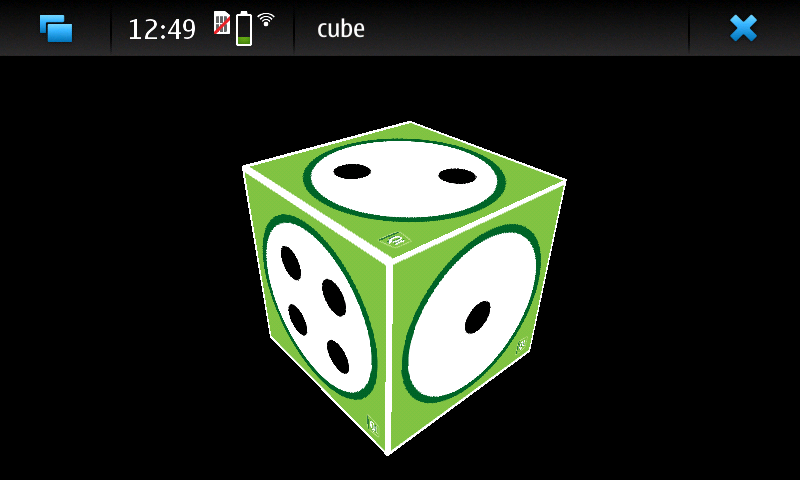
该示例由两个类组成:
MainWidget继承自QOpenGLWidget ,包含 OpenGL ES 2.0 的初始化、绘制以及鼠标和定时器事件处理GeometryEngine负责处理多边形几何体。将多边形几何体转换为顶点缓冲对象,并从顶点缓冲对象中绘制几何体。
我们将从在MainWidget 中初始化OpenGL ES 2.0开始。
初始化 OpenGL ES 2.0
由于 OpenGL ES 2.0 不再支持固定的图形管道,因此必须由我们自行实现。这使得图形管道非常灵活,但同时也增加了难度,因为用户甚至要让最简单的示例运行起来,都必须实现图形管道。此外,这也提高了图形管道的效率,因为用户可以根据应用程序的需求决定需要何种类型的管道。
首先,我们需要实现顶点着色器。它将顶点数据和模型-视图-投影矩阵(MVP)作为参数接收。它使用MVP矩阵将顶点位置变换到屏幕空间,并将纹理坐标传递给片段着色器。纹理坐标将在多边形面上自动进行插值。
void main()
{
    // Calculate vertex position in screen space
    gl_Position = mvp_matrix * a_position;

    // Pass texture coordinate to fragment shader
    // Value will be automatically interpolated to fragments inside polygon faces
    v_texcoord = a_texcoord;
}
接下来,我们需要实现图形管线的第二部分——片段着色器。在本练习中,我们需要实现一个负责纹理处理的片段着色器。它将插值后的纹理坐标作为参数接收,并从给定的纹理中查找片段颜色。
void main()
{
    // Set fragment color from texture
    gl_FragColor = texture2D(texture, v_texcoord);
}通过QOpenGLShaderProgram ,我们可以编译、链接并将着色器代码绑定到图形管道中。该代码使用 Qt 资源文件来访问着色器源代码。
void MainWidget::initShaders()
{
    // Compile vertex shader
    if (!program.addShaderFromSourceFile(QOpenGLShader::Vertex, ":/vshader.glsl"))
        close();

    // Compile fragment shader
    if (!program.addShaderFromSourceFile(QOpenGLShader::Fragment, ":/fshader.glsl"))
        close();

    // Link shader pipeline
    if (!program.link())
        close();

    // Bind shader pipeline for use
    if (!program.bind())
        close();
}
以下代码启用了深度缓冲和背面剔除。
    // Enable depth buffer
    glEnable(GL_DEPTH_TEST);

    // Enable back face culling
    glEnable(GL_CULL_FACE);
从 Qt 资源文件加载纹理
QOpenGLWidget 接口实现了从QImage 加载纹理到 OpenGL 纹理内存的方法。我们仍需使用 OpenGL 提供的函数来指定 OpenGL 纹理单元并配置纹理过滤选项。
void MainWidget::initTextures()
{
    // Load cube.png image
    texture = new QOpenGLTexture(QImage(":/cube.png").flipped());

    // Set nearest filtering mode for texture minification
    texture->setMinificationFilter(QOpenGLTexture::Nearest);

    // Set bilinear filtering mode for texture magnification
    texture->setMagnificationFilter(QOpenGLTexture::Linear);

    // Wrap texture coordinates by repeating
    // f.ex. texture coordinate (1.1, 1.2) is same as (0.1, 0.2)
    texture->setWrapMode(QOpenGLTexture::Repeat);
}
立方体几何体
在 OpenGL 中渲染多边形的方法有很多,但最有效的方法是仅使用三角形条带基元,并从图形硬件内存中渲染顶点。OpenGL 提供了一种机制,用于在此内存区域中创建缓冲对象并将顶点数据传输到这些缓冲区。在 OpenGL 术语中,这些被称为顶点缓冲对象 (VBO)。
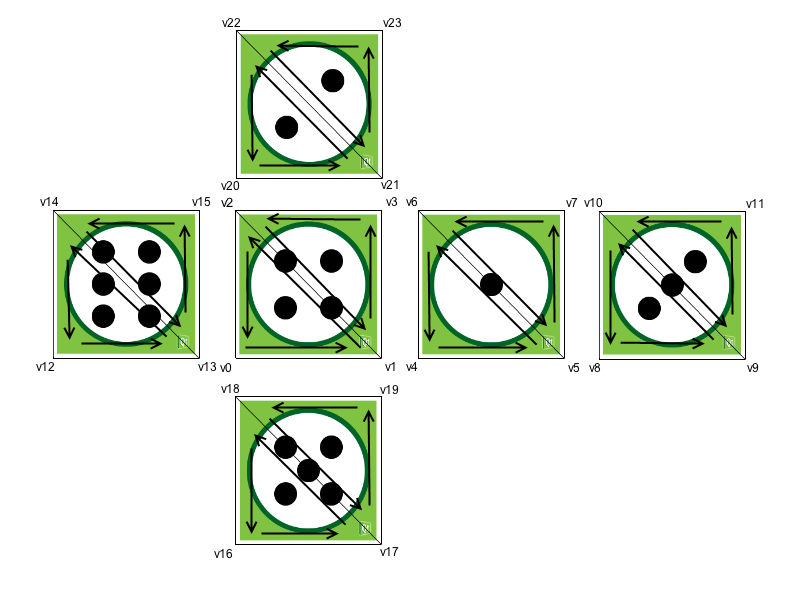
以下是立方体面如何分解为三角形的过程。顶点按此顺序排列,以确保在使用三角形条时顶点顺序正确。OpenGL 会根据顶点顺序确定三角形的前后表面。 默认情况下,OpenGL采用逆时针顺序表示前表面。该信息用于背面剔除,通过不渲染三角形的背面对,从而提升渲染性能。这样,图形管道就可以跳过渲染那些未朝向屏幕的三角形侧面。
使用QOpenGLBuffer 创建顶点缓冲对象并将数据传输至其中非常简单。MainWidget确保在当前OpenGL上下文中创建和销毁GeometryEngine实例。这样,我们就可以在构造函数中使用OpenGL资源,并在析构函数中执行适当的清理工作。
GeometryEngine::GeometryEngine()
    : indexBuf(QOpenGLBuffer::IndexBuffer)
{
    initializeOpenGLFunctions();

    // Generate 2 VBOs
    arrayBuf.create();
    indexBuf.create();

    // Initializes cube geometry and transfers it to VBOs
    initCubeGeometry();
}

GeometryEngine::~GeometryEngine()
{
    arrayBuf.destroy();
    indexBuf.destroy();
}
    // Transfer vertex data to VBO 0
    arrayBuf.bind();
    arrayBuf.allocate(vertices, 24 * sizeof(VertexData));

    // Transfer index data to VBO 1
    indexBuf.bind();
    indexBuf.allocate(indices, 34 * sizeof(GLushort));
从 VBO 绘制基元并告知可编程图形管道如何定位顶点数据只需几个步骤。首先,我们需要绑定要使用的 VBO。之后,我们绑定着色器程序的属性名称,并配置已绑定 VBO 中包含的数据类型。最后,我们将使用来自另一个 VBO 的索引来绘制三角形带基元。
void GeometryEngine::drawCubeGeometry(QOpenGLShaderProgram *program)
{
    // Tell OpenGL which VBOs to use
    arrayBuf.bind();
    indexBuf.bind();

    // Offset for position
    quintptr offset = 0;

    // Tell OpenGL programmable pipeline how to locate vertex position data
    int vertexLocation = program->attributeLocation("a_position");
    program->enableAttributeArray(vertexLocation);
    program->setAttributeBuffer(vertexLocation, GL_FLOAT, offset, 3, sizeof(VertexData));

    // Offset for texture coordinate
    offset += sizeof(QVector3D);

    // Tell OpenGL programmable pipeline how to locate vertex texture coordinate data
    int texcoordLocation = program->attributeLocation("a_texcoord");
    program->enableAttributeArray(texcoordLocation);
    program->setAttributeBuffer(texcoordLocation, GL_FLOAT, offset, 2, sizeof(VertexData));

    // Draw cube geometry using indices from VBO 1
    glDrawElements(GL_TRIANGLE_STRIP, 34, GL_UNSIGNED_SHORT, nullptr);
}
透视投影
使用QMatrix4x4 辅助方法,计算透视投影矩阵非常简单。该矩阵用于将顶点投影到屏幕空间。
void MainWidget::resizeGL(int w, int h)
{
    // Calculate aspect ratio
    qreal aspect = qreal(w) / qreal(h ? h : 1);

    // Set near plane to 3.0, far plane to 7.0, field of view 45 degrees
    const qreal zNear = 3.0, zFar = 7.0, fov = 45.0;

    // Reset projection
    projection.setToIdentity();

    // Set perspective projection
    projection.perspective(fov, aspect, zNear, zFar);
}
3D 对象的朝向
四元数是表示 3D 对象方向的便捷方式。虽然四元数涉及相当复杂的数学运算,但幸运的是,QQuaternion 中已实现了四元数所需的所有数学运算。这使我们能够将立方体的方向存储为四元数,并能非常简单地围绕给定轴旋转立方体。
以下代码根据鼠标事件计算旋转轴和角速度。
void MainWidget::mousePressEvent(QMouseEvent *e)
{
    // Save mouse press position
    mousePressPosition = QVector2D(e->position());
}

void MainWidget::mouseReleaseEvent(QMouseEvent *e)
{
    // Mouse release position - mouse press position
    QVector2D diff = QVector2D(e->position()) - mousePressPosition;

    // Rotation axis is perpendicular to the mouse position difference
    // vector
    QVector3D n = QVector3D(diff.y(), diff.x(), 0.0).normalized();

    // Accelerate angular speed relative to the length of the mouse sweep
    qreal acc = diff.length() / 100.0;

    // Calculate new rotation axis as weighted sum
    rotationAxis = (rotationAxis * angularSpeed + n * acc).normalized();

    // Increase angular speed
    angularSpeed += acc;
}
QBasicTimer 用于动画化场景并更新立方体的方向。通过四元数相乘即可轻松组合旋转操作。
void MainWidget::timerEvent(QTimerEvent *)
{
    // Decrease angular speed (friction)
    angularSpeed *= 0.99;

    // Stop rotation when speed goes below threshold
    if (angularSpeed < 0.01) {
        angularSpeed = 0.0;
    } else {
        // Update rotation
        rotation = QQuaternion::fromAxisAndAngle(rotationAxis, angularSpeed) * rotation;

        // Request an update
        update();
    }
}
模型-视图矩阵是通过四元数并沿 Z 轴移动世界坐标系来计算的。将该矩阵与投影矩阵相乘,即可得到着色器程序所需的 MVP 矩阵。
    // Calculate model view transformation
    QMatrix4x4 matrix;
    matrix.translate(0.0, 0.0, -5.0);
    matrix.rotate(rotation);

    // Set modelview-projection matrix
program.setUniformValue("mvp_matrix", projection * matrix);© 2026 The Qt Company Ltd. Documentation contributions included herein are the copyrights of their respective owners. The documentation provided herein is licensed under the terms of the GNU Free Documentation License version 1.3 as published by the Free Software Foundation. Qt and respective logos are trademarks of The Qt Company Ltd. in Finland and/or other countries worldwide. All other trademarks are property of their respective owners.
