
模型与视图:使用工作线程实现“加载更多”功能
演示如何在保持用户界面响应性的同时,在工作线程中实现 fetchMore() 方法。
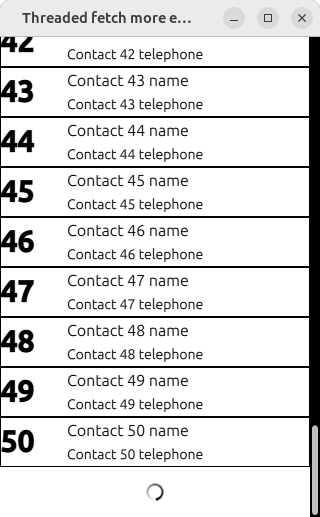
本示例演示了如何将QAbstractItemModel::fetchMore() 与移至QThread 的对象结合使用,以确保数据获取不会阻塞 UI。每次调用时,FetchWorker 都会先休眠 2 秒(以模拟后端服务响应缓慢),然后才将更多数据发送至 UI 线程。
基本功能
在工作线程中获取数据时,模型会将一个BusyIndicator 添加到列表末尾。一旦数据成功获取,BusyIndicator 就会被移除,新项会被追加到列表中。ListView 的使用方式与常规情况相同,无需进行任何调整来应对模型运行缓慢的情况。
职责
项目模型的变更(本例中为插入和删除行)必须在 UI 线程中进行。 工作线程对象会缓慢地构建 DataBlock 结构体,并发出dataFetched 信号,其有效载荷为一组数据块的QList ;该信号通过Qt::QueuedConnection 发送至 ThreadedFetchMoreModel::dataReceived() 槽函数,该函数将其追加到 UI 线程中的数据列表中。 UI 线程会在列表末尾添加一个占位项,然后向工作线程对象发送 fetchDataBlock() 信号以启动获取过程;在将新项追加到列表之前,会先移除该占位项。
在获取所有可用数据后,工作线程对象会向模型发送noMoreToFetch 信号;此后,canFetchMore()方法将始终返回false 。
© 2026 The Qt Company Ltd. Documentation contributions included herein are the copyrights of their respective owners. The documentation provided herein is licensed under the terms of the GNU Free Documentation License version 1.3 as published by the Free Software Foundation. Qt and respective logos are trademarks of The Qt Company Ltd. in Finland and/or other countries worldwide. All other trademarks are property of their respective owners.
