
Qt Quick 3D - 自定义特效示例
演示如何编写自定义后处理效果。
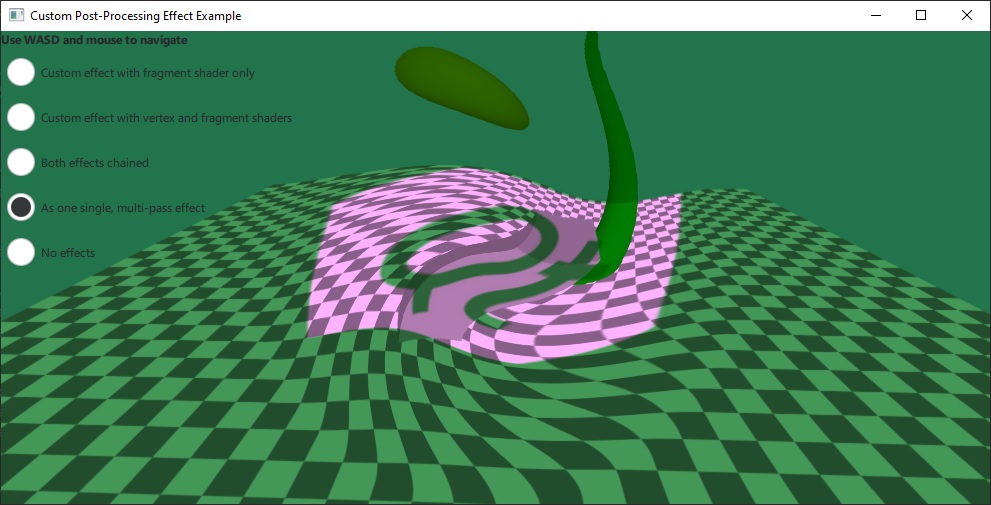
该示例实现了自己的自定义后处理效果,并通过SceneEnvironment::effects 将其应用到场景中。它既演示了仅包含片段着色器的最简单类型效果,也演示了包含顶点着色器和片段着色器且二者之间传递数据的高级案例。
简单的效果仅使用单个片段着色器,并从图像文件中添加纹理输入:
Effect {
    id: eff1
    property TextureInput tex: TextureInput {
        id: qtLogo
        texture: Texture { source: "qt_logo_rect.png" }
    }
    passes: Pass {
        shaders: Shader {
            id: fs1
            stage: Shader.Fragment
            shader: "effect.frag"
        }
    }
}
该效果使用了一个非常简单的片段着色器,仅将包含场景的输入纹理与图像纹理相乘:
void MAIN()
{
    vec4 c = texture(tex, TEXTURE_UV);
    FRAGCOLOR = c * texture(INPUT, INPUT_UV);
}
.vert 和.frag 文件中的着色器代码片段,是根据Effect 文档中的说明,使用内置关键字编写的。基本类型的自定义属性,以及TextureInput 类型的属性,会自动作为 uniform 和 sampler 暴露给着色器。
第二个效果更为复杂。它同时指定了顶点着色器和片段着色器,以及两个属性:uRed 和uGreen ,并在uRed 上进行了动画设置:
Effect {
    id: eff2
    property real uRed: 0.0
    SequentialAnimation {
        running: radioEff2.checked || radioEff3.checked
        loops: Animation.Infinite
        NumberAnimation { target: eff2; property: "uRed"; from: 0; to: 1; duration: 2000 }
        NumberAnimation { target: eff2; property: "uRed"; from: 1; to: 0; duration: 2000 }
    }
    property real uGreen: 1.0
    Shader {
        id: vs2
        stage: Shader.Vertex
        shader: "effect2.vert"
    }
    Shader {
        id: fs2
        stage: Shader.Fragment
        shader: "effect2.frag"
    }
    passes: Pass {
        shaders: [ vs2, fs2 ]
    }
}该效果的片段着色器通过修改采样坐标来产生变形。计算过程中使用了center_vec ,这是一个由顶点着色器设定的 VARYING 变量,其中包含从屏幕中心到当前片段的、经过宽高比校正的向量。 最后,着色器通过uRed 和uGreen 这两个uniform变量调整颜色。请注意,这些uniform变量无需在着色器中声明:
VARYING vec2 center_vec;

void MAIN()
{
    float radius = 0.25;
    float dist_to_center = length(center_vec) / radius;
    vec2 texcoord = INPUT_UV;
    if (dist_to_center <= 1.0) {
        float rotation_amount = (1.0 - dist_to_center) * (1.0 - dist_to_center);
        float r = radians(360.0) * rotation_amount / 4.0 * FRAMEBUFFER_Y_UP;
        float cos_r = cos(r);
        float sin_r = sin(r);
        mat2 rotation = mat2(cos_r, sin_r, -sin_r, cos_r);
        texcoord = vec2(0.5, 0.5) + rotation * (INPUT_UV - vec2(0.5, 0.5));
    }
    vec4 c = texture(INPUT, texcoord);
    c.r *= uRed;
    c.g *= uGreen;
    FRAGCOLOR = c;
}© 2026 The Qt Company Ltd. Documentation contributions included herein are the copyrights of their respective owners. The documentation provided herein is licensed under the terms of the GNU Free Documentation License version 1.3 as published by the Free Software Foundation. Qt and respective logos are trademarks of The Qt Company Ltd. in Finland and/or other countries worldwide. All other trademarks are property of their respective owners.
