
Qt Quick 3D - 拣货示例
演示模型的选取操作。
本示例演示了选择功能。共有 3 个不同的动画模型可供选择。当选中某个模型时,动画会停止,且模型颜色会发生变化,以便清晰显示选中的模型。选择结果的详细信息会显示在应用程序窗口的顶部。
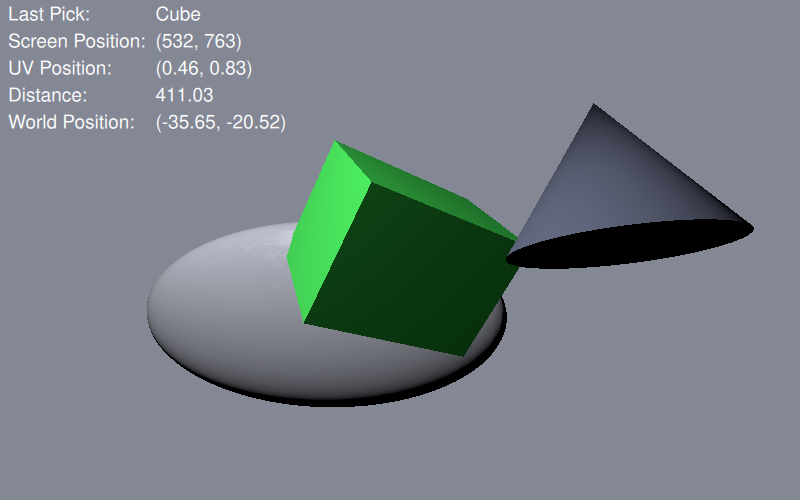
使模型可选
要使模型可选中,需将pickable 属性设置为true 。我们还为模型添加了objectName 属性,以便显示所选模型的名称。
Model {
    id: cubeModel
    objectName: "Cube"
    source: "#Cube"
    pickable: true
property bool isPicked: false添加isPicked 属性是为了用于切换动画和颜色。
materials: PrincipledMaterial {
    baseColor: cubeModel.isPicked ? "#41cd52" : "#09102b"
    ...
SequentialAnimation on eulerRotation {
    running: !cubeModel.isPicked
获取选择结果
要进行实际的选取操作,我们需要添加一个MouseArea 来覆盖整个View3D 。
MouseArea {
anchors.fill: view在鼠标区域的onClicked 处理程序中,我们使用pick 方法获取实际的选择结果。
var result = view.pick(mouse.x, mouse.y);如果结果包含一个target object ,我们会解析该结果的具体细节,并将它们显示在应用程序视图顶部的文本框中。
if (result.objectHit) {
    var pickedObject = result.objectHit;
    // Toggle the isPicked property for the model
    pickedObject.isPicked = !pickedObject.isPicked;
    // Get picked model name
    pickName.text = pickedObject.objectName;
    // Get other pick specifics
    uvPosition.text = "("
            + result.uvPosition.x.toFixed(2) + ", "
            + result.uvPosition.y.toFixed(2) + ")";
    distance.text = result.distance.toFixed(2);
    scenePosition.text = "("
            + result.scenePosition.x.toFixed(2) + ", "
            + result.scenePosition.y.toFixed(2) + ", "
            + result.scenePosition.z.toFixed(2) + ")";
    localPosition.text = "("
            + result.position.x.toFixed(2) + ", "
            + result.position.y.toFixed(2) + ", "
            + result.position.z.toFixed(2) + ")";
    worldNormal.text = "("
            + result.sceneNormal.x.toFixed(2) + ", "
            + result.sceneNormal.y.toFixed(2) + ", "
            + result.sceneNormal.z.toFixed(2) + ")";
    localNormal.text = "("
            + result.normal.x.toFixed(2) + ", "
            + result.normal.y.toFixed(2) + ", "
+ result.normal.z.toFixed(2) + ")";© 2026 The Qt Company Ltd. Documentation contributions included herein are the copyrights of their respective owners. The documentation provided herein is licensed under the terms of the GNU Free Documentation License version 1.3 as published by the Free Software Foundation. Qt and respective logos are trademarks of The Qt Company Ltd. in Finland and/or other countries worldwide. All other trademarks are property of their respective owners.
