
Qt Quick 3D 物理学——关节示例
演示如何在物理场景中使用关节。
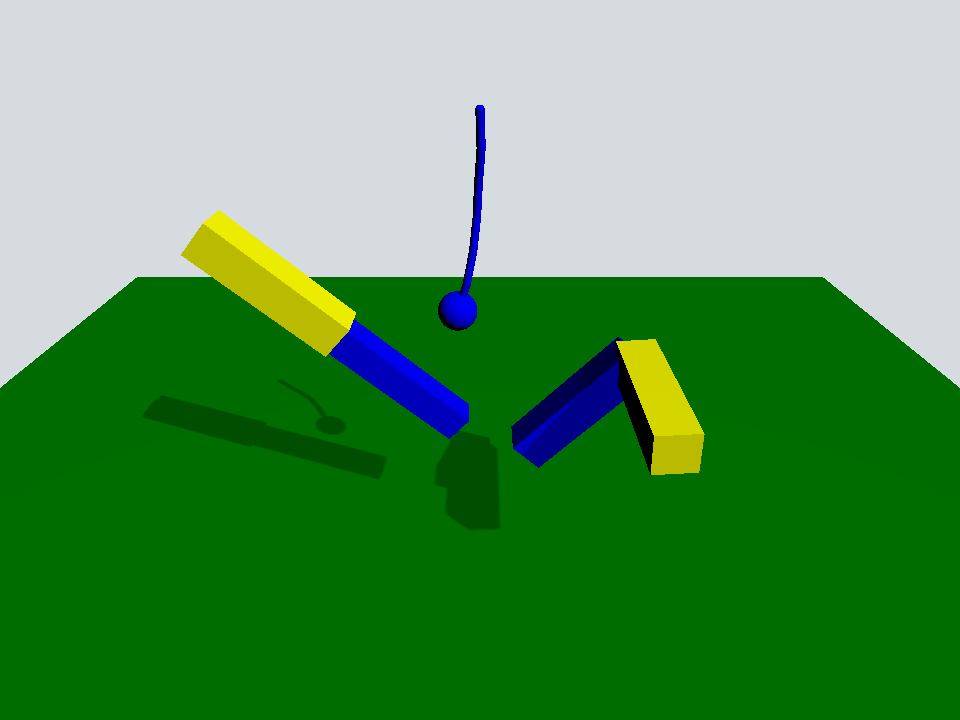
本示例演示了如何使用 Quick 3D Physics 中提供的几种关节。
该场景是一个典型的场景,包含一个PhysicsWorld 、一个带有PerspectiveCamera 的View3D 以及一个DirectionalLight :
Window {
    width: 640
    height: 480
    visible: true
    title: qsTr("Qt Quick 3D Physics - Joints")

    PhysicsWorld {
        scene: viewport.scene
        running: true
    }

    View3D {
        id: viewport
        anchors.fill: parent

        environment: SceneEnvironment {
            clearColor: "#d6dbdf"
            backgroundMode: SceneEnvironment.Color
        }

        PerspectiveCamera {
            position: Qt.vector3d(0, 600, 700)
            eulerRotation: Qt.vector3d(-30, 0, 0)
            clipFar: 5000
            clipNear: 1
        }

        DirectionalLight {
            eulerRotation.x: -45
            eulerRotation.y: 45
            castsShadow: true
            brightness: 1
            shadowFactor: 50
            shadowMapQuality: Light.ShadowMapQualityHigh
        }

        Rope {
            eulerRotation: Qt.vector3d(0, 0, -90)
            position: Qt.vector3d(0, 500, 0)
        }

        Prismatic {
            id: prismatic
            position: Qt.vector3d(-250, 100, 0)
        }

        Revolute {
            id: revolute
            position: Qt.vector3d(200, 200, 100)
        }

        StaticRigidBody {
            position: Qt.vector3d(0, -100, 0)
            eulerRotation: Qt.vector3d(-90, 0, 0)
            collisionShapes: PlaneShape {}
            Model {
                source: "#Rectangle"
                scale: Qt.vector3d(20, 20, 1)
                materials: PrincipledMaterial {
                    baseColor: "green"
                }
                castsShadows: false
                receivesShadows: true
            }
        }

        FrameAnimation {
            id: animator
            running: true
            onTriggered: {
                prismatic.jointRotation.z += 1
                revolute.jointRotation.x += 0.95
            }
        }
    }
}其中有一个带有PlaneShape 的StaticRigidBody 作为地面,以及三个自定义QML对象:Rope、Prismatic和Revolute。
Rope {
    eulerRotation: Qt.vector3d(0, 0, -90)
    position: Qt.vector3d(0, 500, 0)
}

Prismatic {
    id: prismatic
    position: Qt.vector3d(-250, 100, 0)
}

Revolute {
    id: revolute
    position: Qt.vector3d(200, 200, 100)
}“Rope”对象由一系列胶囊和一个球体组成,其中胶囊通过spherical joints 连接,球体则通过fixed joint 连接。
Node {
    id: root

    SphericalJoint {
        bodyB: shape0
        positionA: root.position
        positionB: Qt.vector3d(-20, 0, 0)
    }

    SphericalJoint {
        bodyA: shape0
        bodyB: shape1
        positionA: Qt.vector3d(20, 0, 0)
        positionB: Qt.vector3d(-20, 0, 0)
    }

    SphericalJoint {
        bodyA: shape1
        bodyB: shape2
        positionA: Qt.vector3d(20, 0, 0)
        positionB: Qt.vector3d(-20, 0, 0)
    }

    SphericalJoint {
        bodyA: shape2
        bodyB: shape3
        positionA: Qt.vector3d(20, 0, 0)
        positionB: Qt.vector3d(-20, 0, 0)
    }

    SphericalJoint {
        bodyA: shape3
        bodyB: shape4
        positionA: Qt.vector3d(20, 0, 0)
        positionB: Qt.vector3d(-20, 0, 0)
    }

    SphericalJoint {
        bodyA: shape4
        bodyB: shape5
        positionA: Qt.vector3d(20, 0, 0)
        positionB: Qt.vector3d(-20, 0, 0)
    }

    FixedJoint {
        bodyA: shape5
        bodyB: sphere
        positionA: Qt.vector3d(20, 0, 0)
        positionB: Qt.vector3d(0, 0, 0)
    }

    DynamicRigidBody {
        id: shape0
        position: Qt.vector3d(0, 0, 0)
        collisionShapes: CapsuleShape {
            diameter: 10
            height: 40
        }
        Model {
            geometry: CapsuleGeometry {
                diameter: 10
                height: 40
            }
            materials: PrincipledMaterial {
                baseColor: "blue"
            }
        }
    }

    DynamicRigidBody {
        id: shape1
        position: Qt.vector3d(40, 0, 0)
        collisionShapes: CapsuleShape {
            diameter: 10
            height: 40
        }
        Model {
            geometry: CapsuleGeometry {
                diameter: 10
                height: 40
            }
            materials: PrincipledMaterial {
                baseColor: "blue"
            }
        }
    }

    DynamicRigidBody {
        id: shape2
        position: Qt.vector3d(80, 0, 0)
        collisionShapes: CapsuleShape {
            diameter: 10
            height: 40
        }
        Model {
            geometry: CapsuleGeometry {
                diameter: 10
                height: 40
            }
            materials: PrincipledMaterial {
                baseColor: "blue"
            }
        }
    }

    DynamicRigidBody {
        id: shape3
        position: Qt.vector3d(120, 0, 0)
        collisionShapes: CapsuleShape {
            diameter: 10
            height: 40
        }
        Model {
            geometry: CapsuleGeometry {
                diameter: 10
                height: 40
            }
            materials: PrincipledMaterial {
                baseColor: "blue"
            }
        }
    }

    DynamicRigidBody {
        id: shape4
        position: Qt.vector3d(160, 0, 0)
        collisionShapes: CapsuleShape {
            diameter: 10
            height: 40
        }
        Model {
            geometry: CapsuleGeometry {
                diameter: 10
                height: 40
            }
            materials: PrincipledMaterial {
                baseColor: "blue"
            }
        }
    }

    DynamicRigidBody {
        id: shape5
        position: Qt.vector3d(200, 0, 0)
        collisionShapes: CapsuleShape {
            diameter: 10
            height: 40
        }
        Model {
            geometry: CapsuleGeometry {
                diameter: 10
                height: 40
            }
            materials: PrincipledMaterial {
                baseColor: "blue"
            }
        }
    }

    DynamicRigidBody {
        id: sphere
        position: Qt.vector3d(240, 0, 0)
        scale: Qt.vector3d(0.5, 0.5, 0.5)
        collisionShapes: SphereShape {}
        Model {
            source: "#Sphere"
            materials: PrincipledMaterial {
                baseColor: "blue"
            }
        }
    }
}Prismatic对象由两根杆组成,这两根杆沿各自的x轴通过prismatic joint 相互锁定。借助该关节,较小的杆可以沿该x轴自由移动,直到达到其upper 和lower 约束极限。
Node {
    id: root
    property vector3d jointRotation : Qt.vector3d(0, 0, 0)

    PrismaticJoint {
        bodyA: prismaticBoxA
        bodyB: prismaticBoxB
        lowerLimit: -200
        upperLimit: 0
        positionA: Qt.vector3d(100, 0, 0)
        positionB: Qt.vector3d(-100, 0, 0)
    }

    DynamicRigidBody {
        id: prismaticBoxA
        kinematicPosition: Qt.vector3d(0, 200, 0)
        kinematicEulerRotation: root.jointRotation
        isKinematic: true
        scale: Qt.vector3d(2, 0.5, 0.5)
        collisionShapes: BoxShape {}
        Model {
            source: "#Cube"
            materials: PrincipledMaterial {
                baseColor: "yellow"
            }
        }
    }

    DynamicRigidBody {
        id: prismaticBoxB
        position: Qt.vector3d(0, 0, 0)
        scale: Qt.vector3d(2, 0.4, 0.4)
        collisionShapes: BoxShape {}
        Model {
            source: "#Cube"
            materials: PrincipledMaterial {
                baseColor: "blue"
            }
        }
    }
}“Revolute”对象由两根旋转了90度的杆组成,并通过revolute joint 连接并锁定。
Node {
    id: root
    property vector3d jointRotation : Qt.vector3d(0, 90, 0)

    RevoluteJoint {
        bodyA: revoluteBoxA
        bodyB: revoluteBoxB
        positionA: Qt.vector3d(100, 0, 0)
        positionB: Qt.vector3d(100, 0, 0)
        orientationB: Quaternion.fromEulerAngles(0, 0, 90)
        angularLimitLower: -Math.PI / 4
        angularLimitUpper: Math.PI / 4
        enableAngularLimit: true
    }

    DynamicRigidBody {
        id: revoluteBoxA
        kinematicPosition: Qt.vector3d(0, 0, 0)
        kinematicEulerRotation: root.jointRotation
        isKinematic: true
        scale: Qt.vector3d(2, 0.5, 0.5)
        collisionShapes: BoxShape {}
        Model {
            source: "#Cube"
            materials: PrincipledMaterial {
                baseColor: "yellow"
            }
        }
    }

    DynamicRigidBody {
        id: revoluteBoxB
        position: Qt.vector3d(0, 100, -100)
        eulerRotation: Qt.vector3d(0, 90, -90)
        scale: Qt.vector3d(2, 0.5, 0.5)
        collisionShapes: BoxShape {}
        Model {
            source: "#Cube"
            materials: PrincipledMaterial {
                baseColor: "blue"
            }
        }
    }
}回到主场景,这里有一个FrameAnimation 对象,它会旋转运动学关节prismatic 和revolute 。
FrameAnimation {
    id: animator
    running: true
    onTriggered: {
        prismatic.jointRotation.z += 1
        revolute.jointRotation.x += 0.95
    }
}
通过这些运动部件,我们可以观察到不同关节在物理场景中是如何相互作用的。
文件:
© 2026 The Qt Company Ltd. Documentation contributions included herein are the copyrights of their respective owners. The documentation provided herein is licensed under the terms of the GNU Free Documentation License version 1.3 as published by the Free Software Foundation. Qt and respective logos are trademarks of The Qt Company Ltd. in Finland and/or other countries worldwide. All other trademarks are property of their respective owners.
