
TaskTree 交通信号灯
通过交通信号灯模拟,演示如何使用 TaskTree 实现状态机行为。
“TaskTree 交通信号灯”是 Qt SCXML 以及 Qt State Machine中的交通信号灯示例的另一种实现方案。
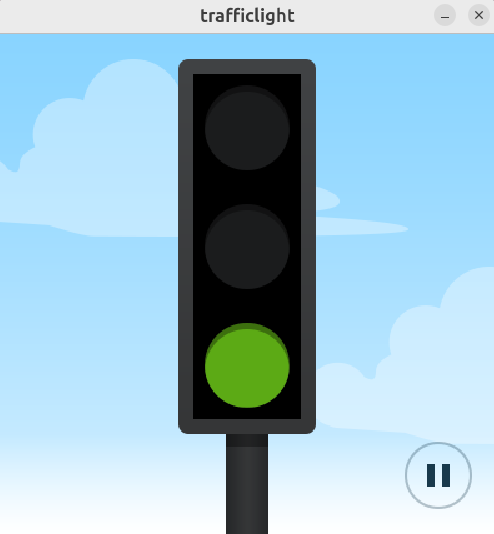
该应用程序由三个主要组件构成:
- 一个用于显示当前状态的
TrafficLight控件。 - 一个
TaskTree配方,用于控制状态转换。 - 一个用于将用户界面与状态机进行同步的
GlueInterface。
以下各节将详细介绍该示例的代码。
辅助粘合类
GlueInterface 类实现了 UI 与业务逻辑之间的清晰分离。
enum class Light
{
    Off    = 0,
    Red    = 1 << 0,
    Yellow = 1 << 1,
    Green  = 1 << 2,
};

Q_DECLARE_FLAGS(Lights, Light)
Q_DECLARE_OPERATORS_FOR_FLAGS(Lights)

class GlueInterface final : public QObject
{
    Q_OBJECT

public:
    // operational logic -> GUI
    void setLights(Lights lights) { emit lightsChanged(lights); }

    // GUI -> operational logic
    void smash() { emit smashed(); }
    void repair() { emit repaired(); }

signals:
    void lightsChanged(Lights lights);

    void smashed();
    void repaired();
};
GlueInterface 类提供了以下接口方法:
| 方法 | 用途 |
|---|---|
setLights() | 根据 TaskTree 配方更新交通信号灯状态 |
lightsChanged() | 在信号灯状态发生变化时通知用户界面 |
smash()/ repair() | 处理故障模拟和恢复操作 |
当用户与 UI 交互时:
- 点击“暂停”将触发
smash(),模拟故障。 - 点击“播放”将触发
repair(),恢复正常运行。
实现状态机
状态机逻辑通过 TaskTree 配方实现。recipe() 方法通过引用GlueInterface 来创建该逻辑:
ExecutableItem recipe(GlueInterface &iface)
{
    return Forever {
        Group { // "working" state
            stopOnSuccess,
            parallel,
            signalAwaiterTask(&iface, &GlueInterface::smashed), // transitions to the "broken" state
            Forever {
                switchLightsTask(&iface, Light::Red, 3s), // "red" state
                switchLightsTask(&iface, Light::Red | Light::Yellow, 1s), // "redGoingGreen" state
                switchLightsTask(&iface, Light::Green, 3s), // "green" state
                switchLightsTask(&iface, Light::Yellow, 1s), // "greenGoingRed" state
            }
        },
        Group { // "broken" state
            stopOnSuccess,
            parallel,
            signalAwaiterTask(&iface, &GlueInterface::repaired), // transitions to the "working" state
            Forever {
                switchLightsTask(&iface, Light::Yellow, 1s), // "blinking" state
                switchLightsTask(&iface, Light::Off, 1s), // "unblinking" state
            }
        }
    };
}
根状态管理
顶级Forever 项以无限循环的方式执行其子项。它包含两个子组,分别代表正常工作状态和故障状态。
状态转换规则:
- 状态按顺序执行,因为默认的execution mode 是sequential 。
- 当一个状态完成时,另一个状态随即开始。
- 当用户点击 UI 中的暂停或播放按钮时,会触发状态转换并发出相应的信号。
“正常运行”操作状态
“working” Group 包含两个在parallel 中运行的任务:
- signalAwaiterTask 连接到
GlueInterface::smashed信号。如果该信号被触发,该任务将立即通过DoneResult::Success 结束。这会导致正在运行的 Group 停止执行,配方将过渡到“故障”状态。 - 嵌套的Forever 任务由四个
switchLightsTask任务(“red”、“redGoingGreen”、“green”和“greenGoingRed”)组成,这些任务在无限循环中sequentially 执行。
每个组中的stopOnSuccess 项会指示该组,当其任何子任务以DoneResult::Success 结束执行时,该组即停止执行。
switchLightsTask 的实现:
- 通过 `
GlueInterface::setLights()` 更新灯光状态。 - 使用timeoutTask 创建定时延迟。
- 通过
timeout维持状态指定时长。
static Group switchLightsTask(GlueInterface *iface, Lights lights, const milliseconds &timeout)
{
    return {
        onGroupSetup([iface, lights] { iface->setLights(lights); }),
        timeoutTask(timeout, DoneResult::Success)
    };
}
“故障”操作状态
“故障”状态的Group 与正常工作状态的Group 类似。唯一的区别在于,它连接到GlueInterface::repaired 信号,且灯光仅在两种状态之间循环,通过切换黄色灯光的开/关状态来实现。
应用程序设置
主应用程序设置会创建并连接所有组件:
int main(int argc, char **argv)
{
    QApplication app(argc, argv);

    GlueInterface iface;
    QTaskTree taskTree({recipe(iface)});
    TrafficLight widget(iface);

    widget.show();
    taskTree.start();

    return app.exec();
}
main() 函数实例化了QApplication、GlueInterface 、QTaskTree和TrafficLight 对象。
为了构造taskTree 对象,我们传入一个使用iface 对象构建的recipe() 。widget 还使用了传入的iface 对象。
在执行应用程序之前,main() 函数会显示TrafficLight 控件并启动任务树。
运行示例
您可以通过以下方式运行示例:
- Qt Creator
打开Welcome 模式,并从Examples 中选择该示例。有关更多信息,请参阅Qt Creator :教程:构建和运行。
- Qt Extension for Visual Studio Code
在Command Palette 中运行Qt: Open Qt examples 命令,并从列表中选择该示例。有关更多信息,请参阅Qt Extension for Visual Studio Code :教程:构建和运行。
© 2026 The Qt Company Ltd. Documentation contributions included herein are the copyrights of their respective owners. The documentation provided herein is licensed under the terms of the GNU Free Documentation License version 1.3 as published by the Free Software Foundation. Qt and respective logos are trademarks of The Qt Company Ltd. in Finland and/or other countries worldwide. All other trademarks are property of their respective owners.
