
xml-ph-0000@deepl.internal中的虚拟键盘Qt Quick
本示例演示了如何在Qt Quick 应用程序中使用虚拟键盘。
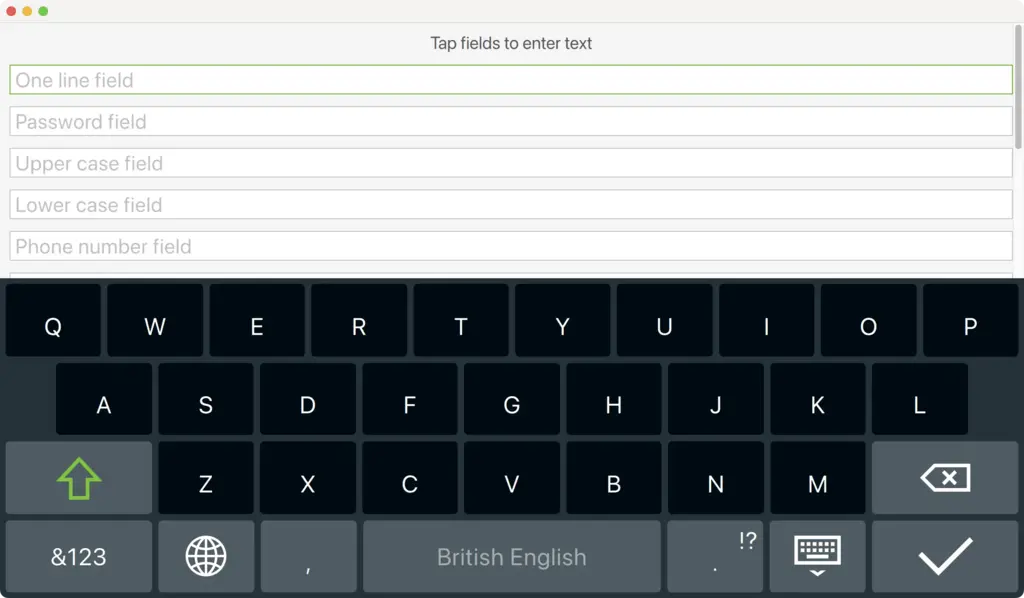
该示例包含两种实现方式:一种适用于桌面平台,另一种适用于嵌入式平台。前者允许通过虚拟键盘向多个文本框输入文本,而后者虽然使用相同的用户界面,但采用了自定义的虚拟键盘(InputPanel )。以下代码片段演示了如何配置项目,以便根据CONFIG选项选择合适的实现方式:
- 在 qmake 中(
basic.pro):!qtConfig(vkb-desktop) { DEFINES += MAIN_QML=\\\"basic-b2qt.qml\\\" } else { DEFINES += MAIN_QML=\\\"Basic.qml\\\" } - 在 CMake 中(
CMakeLists.txt):if(NOT QT_FEATURE_vkb_desktop) target_compile_definitions(basic PUBLIC MAIN_QML="basic-b2qt.qml" ) endif() ... if(QT_FEATURE_vkb_desktop) target_compile_definitions(basic PUBLIC MAIN_QML="Basic.qml" ) endif()
该示例通过在加载.qml 文件之前设置QT_IM_MODULE 环境变量来启用虚拟键盘:
#include <QQuickView>
#include <QGuiApplication>
#include <QQmlEngine>

int main(int argc, char *argv[])
{
    qputenv("QT_IM_MODULE", QByteArray("qtvirtualkeyboard"));

    QGuiApplication app(argc, argv);
    QQuickView view(QString("qrc:/%2").arg(MAIN_QML));
    if (view.status() == QQuickView::Error)
        return -1;
    view.setResizeMode(QQuickView::SizeRootObjectToView);

    view.show();

    return app.exec();
}此外,它还使用自定义的TextField 和TextArea 项,通过EnterKeyAction 附加属性来配置[ENTER]键的行为。
import QtQuick
import QtQuick.Controls
import QtQuick.VirtualKeyboard
import "content"

Rectangle {
    ...
                TextField {
                    width: parent.width
                    placeholderText: "One line field"
                    enterKeyAction: EnterKeyAction.Next
                    onAccepted: passwordField.focus = true
                }
    ...
                TextArea {
                    id: textArea
                    width: parent.width
                    placeholderText: "Multiple line field"
                    height: Math.max(206, implicitHeight)
                }
}
TextField 和TextArea 控件分别扩展了相应的Qt Quick Controls 2类型,并增加了enterKeyEnabled 和enterKeyAction 属性。代码片段中的TextField 和TextArea 实例可通过设置这些属性来更改默认行为。
运行示例
您可以通过以下方式运行示例:
- Qt Creator
打开“Welcome ”模式,并从Examples 中选择该示例。有关更多信息,请参阅Qt Creator :教程:构建和运行。
- Qt Extension for Visual Studio Code
在Command Palette 中运行Qt: Open Qt examples 命令,然后从列表中选择该示例。有关更多信息,请参阅Qt Extension for Visual Studio Code :教程:构建和运行。
© 2026 The Qt Company Ltd. Documentation contributions included herein are the copyrights of their respective owners. The documentation provided herein is licensed under the terms of the GNU Free Documentation License version 1.3 as published by the Free Software Foundation. Qt and respective logos are trademarks of The Qt Company Ltd. in Finland and/or other countries worldwide. All other trademarks are property of their respective owners.
