
Minimal CPP
Minimal CPP 是一个演示如何用 C++ 编写 Wayland 合成器的示例。
Minimal CPP 是一个极简的合成器示例,使用 C++ 实现了完整的Qt Wayland Compositor 。QtWaylandCompositor 的 C++ API 属于底层接口,主要面向专业应用场景,例如支持硬件特性,或者当Qt Quick 不可用时。QML API 则提供了更便捷的功能和更丰富的功能。 作为对比,Minimal QML示例仅用30行QML代码就实现了比本示例300多行代码更多的功能。
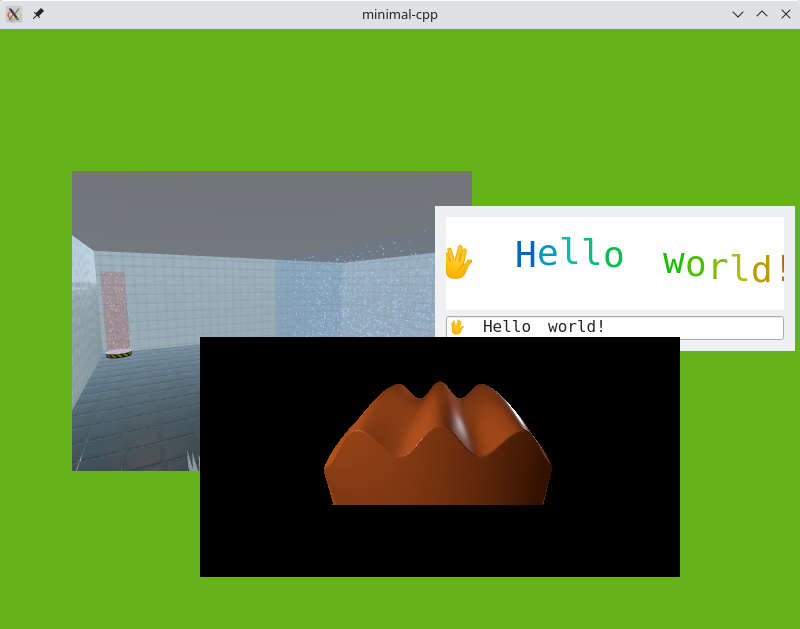
本示例分为两部分:Wayland 逻辑包含在Compositor 类中,用户界面则位于Window 类中。
窗口
Window 类相当直观。为了显示Wayland画布,它会遍历合成器的视图,并使用QOpenGLTextureBlitter 将它们渲染到屏幕上:
void Window::paintGL()
{
    m_compositor->startRender();

    QOpenGLFunctions *functions = context()->functions();
    functions->glClearColor(.4f, .7f, .1f, 0.5f);
    functions->glClear(GL_COLOR_BUFFER_BIT | GL_DEPTH_BUFFER_BIT);

    GLenum currentTarget = GL_TEXTURE_2D;
    m_textureBlitter.bind(currentTarget);
    functions->glEnable(GL_BLEND);
    functions->glBlendFunc(GL_SRC_ALPHA, GL_ONE_MINUS_SRC_ALPHA);

    const auto views = m_compositor->views();
    for (View *view : views) {
        auto texture = view->getTexture();
        if (!texture)
            continue;
        if (texture->target() != currentTarget) {
            currentTarget = texture->target();
            m_textureBlitter.bind(currentTarget);
        }
        GLuint textureId = texture->textureId();
        QWaylandSurface *surface = view->surface();
        if (surface && surface->hasContent()) {
            QSize s = surface->destinationSize();
            view->initPosition(size(), s);
            QPointF pos = view->globalPosition();
            QRectF surfaceGeometry(pos, s);
            QOpenGLTextureBlitter::Origin surfaceOrigin =
                    view->currentBuffer().origin() == QWaylandSurface::OriginTopLeft
                    ? QOpenGLTextureBlitter::OriginTopLeft
                    : QOpenGLTextureBlitter::OriginBottomLeft;
            QMatrix4x4 targetTransform = QOpenGLTextureBlitter::targetTransform(surfaceGeometry, QRect(QPoint(), size()));
            m_textureBlitter.blit(textureId, targetTransform, surfaceOrigin);
        }
    }
    m_textureBlitter.release();
    m_compositor->endRender();
}
所有键盘和鼠标事件都会传递给合成器。例如:
void Window::mousePressEvent(QMouseEvent *event)
{
    m_compositor->handleMousePress(event->position().toPoint(), event->button());
}
合成器
Compositor 类则更为复杂,因为它必须实现许多在基于QML的合成器中本应由WaylandCompositor 和WaylandQuickItem 处理的逻辑。
create 函数使用IviApplication (这是最基本的 shell 扩展)来设置合成器。该函数在 OpenGL 上下文初始化完成后被调用:
void Compositor::create()
{
    QWaylandOutput *output = new QWaylandOutput(this, m_window);
    QWaylandOutputMode mode(m_window->size(), 60000);
    output->addMode(mode, true);
    QWaylandCompositor::create();
    output->setCurrentMode(mode);

    m_iviApplication = new QWaylandIviApplication(this);
    connect(m_iviApplication, &QWaylandIviApplication::iviSurfaceCreated, this, &Compositor::onIviSurfaceCreated);
}
鼠标事件和键盘焦点的所有逻辑都必须手动实现,包括隐式鼠标抓取(将所有鼠标移动发送给接收初始鼠标按下的表面)。请注意,Wayland 协议中的鼠标按下事件不包含鼠标位置,因此每当收到鼠标按下事件时,我们都必须发送鼠标移动事件:
void Compositor::handleMousePress(const QPoint &position, Qt::MouseButton button)
{
    if (!m_mouseView) {
        if ((m_mouseView = viewAt(position)))
            raise(m_mouseView);
    }
    auto *seat = defaultSeat();
    seat->sendMouseMoveEvent(m_mouseView, mapToView(m_mouseView, position));
    seat->sendMousePressEvent(button);
}
对于鼠标释放事件,我们会结束隐式捕获,并通知当前鼠标位置所在的表面:
void Compositor::handleMousePress(const QPoint &position, Qt::MouseButton button)
{
    if (!m_mouseView) {
        if ((m_mouseView = viewAt(position)))
            raise(m_mouseView);
    }
    auto *seat = defaultSeat();
    seat->sendMouseMoveEvent(m_mouseView, mapToView(m_mouseView, position));
    seat->sendMousePressEvent(button);
}
当收到新画面的通知时,我们会创建一个 `View ` 来跟踪该画面,并连接信号以便处理更新。
void Compositor::onIviSurfaceCreated(QWaylandIviSurface *iviSurface)
{
    View *view = new View(iviSurface->iviId());
    view->setSurface(iviSurface->surface());
    view->setOutput(outputFor(m_window));

    m_views << view;
    connect(view, &QWaylandView::surfaceDestroyed, this, &Compositor::viewSurfaceDestroyed);
    connect(iviSurface->surface(), &QWaylandSurface::redraw, this, &Compositor::triggerRender);
}
View 类继承自QWaylandView ,后者代表表面(surface)的特定视图。advance 函数更新视图的当前缓冲区,若存在新内容则返回true。getTexture 函数将缓冲区内容作为OpenGL纹理提供,供Window 类使用:
QOpenGLTexture *View::getTexture() {
    if (advance())
        m_texture = currentBuffer().toOpenGLTexture();
    return m_texture;
}© 2026 The Qt Company Ltd. Documentation contributions included herein are the copyrights of their respective owners. The documentation provided herein is licensed under the terms of the GNU Free Documentation License version 1.3 as published by the Free Software Foundation. Qt and respective logos are trademarks of The Qt Company Ltd. in Finland and/or other countries worldwide. All other trademarks are property of their respective owners.
