
从 Modo 导出
从 Modo 导出 COLLADA 文件
- 选中网格对象后,按Shift+T 键对网格进行三角化。
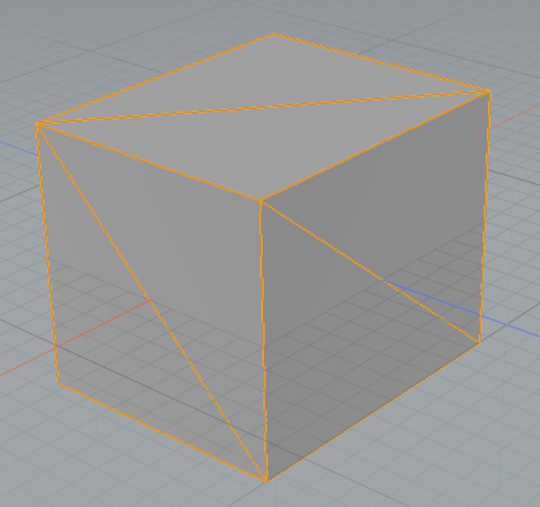
- 接下来,从菜单栏中选择“System > Preferences ”以配置 COLLADA 导出器。
- 在“首选项”对话框中,找到“File I/O ”下的“Collada I/O ”部分。确保已勾选“Save Triangles as Triangles ”选项。
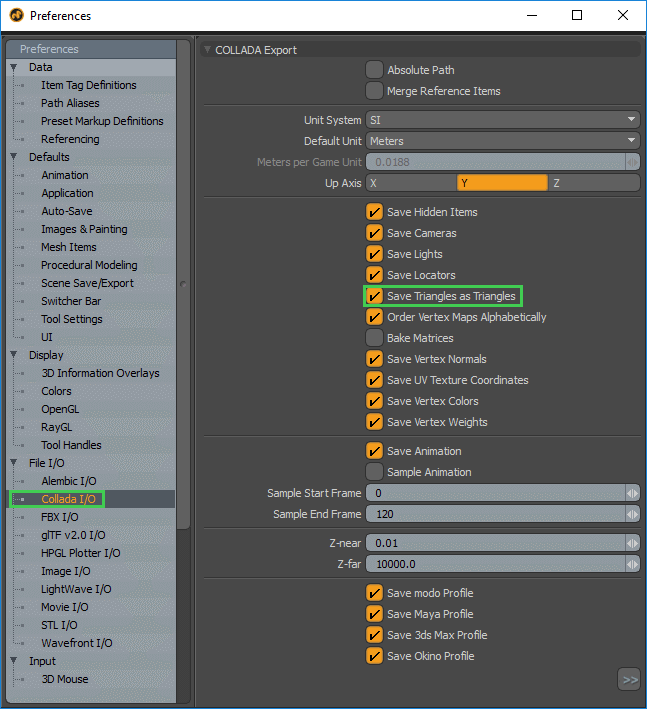
- 关闭“首选项”对话框。
- 从菜单栏中,选择“File > Export As ”。
- 在“Save as Type ”下拉列表中选择“Collada”。
- 点击“Save ”。
从 Modo 导出 FBX
- 选中网格对象后,按Shift+T 键将网格三角化。
- 从菜单栏中,选择“File > Export As ”。
- 在“Save as Type ”下拉列表中选择“FBX”。
- 选择“Save ”。
© 2026 The Qt Company Ltd. Documentation contributions included herein are the copyrights of their respective owners. The documentation provided herein is licensed under the terms of the GNU Free Documentation License version 1.3 as published by the Free Software Foundation. Qt and respective logos are trademarks of The Qt Company Ltd. in Finland and/or other countries worldwide. All other trademarks are property of their respective owners.
