
QVBoxLayout Class
QVBoxLayout 类用于将小部件垂直排列。更多内容...
| 标题: | #include <QVBoxLayout> |
| CMake: | find_package(Qt6 REQUIRED COMPONENTS Widgets) target_link_libraries(mytarget PRIVATE Qt6::Widgets) |
| qmake: | QT += widgets |
| 继承自: | QBoxLayout |
公共函数
| QVBoxLayout() | |
| QVBoxLayout(QWidget *parent) | |
| virtual | ~QVBoxLayout() |
详细说明
该类用于构建垂直盒式布局对象。详情请参阅QBoxLayout 。
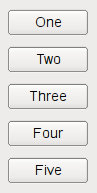
该类的最简单用法如下:
QWidget *window = new QWidget;
QPushButton *button1 = new QPushButton("One");
QPushButton *button2 = new QPushButton("Two");
QPushButton *button3 = new QPushButton("Three");
QPushButton *button4 = new QPushButton("Four");
QPushButton *button5 = new QPushButton("Five");

QVBoxLayout *layout = new QVBoxLayout(window);
layout->addWidget(button1);
layout->addWidget(button2);
layout->addWidget(button3);
layout->addWidget(button4);
layout->addWidget(button5);

window->show();
首先,我们创建要添加到布局中的控件。然后,我们创建 QVBoxLayout 对象,通过在构造函数中传入window 来将其设为父对象;接下来,我们将控件添加到布局中。window 将成为添加到布局中的控件的父对象。
如果你在构造函数中没有传入父对象window ,可以在稍后使用QWidget::setLayout() 将 QVBoxLayout 对象安装到window 上。此时,布局中的控件将被重新关联,使其父对象变为window 。
另请参阅 QHBoxLayout 、QGridLayout 、QStackedLayout 、布局管理以及基本布局示例。
成员函数文档
QVBoxLayout::QVBoxLayout()
创建一个新的垂直框。您必须将其添加到另一个布局中。
[explicit] QVBoxLayout::QVBoxLayout(QWidget *parent)
创建一个新的顶级垂直框,其父元素为parent 。
该布局被直接设置为parent 的顶级布局。一个控件只能有一个顶级布局。该布局由QWidget::layout()返回。
另请参阅 QWidget::setLayout()。
[virtual noexcept] QVBoxLayout::~QVBoxLayout()
销毁此盒子布局。
该布局的控件不会被销毁。
© 2026 The Qt Company Ltd. Documentation contributions included herein are the copyrights of their respective owners. The documentation provided herein is licensed under the terms of the GNU Free Documentation License version 1.3 as published by the Free Software Foundation. Qt and respective logos are trademarks of The Qt Company Ltd. in Finland and/or other countries worldwide. All other trademarks are property of their respective owners.
