
示例 1:使用静态源进行直接连接
- 创建源对象
要创建此源对象,首先需要创建定义文件
simpleswitch.rep。该文件描述了对象的属性和方法,并将作为输入提供给Qt Remote Objects 编译器repc。该文件仅定义了需要向副本(Replicas)暴露的接口。simpleswitch.repclass SimpleSwitch { PROP(bool currState=false); SLOT(server_slot(bool clientState)); };在
simpleswitch.rep中,currState保存了开关的当前状态。server_slot()允许我们与源进行交互——它将连接到echoSwitchState(bool newstate)信号。
为了让 repc 处理此文件,请在您的 `
cmake` 文件中添加以下一行:qt6_add_repc_sources(directconnectserver simpleswitch.rep )如果您使用的是
qmake:REPC_SOURCE = simpleswitch.rep这些说明仅适用于 Qt Remote Objects 模块,因此您还需要将其添加到项目中。如果您使用的是 CMake,请添加:
find_package(Qt6 REQUIRED COMPONENTS RemoteObjects)
target_link_libraries(directconnectserver PRIVATE Qt6::RemoteObjects)
如果您使用的是
qmake:QT += remoteobjectsrepc 会在您指定的构建目录中生成
rep_SimpleSwitch_source.h头文件。有关详细信息,请参阅“源代码”。repc 会生成三个用于与 QtRO 配合使用的辅助类。在本示例中,我们将使用基础类:
SimpleSwitchSimpleSource。这是一个抽象类,定义在rep_SimpleSwitch_source.h中。我们通过继承该类来定义我们的 SimpleSwitch 实现类,如下所示:simpleswitch.h#ifndef SIMPLESWITCH_H #define SIMPLESWITCH_H #include "rep_simpleswitch_source.h" class SimpleSwitch : public SimpleSwitchSimpleSource { Q_OBJECT public: SimpleSwitch(QObject *parent = nullptr); ~SimpleSwitch(); void server_slot(bool clientState) override; public Q_SLOTS: void timeout_slot(); private: QTimer *stateChangeTimer; }; #endif在
simpleswitch.h中,stateChangeTimer是一个QTimer ,用于切换我们的SimpleSwitch的状态。timeout_slot()连接到stateChangeTimer的 timeout() 信号。server_slot()——当任何副本调用其对应槽位时,源节点会自动调用该方法——该方法会输出接收到的值。currStateChanged(bool)该信号定义在repc 生成的rep_SimpleSwitch_source.h中,每当currState切换状态时都会被触发。在此示例中,我们在源端忽略该信号,并在后续的副本端进行处理。
我们的
SimpleSwitch类的定义如下:simpleswitch.cpp#include "simpleswitch.h" // 构造函数 SimpleSwitch::SimpleSwitch(QObject*parent) : SimpleSwitchSimpleSource(parent) { stateChangeTimer= newQTimer(this);// 初始化定时器 QObject::connect(stateChangeTimer, &QTimer::timeout, this, &SimpleSwitch::timeout_slot);// 将 stateChangeTimer 的 timeout() 信号连接到 simpleSwitch 的 timeout_slot() stateChangeTimer->start(2000);// 启动定时器并将超时时间设置为 2 秒 qDebug() << "Source Node Started"; } // 析构函数 SimpleSwitch::~SimpleSwitch() { stateChangeTimer->stop(); } voidSimpleSwitch::server_slot(boolclientState) { qDebug() << "Replica state is " << clientState; // print switch state echoed back by client } voidSimpleSwitch::timeout_slot() { // 定时器超时时调用的插槽 if(currState())// 检查当前状态是否为真,currState() 在 repc 生成的 rep_simpleswitch_source.h 中定义 setCurrState(false);// 将状态设为 false else setCurrState(true);// 将状态设为 true qDebug() << "Source State is "<<currState(); } - 创建
注册表 由于本示例使用节点之间的直接连接,因此可以省略此步骤。
- 创建
主机节点:主机节点的创建方式如下所示:
QRemoteObjectHost srcNode(QUrl(QStringLiteral("local:replica"))); - 主机源对象与
远程调用:以下语句实例化Source对象并将其传递给主机,以启用“远程调用”——即使对象在 QtRO 网络中可见的过程:
SimpleSwitch srcSwitch; // create simple switch
srcNode.enableRemoting(&srcSwitch); // enable remoting
实现上述步骤的
main.cpp文件内容如下:main.cpp#include <QCoreApplication> #include "simpleswitch.h" int main(int argc, char *argv[]) { QCoreApplication a(argc, argv); SimpleSwitch srcSwitch; // create simple switch // Create host node without Registry: QRemoteObjectHost srcNode(QUrl(QStringLiteral("local:replica"))); srcNode.enableRemoting(&srcSwitch); // enable remoting/sharing return a.exec(); }编译并运行此源端项目。在未创建任何副本的情况下,输出应如下所示:开关状态每两秒在
true和false之间切换。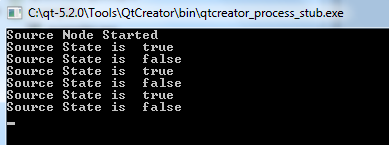
后续步骤将用于创建网络的副本端,在本示例中,该副本端从源端获取交换机的状态,并将其回传。
副本代码
- 使用 repc 将副本添加
到项目中。我们使用与源端相同的 API 定义文件
SimpleSwitch.rep,通过repc 生成Replica头文件。如果您使用的是cmake,请在客户端的cmake文件中包含以下行,指定.rep文件作为输入:qt6_add_repc_replicas(directconnectclient simpleswitch.rep )如果您使用的是
qmake,请在客户端的.pro文件中添加以下行:REPC_REPLICA = simpleswitch.reprepc工具会在构建目录中生成一个
rep_SimpleSwitch_replica.h文件。有关更多信息,请参阅Replica。 - 创建一个节点以连接到源主机的
节点。以下代码在网络上实例化第二个节点,并将其连接到源主机节点:
QRemoteObjectNode repNode; // create remote object node repNode.connectToNode(QUrl(QStringLiteral("local:replica"))); // connect with remote host node - 调用节点的acquire() 方法以创建一个指向副本的指针
首先,我们实例化一个副本:
QSharedPointer<SimpleSwitchReplica> ptr;
ptr.reset(repNode.acquire<SimpleSwitchReplica>()); // acquire replica of source from host node
注意: acquire() 返回一个指向副本的指针,但不会管理其生命周期。本示例展示了推荐的做法:将返回的指针包装在QSharedPointer 或QScopedPointer 中,以确保该指针始终被正确删除。
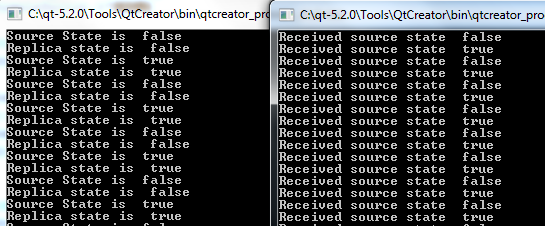
main.cpp实现了上述步骤,并实例化了我们的对象:main.cpp#include <QCoreApplication> #include "client.h" int main(int argc, char *argv[]) { QCoreApplication a(argc, argv); QSharedPointer<SimpleSwitchReplica> ptr; // shared pointer to hold source replica QRemoteObjectNode repNode; // create remote object node repNode.connectToNode(QUrl(QStringLiteral("local:replica"))); // connect with remote host node ptr.reset(repNode.acquire<SimpleSwitchReplica>()); // acquire replica of source from host node Client rswitch(ptr); // create client switch object and pass reference of replica to it return a.exec(); }Client类的完整声明和定义如下:client.h#ifndef _CLIENT_H #define _CLIENT_H #include <QObject> #include <QSharedPointer> #include "rep_simpleswitch_replica.h" class Client : public QObject { Q_OBJECT public: Client(QSharedPointer<SimpleSwitchReplica> ptr); ~Client() override = default; void initConnections();// Function to connect signals and slots of source and client Q_SIGNALS: void echoSwitchState(bool switchState);// this signal is connected with server_slot(..) on the source object and echoes back switch state received from source public Q_SLOTS: void recSwitchState_slot(bool); // slot to receive source state private: bool clientSwitchState; // holds received server switch state QSharedPointer<SimpleSwitchReplica> reptr;// holds reference to replica }; #endifclient.cpp#include "client.h" // 构造函数 Client::Client(QSharedPointer<SimpleSwitchReplica>ptr) : QObject(nullptr),reptr(ptr) { // 通过初始化槽初始化复制体的信号连接。 initConnections(); // 由于我们的复制体是由 repc 生成的, // 因此可以直接 连接到 SimpleSwitchReplica 的信号/槽 。 } voidClient::initConnections() { // 初始化信号与插槽之间的连接 // 将源副本的信号 currStateChanged() 与客户端的 recSwitchState() 插槽连接,以接收源的当前状态 QObject::connect(reptr.data(), &SimpleSwitchReplica::currStateChanged, this, &Client::recSwitchState_slot); // 将客户端的 echoSwitchState(..) 信号与副本的 server_slot(..) 连接,以回显接收到的状态 QObject::connect(this, &Client::echoSwitchState,reptr.data(), &SimpleSwitchReplica::server_slot); } voidClient::recSwitchState_slot(boolvalue) { qDebug() << "Received source state "<< value << reptr.data()->currState(); clientSwitchState=reptr.data()->currState(); Q_EMIT echoSwitchState(clientSwitchState);// 发出信号,将接收到的状态回传给服务器 }将此示例与源端示例一起编译并运行后,将生成以下输出:
© 2026 The Qt Company Ltd. Documentation contributions included herein are the copyrights of their respective owners. The documentation provided herein is licensed under the terms of the GNU Free Documentation License version 1.3 as published by the Free Software Foundation. Qt and respective logos are trademarks of The Qt Company Ltd. in Finland and/or other countries worldwide. All other trademarks are property of their respective owners.
