
Opći ističač
Qt Creator koristi motor KSyntaxHighlighting s definicijama sintakse Kate za isticanje koda u datotekama koje nemaju namjensku podršku, kao što su datoteke s Pythonom ili shell skriptama. Za upravljanje definicijama isticanja koje ovaj motor koristi, odaberite Preferences > Text Editor > Generic Highlighter.
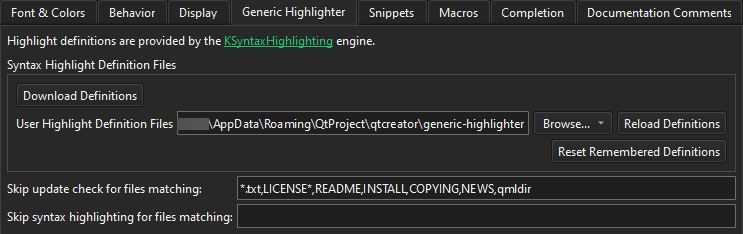
Sljedeća tablica opisuje postavke koje možete postaviti.
| Preferencija | Opis |
|---|---|
| Download Definitions | Preuzeti nedostajuće i ažurirati postojeće datoteke definicija sintakse. |
| User Highlight Definition Files | Postavite mapu u kojoj Qt Creator traži vaše vlastite datoteke s definicijama isticanja, uz one preuzete. |
| Reload Definitions | Ponovno učitajte datoteke definicija koje su izmijenjene izvan Qt Creator-a. |
| Reset Remembered Definitions | Resetirajte definicije isticanja koje je Qt Creator zapamtio za datoteke koje se mogu povezati s više od jedne definicije. Pogledajte Preuzimanje definicija isticanja. |
| Skip update check for files matching | Popis uzoraka datoteka osjetljivih na žig, odvojenih zarezima, za koje Qt Creator ne traži preuzimanje nedostajuće definicije isticanja. |
| Skip syntax highlighting for files matching | Navedi obrasce datoteka osjetljive na džoker znakove, odvojene zarezima, za koje Qt Creator uopće ne primjenjuje generičko isticanje sintakse. |
Vidi također Kako: Konfigurirati uređivače, Konfiguriranje uređivača i Preuzimanje definicija isticanja.
Copyright © The Qt Company Ltd. and other contributors. Documentation contributions included herein are the copyrights of their respective owners. The documentation provided herein is licensed under the terms of the GNU Free Documentation License version 1.3 as published by the Free Software Foundation. Qt and respective logos are trademarks of The Qt Company Ltd in Finland and/or other countries worldwide. All other trademarks are property of their respective owners.
