
Boot to Qt デバイスへのアプリケーションファイルのコピー
プロジェクト設定ファイルおよび「xml-ph-0000@deepl.internal」の「xml-ph-0001@deepl.internal」で、 Boot to Qt プロジェクト構成ファイルおよび「Projects 」>「Deploy Settings 」で設定します。
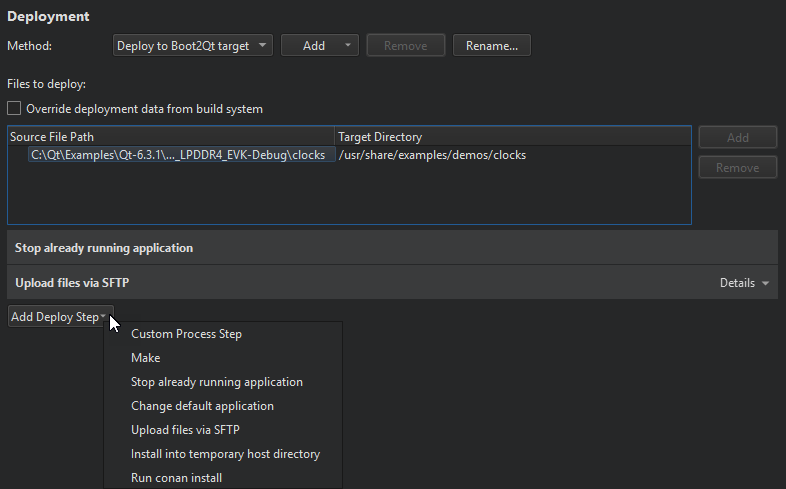
デプロイのプロセスについては、「リモート Linux デバイスへのアプリケーションのデプロイ」で詳しく説明しています。
起動時にアプリケーションを起動する
起動時にアプリケーションを起動するには、[Add Deploy Step ] > [Change default application ] > [Set this application to start by default] を選択します。
「手順:ビルドと実行」、 「手順:Boot to Qt 向けの開発」、および「 Boot to Qt デバイス向けの開発」も参照してください 。
Copyright © The Qt Company Ltd. and other contributors. Documentation contributions included herein are the copyrights of their respective owners. The documentation provided herein is licensed under the terms of the GNU Free Documentation License version 1.3 as published by the Free Software Foundation. Qt and respective logos are trademarks of The Qt Company Ltd in Finland and/or other countries worldwide. All other trademarks are property of their respective owners.
