
外部ドキュメントを追加する
Help モードでは、外部ドキュメントを表示できます。Qt Creator およびQt XMLに同梱されているドキュメントを追加または置き換えるには、次の手順を実行します。
- ドキュメントから .qch ファイルを作成します。
ドキュメントの準備方法および .qch ファイルの作成方法については、『Qt Help Framework』を参照してください。
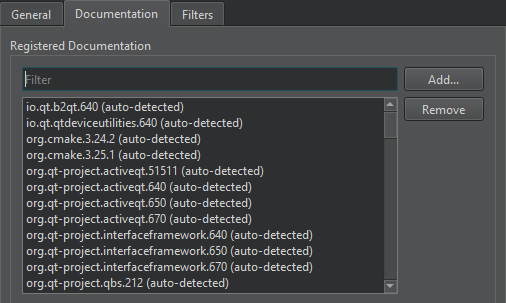
- .qch ファイルをQt Creator に追加するには、Preferences >Help >Documentation >Add に移動します。
「手順:ドキュメントの閲覧方法」も参照してください 。
Copyright © The Qt Company Ltd. and other contributors. Documentation contributions included herein are the copyrights of their respective owners. The documentation provided herein is licensed under the terms of the GNU Free Documentation License version 1.3 as published by the Free Software Foundation. Qt and respective logos are trademarks of The Qt Company Ltd in Finland and/or other countries worldwide. All other trademarks are property of their respective owners.
