
ヘルプウィンドウを分離する
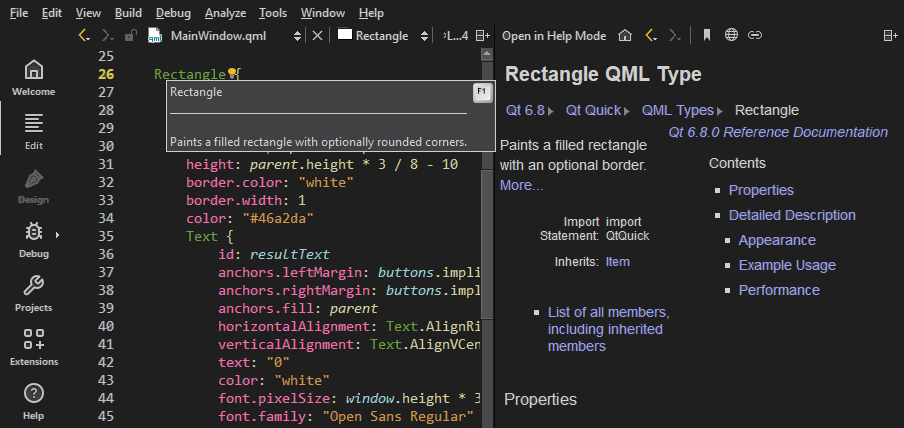
デフォルトでは、F1キーを押すと、コンテキストに応じたヘルプがコードエディタの隣にウィンドウとして開きます。縦方向のスペースが足りない場合は、ヘルプはフルスクリーンモードで開きます。
ヘルプを常にフルスクリーンモードまたは外部ウィンドウで開くように指定するには、[Preferences ] > [Help ] > [General] の順に選択します。
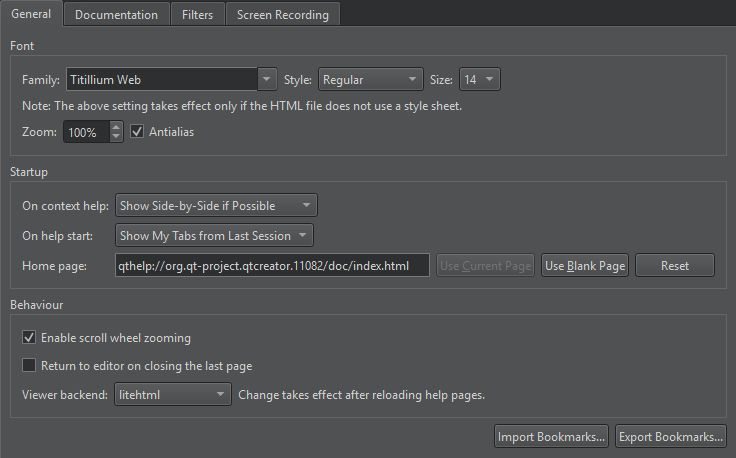
コンテキスト依存ヘルプの表示に関する設定は、[On context help] で行います。ヘルプウィンドウを分離するには、[Always Show in External Window] を選択します。
ヘルプ表示中にこの設定を変更するには、[ ] を選択します。
「ドキュメントの読み方」も参照してください 。
Copyright © The Qt Company Ltd. and other contributors. Documentation contributions included herein are the copyrights of their respective owners. The documentation provided herein is licensed under the terms of the GNU Free Documentation License version 1.3 as published by the Free Software Foundation. Qt and respective logos are trademarks of The Qt Company Ltd in Finland and/or other countries worldwide. All other trademarks are property of their respective owners.
