
Androidパッケージへの外部ライブラリの追加
Qt Creator アプリケーションが使用する Qt ライブラリを自動的に検出し、依存関係として追加します。
外部ライブラリをアプリケーションのライブラリフォルダにコピーし、起動時に読み込むには:
- 「Projects 」 > 「Build Settings 」 > 「Build Android APK 」の順に移動し、「Details 」を選択します。
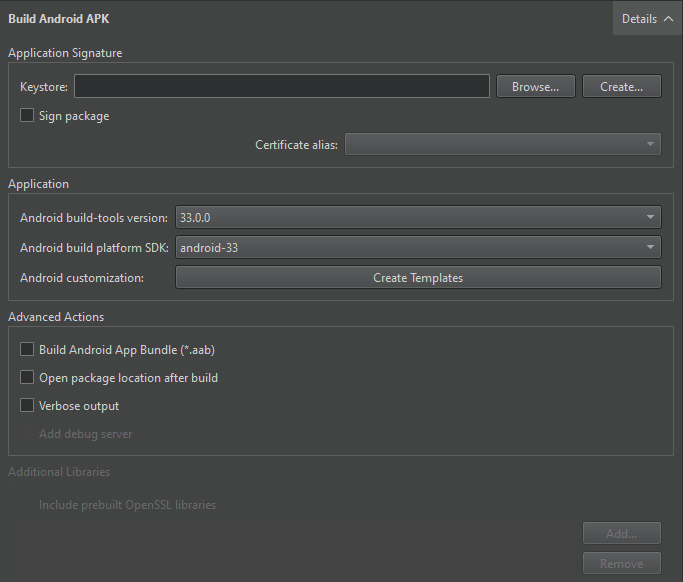
- 「Additional Libraries 」で、追加するライブラリを選択します。
OpenSSLライブラリの追加
OpenSSL ライブラリを追加するには、「Additional Libraries 」グループ内の「Include prebuilt OpenSSL libraries 」を選択します。
これにより、[Preferences ] > [SDKs ] > [Android OpenSSL Settings] で指定した OpenSSL インクルード プロジェクトが追加されます。これは、qmake および CMake プロジェクトの両方で機能します。
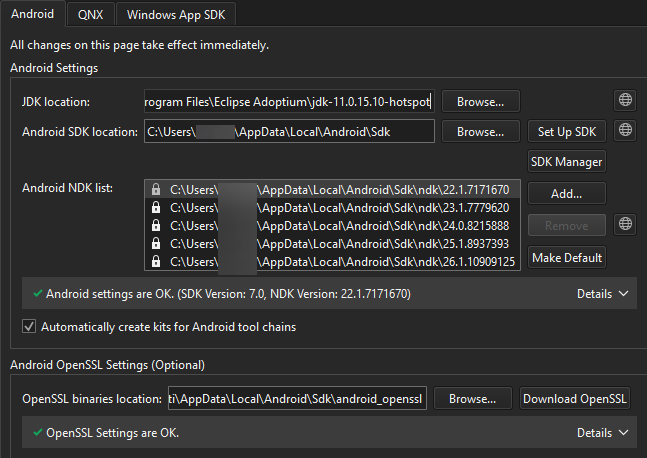
また、「Additional Libraries 」フィールドに、必要なlibssl.so およびlibcrypto.so ライブラリへのパスを手動で追加することもできます。
「Android向け開発の手順」および「Android向け開発」も参照してください 。
Copyright © The Qt Company Ltd. and other contributors. Documentation contributions included herein are the copyrights of their respective owners. The documentation provided herein is licensed under the terms of the GNU Free Documentation License version 1.3 as published by the Free Software Foundation. Qt and respective logos are trademarks of The Qt Company Ltd in Finland and/or other countries worldwide. All other trademarks are property of their respective owners.
