
Androidパッケージの作成
androiddeployqt ツールの設定を指定するには、Projects >Build Settings >Build Android APK に移動し、「Details 」を選択します。
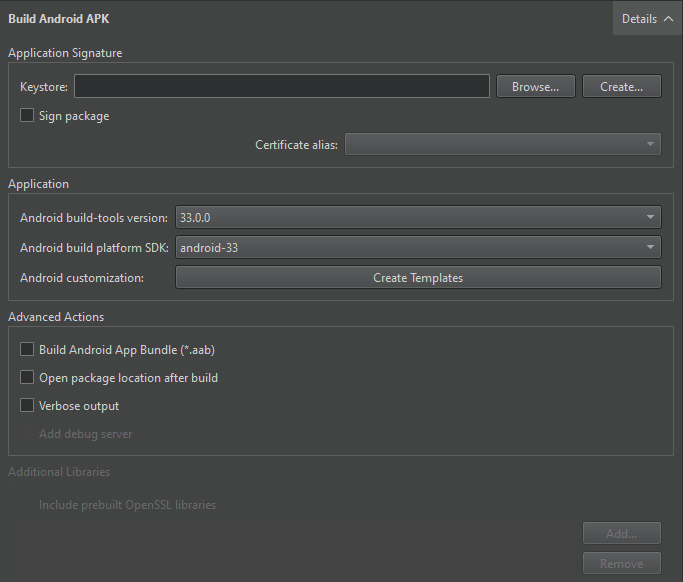
androiddeployqt ツールは、設定に基づいてAPKを作成します。利用可能なオプションの詳細については、androiddeployqtを参照してください。
「Compile Output」では、androiddeployqt ツールが実行している内容に関する情報を確認できます。詳細情報を表示するには、「Verbose output 」を選択してください。
Add debug server を選択すると、デバッグサーバーのバイナリがパッケージに含まれます。
API レベルの選択
[Android build platform SDK ] フィールドで、アプリケーションのビルドに使用するAPI レベルを選択します。通常は、利用可能な中で最も高い API レベルを選択する必要があります。
通常、ビルドには Android SDK ビルドツールの最新バージョンを使用します。必要に応じて、[Android build-tools version ] フィールドで別のバージョンを選択してください。
AABのビルド
アプリケーションをローカルでテストする場合は、Qt Creator がデバイスにパッケージをインストールして実行できるため、APK形式を使用してください。Google Playストアに配布する場合は、「Build Android App Bundle (*.aab) 」を選択してAABを作成してください。
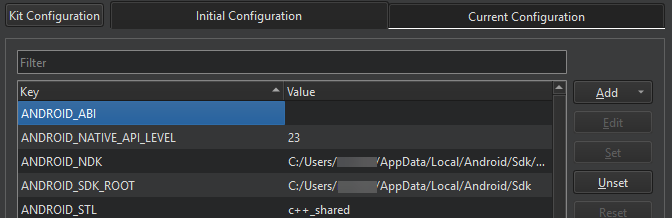
CMake を使用してビルドする場合、Initial Configuration の [CMake ] セクションで、選択された ABI を確認できます。ANDROID_ABI キーの値として、追加の ABI を設定できます:
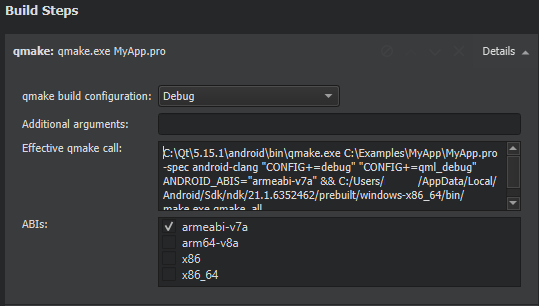
Qbsまたはqmakeを使用してビルドする場合、`Build Steps`内の`ABIs `フィールドでABIを選択できます:
AARのビルド
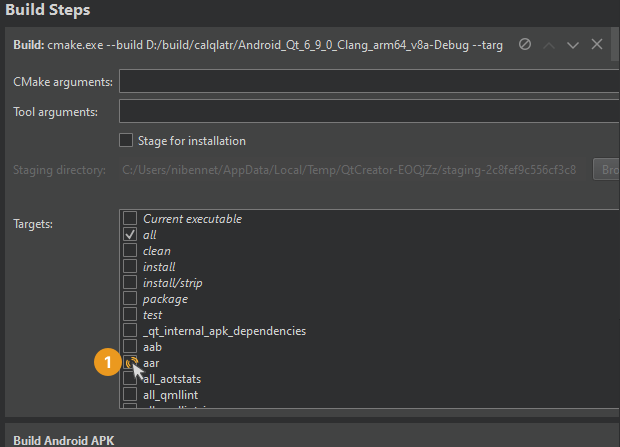
「Build Steps 」セクションで AAR ターゲットを選択します。
「Android向け開発の手順」および「Android向け開発」も参照してください 。
Copyright © The Qt Company Ltd. and other contributors. Documentation contributions included herein are the copyrights of their respective owners. The documentation provided herein is licensed under the terms of the GNU Free Documentation License version 1.3 as published by the Free Software Foundation. Qt and respective logos are trademarks of The Qt Company Ltd in Finland and/or other countries worldwide. All other trademarks are property of their respective owners.
