
ビューの切り離し
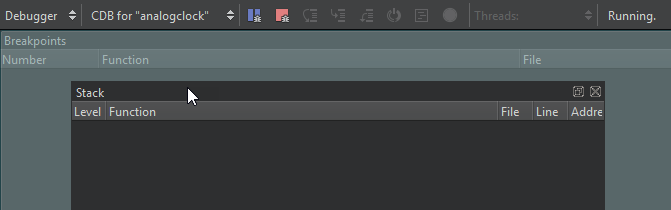
「 」アイコンが付いているQt Creator ビューは、切り離すことができます。切り離したビューは、画面上の別の場所や別の画面に移動させることができます。
ビューを分離するには:
- ビューのタイトルバーをダブルクリックします。
- マウスでビューのタイトルバーを掴み、画面上の別の位置へ移動させます。
- 「 」を選択します。
ビューのタイトルバーを表示するには、[View ] > [Views] を選択し、[Automatically Hide Title Bars] のチェックを外します。
ビューの配置
ビューをアタッチするには、ビューをハイライト表示されたドック領域にドラッグします。
変更を元に戻す
閉じているビューを開くには、「View 」 > 「Views 」を選択します。
変更を元に戻すには、[View ] > [Views ] > [Reset to Default Layout] を選択します。
「操作方法:UIのカスタマイズ」および「UIのカスタマイズ」も参照してください 。
Copyright © The Qt Company Ltd. and other contributors. Documentation contributions included herein are the copyrights of their respective owners. The documentation provided herein is licensed under the terms of the GNU Free Documentation License version 1.3 as published by the Free Software Foundation. Qt and respective logos are trademarks of The Qt Company Ltd in Finland and/or other countries worldwide. All other trademarks are property of their respective owners.
