
git amend
最新の変更を最後のコミットに適用するには、Tools >Git >Local Repository >Amend Last Commit に移動します。
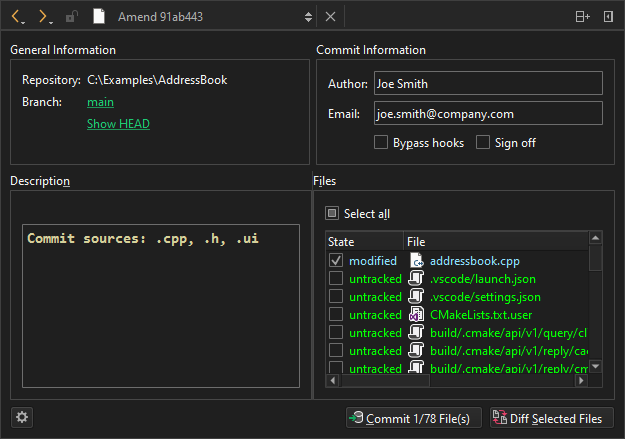
Git コミットの修正
現在のブランチのログを表示するには、Branch でブランチ名を選択します。
修正前のコミットを現在の状態で表示するには、Show HEAD を選択します。
選択したファイルの変更点の差分を表示するには、Diff Selected Files を選択します。
Commit を選択して、コミットを修正します。
関連するコミットの修正
一連の関連するコミットの中で、以前のコミットを修正するには、Tools >Git >Local Repository >Fixup Previous Commit を選択します。この操作では、対話型リベースが使用されます。競合が発生した場合は、マージツールが提案されます。
最後のコミットのコミットメッセージを変更するには、Edit commit message を選択します。リベースが実行されると、コミットメッセージを編集するためのエディタが表示されます。
「Git の使い方」および「 Git の利用方法」も参照してください 。
Copyright © The Qt Company Ltd. and other contributors. Documentation contributions included herein are the copyrights of their respective owners. The documentation provided herein is licensed under the terms of the GNU Free Documentation License version 1.3 as published by the Free Software Foundation. Qt and respective logos are trademarks of The Qt Company Ltd in Finland and/or other countries worldwide. All other trademarks are property of their respective owners.
