
AVDの管理
Linux、macOS、または Windows で Android デバイスをエミュレートするには、Android エミュレータを使用します。Android エミュレータは、Android 仮想デバイス(AVD)と呼ばれる仮想マシン上で Android オペレーティングシステムを実行します。
AVD を表示および追加するには、Preferences >Devices にアクセスします。
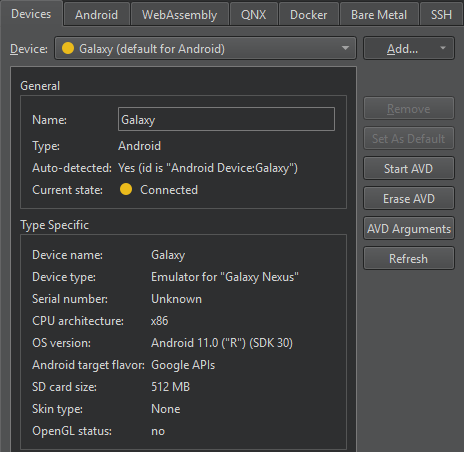
Device で AVD を選択すると、Current state でそのステータスを確認できます。
ステータス情報を更新するには、[Refresh] を選択します。
AVD の起動
AVD を起動するには、[Start AVD] を選択します。通常、Qt Creator では、キットセレクタで AVD を選択してアプリケーションをデプロイすると、その AVD が起動します。
AVDの起動に関する設定
AVD の起動に関する設定を行うには、[AVD Arguments] を選択します。
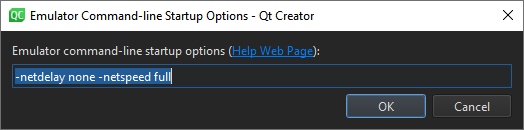
「Emulator command-line startup options 」で設定を行います。利用可能なオプションについては、「コマンドラインからエミュレータを起動する」を参照してください。
ターミナルからエミュレータを手動で起動するには、次のように入力します。
cd <ANDROID_SDK_ROOT>/emulator
./emulator -avd <AVD_NAME>
AVDの削除
リストおよびキットセレクターから AVD を削除するには、[Erase AVD] を選択します。
「Android 向け開発の手順」および「Android 向け開発」も参照してください 。
Copyright © The Qt Company Ltd. and other contributors. Documentation contributions included herein are the copyrights of their respective owners. The documentation provided herein is licensed under the terms of the GNU Free Documentation License version 1.3 as published by the Free Software Foundation. Qt and respective logos are trademarks of The Qt Company Ltd in Finland and/or other countries worldwide. All other trademarks are property of their respective owners.
