
アウトラインを表示
「Outline 」ビューを使用すると、ソースファイル内で定義された型やその他のシンボル、およびそれらのプロパティや階層構造の概要を確認できます。
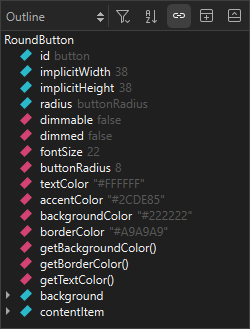
- すべてのバインディングの完全なリストを表示するには、[
 ] (Filter Tree) > [Show All Bindings] を選択します。
 - 型やシンボルをアルファベット順に並べ替えるには、
 (Sort Alphabetically )を選択します。
 - エディタで選択されている型またはシンボルとの同期を停止するには、「
 」(Synchronize with Editor )のチェックを外します。
Copyright © The Qt Company Ltd. and other contributors. Documentation contributions included herein are the copyrights of their respective owners. The documentation provided herein is licensed under the terms of the GNU Free Documentation License version 1.3 as published by the Free Software Foundation. Qt and respective logos are trademarks of The Qt Company Ltd in Finland and/or other countries worldwide. All other trademarks are property of their respective owners.
