
MCU SDK 추가
참고: MCU용 개발을 시작하기 전에 Help > About Plugins 로 이동하여 Qt for MCUs 플러그인이 활성화되어 있는지 확인하십시오.
Qt Creator 와 MCU 보드 간의 연결을 구성하려면:
- Preferences > SDKs > MCU 로 이동합니다.
- 여기서 Qt for MCUs SDKQt for MCUs SDK를 설치한 디렉터리의 경로를 지정하십시오.
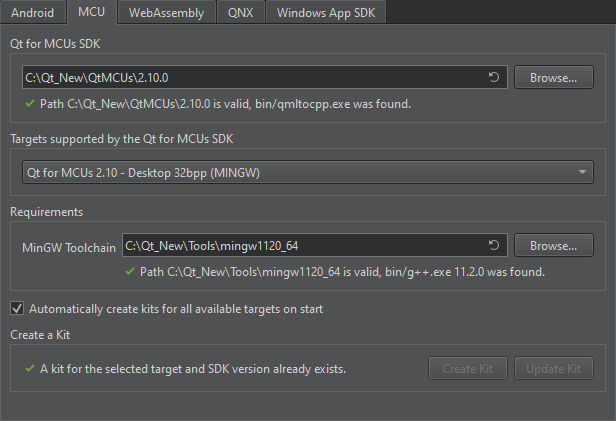
- ' Targets supported by the Qt for MCUs SDK에서 사용 중인 MCU 보드를 선택하십시오.
- Requirements 에서 플랫폼별 요구 사항이 충족되는지 확인하십시오. 이는 대상에 따라 다릅니다.
- Infineon 대상의 경우:
- Green Hills Compiler for ARM 또는 IAR ARM Compiler 경로.
- Graphics Driver for Traveo T2G Cluster Series 경로.
- 다음 Infineon Auto Flash Utility 경로.
- NXP 대상의 경우:
- GNU ARM Embedded Toolchain 또는 IAR ARM Compiler 경로.
- MCUXpresso IDE 설치 경로.
- 선택한 대상에 대한 Board SDK.
- 선택한 대상에 대한 FreeRTOS Sources 선택한 대상에 대한 .
- Renesas 대상의 경우:
- Green Hills Compiler 경로.
- 해당 Renesas Graphics Library 경로.
- 해당 Renesas Flash Programmer 경로 (선택 사항).
- STM32 대상의 경우:
- GNU ARM Embedded Toolchain 또는 IAR ARM Compiler 경로.
- STM32CubeProgrammer 의 설치 경로.
- 선택한 대상용 Board SDK.
- 선택한 타깃에 대한 FreeRTOS Sources 선택한 타깃용.
- Infineon 대상의 경우:
- ' Automatically create kits for all available targets on start '을 선택하면 다음에 ' Qt Creator '가 시작될 때 키트가 자동으로 생성됩니다.
참고: 대상에 대한 키트를 수동으로 생성하려면 ‘ Create Kit ’를선택하십시오 .
- Apply 를 선택하여 기본 설정을 저장하십시오.
참조: 플러그인 활성화 및 비활성화, 방법: MCU용 개발, MCU용 개발, 그리고 Qt for MCUs.
Copyright © The Qt Company Ltd. and other contributors. Documentation contributions included herein are the copyrights of their respective owners. The documentation provided herein is licensed under the terms of the GNU Free Documentation License version 1.3 as published by the Free Software Foundation. Qt and respective logos are trademarks of The Qt Company Ltd in Finland and/or other countries worldwide. All other trademarks are property of their respective owners.
