
키보드 단축키 지정
자주 사용하는 키보드 단축키가 없다면 직접 추가할 수 있습니다. 또한, 마우스로 쉽게 수행할 수 있어 메뉴에 표시되지 않거나 기본 키보드 단축키가 설정되지 않은 기능에 대해 사용자 지정 키보드 단축키를 할당할 수도 있습니다. 예를 들어, 편집기에서 단어나 줄을 선택하고 삭제하는 작업이 있습니다.
기존 키보드 단축키를 변경하거나 새로운 단축키를 지정하려면:
- ‘ Preferences ’ > ‘ Environment ’ > ‘ Keyboard ’을 선택합니다.
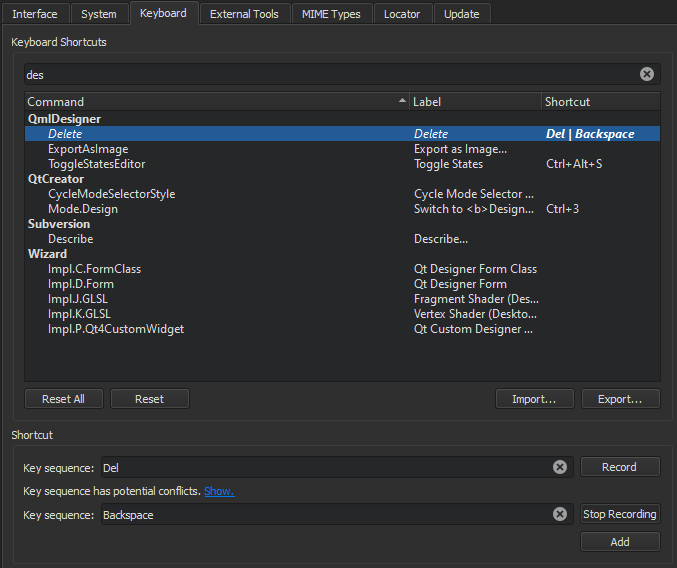
- 목록에서 명령을 선택합니다.
- ' Key Sequence ' 필드에서는 다음 옵션을 사용할 수 있습니다:
- 선택한 명령에 연결할 단축키를 입력합니다.
- 키 순서를 기록합니다.
- 한 기능에 여러 개의 키보드 단축키를 할당하려면 [ Add]을 선택하고, 추가 키 조합을 입력하거나 기록하십시오.
- 기본 단축키로 되돌리려면 [ Reset]를 선택하십시오.
키 순서 기록
- Record 를 선택합니다.
- 키보드 단축키로 사용할 키를 선택합니다.
- 작업이 끝나면 [ Stop Recording ]을 선택합니다.
참조: 키보드 단축키, 키보드 단축키 찾기, 키보드 단축키 가져오기 및 내보내기, 방법: UI 조정, UI 조정.
Copyright © The Qt Company Ltd. and other contributors. Documentation contributions included herein are the copyrights of their respective owners. The documentation provided herein is licensed under the terms of the GNU Free Documentation License version 1.3 as published by the Free Software Foundation. Qt and respective logos are trademarks of The Qt Company Ltd in Finland and/or other countries worldwide. All other trademarks are property of their respective owners.
