
프로젝트용 언어 서버 구성
현재 프로젝트에 대한 언어 서버를 구성하려면 ‘ Projects ’ > ‘ Project Settings ’ > ‘ Language Server ’로 이동하십시오.
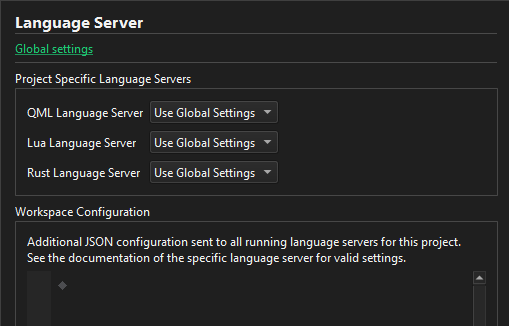
언어 서버를 추가하거나 기본 설정을 변경하려면 ‘ Global settings ’를 선택하십시오.
언어 서버 켜기 및 끄기
언어 서버를 켜거나 끄려면 Project Specific Language Servers 에서 Enabled 또는 Disabled 를 선택하십시오.
언어 서버 작업 공간 구성
언어 클라이언트는 Workspace Configuration 필드의 내용을 JSON 파일로 변환하여, 해당 프로젝트에 속한 파일이 열려 있는 모든 언어 서버로 전송합니다. JSON 파일의 내용은 유효한 JSON이어야 합니다. 사용 가능한 설정은 언어 서버에 따라 다릅니다.
' Workspace Configuration'에서 유효한 JSON 형식을 사용하여 언어 서버 설정을 지정하십시오.
‘방법: 언어 서버 관리’, ‘언어 서버 관리’ 및 ‘프로젝트 빌드 및 실행’항목도 참조하십시오 .
Copyright © The Qt Company Ltd. and other contributors. Documentation contributions included herein are the copyrights of their respective owners. The documentation provided herein is licensed under the terms of the GNU Free Documentation License version 1.3 as published by the Free Software Foundation. Qt and respective logos are trademarks of The Qt Company Ltd in Finland and/or other countries worldwide. All other trademarks are property of their respective owners.
