
SSH 연결 구성
Qt Creator 과 장치 간의 연결을 보호하려면, 컴퓨터에 ssh, sftp 및 ssh-keygen 도구가 포함된 OpenSSH 제품군을 설치하십시오.
가능한 경우, SSH 연결은 마스터 모드에서 실행되는 OpenSSH 클라이언트를 통해 설정됩니다. 기본적으로 단일 SSH 연결을 통해 여러 세션이 공유됩니다. 연결을 한 번 설정하고 이후의 실행 및 배포 절차에 이를 재사용하면, 특히 임베디드 장치의 경우 연결 설정에 드는 오버헤드를 줄일 수 있습니다. Windows에서는 연결 공유가 지원되지 않으므로, 각 배포 또는 실행 절차마다 새로운 SSH 연결이 생성됩니다.
도구가 설치된 디렉터리의 경로를 설정하려면:
- Preferences > Devices > SSH 로 이동합니다.
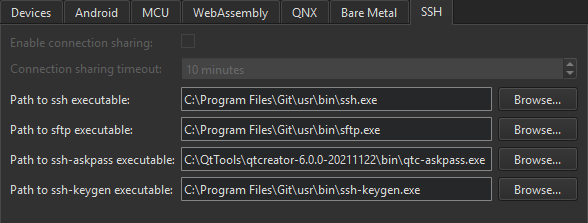
- ' Enable connection sharing ' 옵션을 해제하면 배포 및 실행 절차마다 새로운 SSH 연결이 생성됩니다. 이 옵션은 연결 공유가 지원되지 않는 Windows에서는 비활성화되어 있습니다.
- ' Connection sharing timeout'에서 SSH 연결 재사용에 대한 시간 제한을 분 단위로 지정합니다.
- Path to ssh executable 에서 OpenSSH 실행 파일이 설치된 디렉터리의 경로를 입력합니다.
- Path to sftp executable 에서 SFTP 실행 파일이 설치된 디렉터리의 경로를 입력합니다.
- Path to ssh-askpass executable 에서 ssh-askpass 실행 파일이 설치된 디렉터리의 경로를 입력하십시오. 일반적으로 Qt Creator 와 함께 제공되는 도구인 qtc-askpass를 가리키는 기본 경로를 사용할 수 있습니다.
- Path to ssh-keygen executable 에서 ssh-keygen 실행 파일이 설치된 디렉터리의 경로를 입력하십시오.
‘방법: 원격 Linux용 개발’ 및 ‘원격 Linux 장치용 개발’도 참조하십시오 .
Copyright © The Qt Company Ltd. and other contributors. Documentation contributions included herein are the copyrights of their respective owners. The documentation provided herein is licensed under the terms of the GNU Free Documentation License version 1.3 as published by the Free Software Foundation. Qt and respective logos are trademarks of The Qt Company Ltd in Finland and/or other countries worldwide. All other trademarks are property of their respective owners.
