
Google 테스트 만들기
Google 테스트를 생성하려면:
- File > New Project > Test Project 로 이동합니다.
- Google Test Project > Choose 을 선택하여 Google 테스트용 기본 코드가 포함된 프로젝트를 생성합니다.
- ' Project and Test Information ' 대화 상자에서 프로젝트 및 테스트에 대한 설정을 지정합니다.
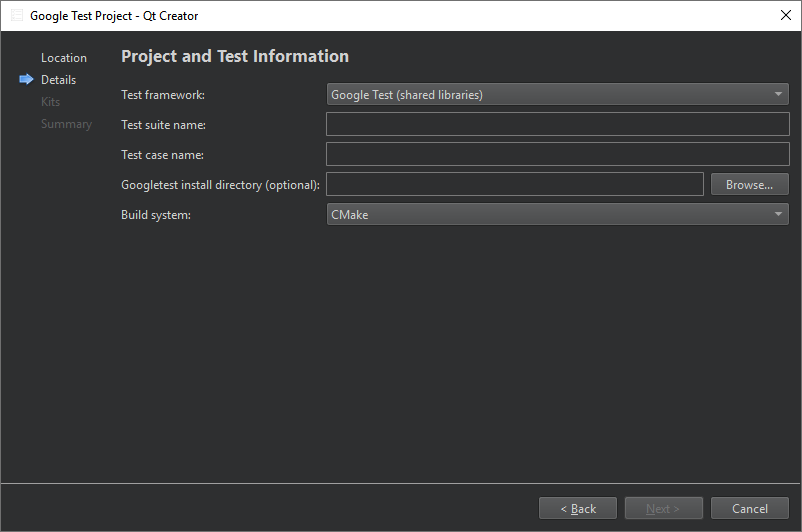
- ' Test framework'에서 ' Google Test (shared libraries) '을 선택하여 Google Test와 링크하거나, ' Google Test (headers only) '을 선택하여 필요한 Google Test 소스 코드를 프로젝트에 포함시킵니다.
- ' Test suite name'에서 테스트 스위트의 이름을 입력합니다.
- Test case name 에서 테스트 케이스 이름을 입력합니다.
- 공유 라이브러리 테스트의 경우, ‘ Googletest install directory (optional) ’에서 Google C++ 테스트 프레임워크 설치 경로를 설정할 수 있습니다.
- 헤더 전용 테스트의 경우, ' Googletest source directory (optional)'에서 googletest 리포지토리 클론의 경로를 설정할 수 있습니다.
- Build system 에서 프로젝트 빌드에 사용할 빌드 시스템(CMake, qmake 또는 Qbs)을 선택합니다.
Qt Creator 지정된 프로젝트 디렉터리에 테스트가 생성됩니다.
Google 테스트 생성에 대한 자세한 내용은 Google Test Primer를 참조하세요.
참고: 테스트를 스캔하는동안 파서는 gtest/gtest.h 를 직접 또는 간접적으로 포함하는 파일만 고려합니다. 현재 빌드되지 않는 파일은 무시됩니다.
‘방법: 테스트’, ‘빌드 시스템 선택’ 및 ‘테스트’항목도 참조하십시오 .
Copyright © The Qt Company Ltd. and other contributors. Documentation contributions included herein are the copyrights of their respective owners. The documentation provided herein is licensed under the terms of the GNU Free Documentation License version 1.3 as published by the Free Software Foundation. Qt and respective logos are trademarks of The Qt Company Ltd in Finland and/or other countries worldwide. All other trademarks are property of their respective owners.
