
상태 차트 생성
Qt Creator 를 사용하여 상태 머신을 내장한 애플리케이션을 만들 수 있습니다. 파일 마법사를 통해 SCXML(State Chart XML) 파일이 생성되며, 이 파일에는 SCXML 편집기를 사용하여 편집할 수 있는 기본 코드가 포함되어 있습니다. Qt SCXML 모듈의 클래스를 사용하여 파일에서 생성된 상태 머신을 Qt 애플리케이션에 내장할 수 있습니다.
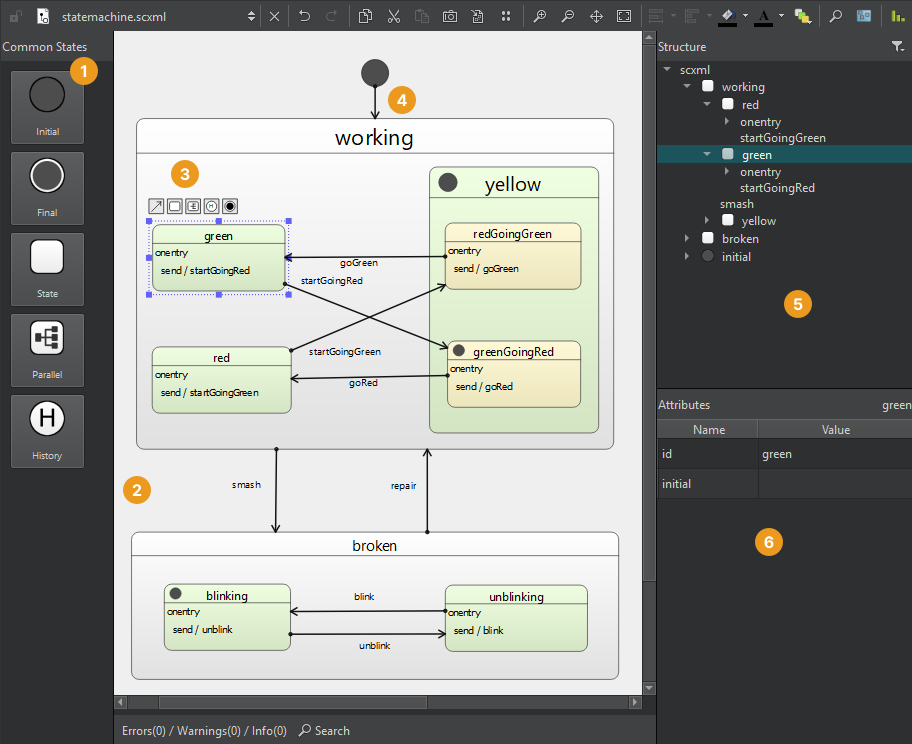
상태 차트를 생성하려면:
- File > New File > Files and Classes > Modeling > State Chart > Choose 을 선택하여 빈 상태 차트를 생성하고 SCXML 편집기에서 엽니다.
- Common States (상태) 뷰(1)에서 상태를 상태 편집기(2)로 드래그합니다.
- 자식 상태를 초기 상태로 드래그하여 복합 상태를 생성하거나, 도구 버튼(3)을 사용하여 선택한 상태와 대상 상태 간의 전환을 생성하십시오.
- 에디터나 ‘ Structure ’ 뷰(5)에서 상태를 선택하여 ‘ Attributes ’ 뷰(6)에서 해당 상태의 속성을 편집할 수 있습니다.
- 전환선(4)을 선택하여 에지 포인트를 추가할 수 있습니다.
- 예를 들어, 이벤트를 발생시키거나 전송하려면 컨텍스트 메뉴 명령을 사용하여 상태의 ‘
<onentry>’ 및 ‘<onexit>’ 요소나 전환에 실행 가능한 콘텐츠를 추가하십시오.
“SCXML 상태 차트 편집”도 참조하십시오 .
Copyright © The Qt Company Ltd. and other contributors. Documentation contributions included herein are the copyrights of their respective owners. The documentation provided herein is licensed under the terms of the GNU Free Documentation License version 1.3 as published by the Free Software Foundation. Qt and respective logos are trademarks of The Qt Company Ltd in Finland and/or other countries worldwide. All other trademarks are property of their respective owners.
