
EBlink 설정
EBlink는 스쿼럴 스크립팅, 라이브 변수 및 핫 플러그를 지원하는 Arm Cortex-M 디버그 도구입니다.
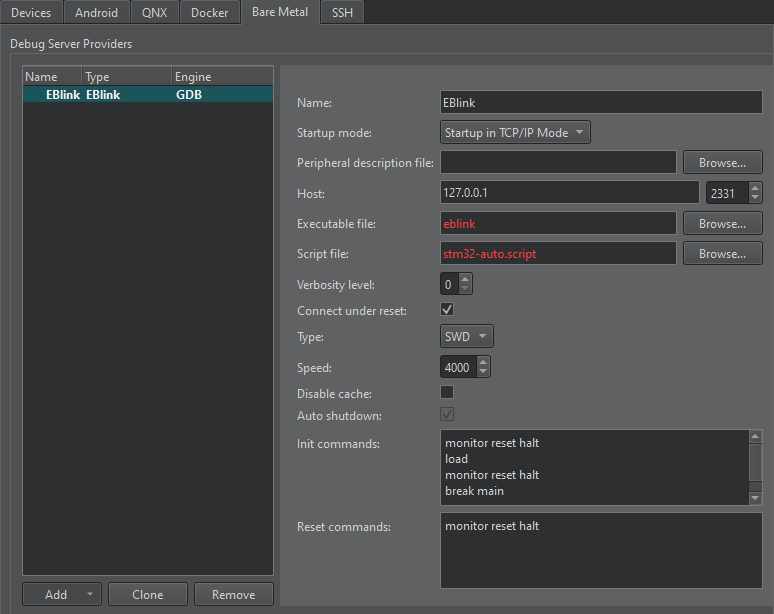
EBlink 환경 설정을 구성하려면:
- Preferences > Devices > Bare Metal.
- ' Add'을 선택합니다.
- ' EBlink'을 선택합니다.
- Name 에서 연결 이름을 입력합니다.
- Startup mode 에서 디버그 서버 공급자를 시작할 모드를 선택하십시오.
- Peripheral description file 에서 장치의 주변 장치를 설명하는 파일의 경로를 지정합니다.
- Host 에서 디버그 서버 공급자에 연결할 호스트 이름과 포트 번호를 선택합니다.
- Executable file 에서 디버그 서버 제공자 실행 파일의 경로를 입력합니다.
- Script file 에서 장치 스크립트 파일의 경로를 입력합니다.
- Verbosity level 에서 상세 로깅 수준을 입력합니다.
- ST-Link 인터페이스를 사용하려면 [ Connect under reset ]을 선택하십시오. 핫 플러그를 사용하려면 선택을 해제하십시오.
- Type 에서 인터페이스 유형을 선택합니다.
- Speed 에서 120~8000킬로헤르츠(kHz) 사이의 인터페이스 속도를 입력합니다.
- Disable cache 를 선택하여 EBlink 플래시 캐시를 비활성화하십시오.
- Auto shutdown 를 선택하여 연결 해제 후 EBlink 서버를 자동으로 종료합니다.
- ' Init commands'에서 연결을 초기화할 때 실행할 명령을 입력합니다.
- Reset commands 에서 연결을 재설정할 때 실행할 명령을 입력합니다.
- Apply 를 선택하여 디버그 서버 공급자를 추가합니다.
' Bare Metal 용 개발 방법' 및 ' Bare Metal 장치용 개발'도 참조하십시오 .
Copyright © The Qt Company Ltd. and other contributors. Documentation contributions included herein are the copyrights of their respective owners. The documentation provided herein is licensed under the terms of the GNU Free Documentation License version 1.3 as published by the Free Software Foundation. Qt and respective logos are trademarks of The Qt Company Ltd in Finland and/or other countries worldwide. All other trademarks are property of their respective owners.
