
Bare Metal 기기 추가
GDB 또는 하드웨어 디버거를 사용하여 원격 Linux 장치 플러그인에서 지원되지 않는 소형 장치에서 애플리케이션을 실행하고 디버깅할 수 있습니다.
베어 메탈 기기를 추가하려면:
- Preferences > Devices > Devices 로 이동합니다.
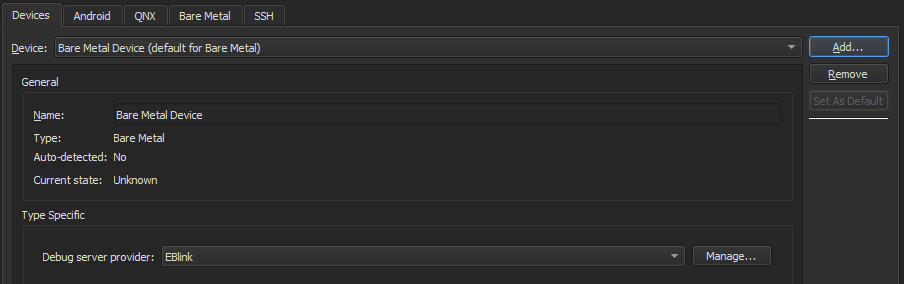
- Add > Bare Metal Device > Start Wizard 를 선택합니다.
- ' Debug server provider'에서 디버그 서버 공급자를 선택합니다.
- Finish 을 선택하여 > Devices 로 돌아갑니다.
- Apply 를 선택하여 장치를 추가합니다.
기기를 키트에 추가하기
애플리케이션을 빌드하고 베어 메탈 장치에서 실행하기 위한 키트를 추가하려면, Preferences > Kits 로 이동하여 Add 를 선택하십시오.
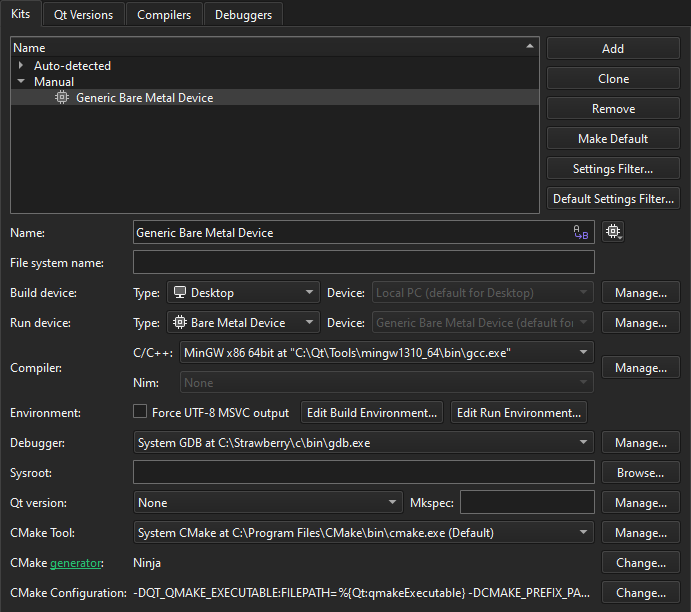
데스크톱에서와 동일한 방식으로 베어 메탈 장치용 애플리케이션을 빌드하고 실행할 수 있습니다.
‘키트 추가’, ‘다양한 플랫폼용 빌드 ’, ‘ Bare Metal 용 개발 방법’, ‘애플리케이션 실행’ 및 ‘ Bare Metal 기기용 개발’항목도 참조하십시오 .
Copyright © The Qt Company Ltd. and other contributors. Documentation contributions included herein are the copyrights of their respective owners. The documentation provided herein is licensed under the terms of the GNU Free Documentation License version 1.3 as published by the Free Software Foundation. Qt and respective logos are trademarks of The Qt Company Ltd in Finland and/or other countries worldwide. All other trademarks are property of their respective owners.
