
SSH 키 생성
Qt Creator 과 장치 간의 연결을 보호하려면 OpenSSH를 사용하십시오.
SSH 공개 및 개인 키 쌍이 없는 경우, Qt Creator 에서 생성할 수 있습니다. 연결 마법사가 키 쌍을 자동으로 생성해 주거나, 직접 생성할 수도 있습니다.
키 길이와 키 알고리즘(RSA 또는 ECDSA)을 지정할 수 있습니다. 에뮬레이터나 장치와의 연결을 보호하는 용도로만 키를 사용하는 경우 기본값을 사용할 수 있습니다.
- Preferences > Devices > Devices
- ' Create New'을 선택합니다.
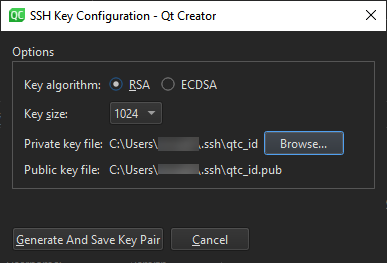
- Private key file 에서 개인 키를 저장할 위치를 선택합니다. Public key file 에는 해당 공개 키를 저장할 위치가 표시됩니다.
- ' Generate And Save Key Pair '를 선택하여 지정된 위치에 키를 생성하고 저장합니다.
‘방법: 원격 Linux용 개발’ 및 ‘원격 Linux 장치용 개발’도 참조하십시오 .
Copyright © The Qt Company Ltd. and other contributors. Documentation contributions included herein are the copyrights of their respective owners. The documentation provided herein is licensed under the terms of the GNU Free Documentation License version 1.3 as published by the Free Software Foundation. Qt and respective logos are trademarks of The Qt Company Ltd in Finland and/or other countries worldwide. All other trademarks are property of their respective owners.
