
git amend
마지막 커밋에 최신 변경 사항을 적용하려면 Tools > Git > Local Repository > Amend Last Commit 로 이동하십시오.
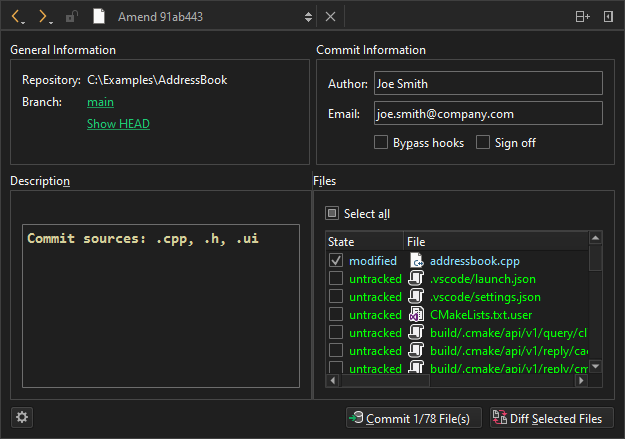
Git 커밋 수정하기
현재 브랜치의 로그를 보려면 Branch 에서 브랜치 이름을 선택하세요.
수정하기 전의 현재 형태의 커밋을 보려면 Show HEAD 을 선택하세요.
선택한 파일의 변경 사항에 대한 차이점을 보려면 Diff Selected Files 을 선택하십시오.
Commit 를 선택하여 커밋을 수정합니다.
관련 커밋 수정
일련의 관련 커밋에서 이전 커밋을 수정하려면 Tools > Git > Local Repository > Fixup Previous Commit 를 선택합니다. 이 작업은 대화형 리베이스(interactive rebase)를 사용합니다. 충돌이 발생하는 경우 병합 도구가 제안됩니다.
마지막 커밋의 커밋 메시지를 수정하려면 Edit commit message 을 선택하십시오. 리베이스 작업이 수행되면 커밋 메시지를 편집할 수 있는 편집기가 나타납니다.
‘Git 사용 방법’ 및 ‘Git 활용’항목도 참조하십시오 .
Copyright © The Qt Company Ltd. and other contributors. Documentation contributions included herein are the copyrights of their respective owners. The documentation provided herein is licensed under the terms of the GNU Free Documentation License version 1.3 as published by the Free Software Foundation. Qt and respective logos are trademarks of The Qt Company Ltd in Finland and/or other countries worldwide. All other trademarks are property of their respective owners.
