
GitLab과 프로젝트 연결
GitLab 토큰으로 프로젝트를 연결하면 ‘ Version Control ’ 패널에서 병합 요청, 이슈 또는 댓글과 같은 이벤트에 대한 알림을 받을 수 있습니다. 정보는 15분마다 가져옵니다. 프로젝트를 처음 열면 GitLab에 마지막으로 로그인한 이후에 발생한 이벤트만 표시됩니다. 이후에는 마지막으로 성공적으로 정보를 가져온 이후에 발생한 이벤트가 나열됩니다.
GitLab과 연결하려면:
- Projects > Project Settings > GitLab 로 이동하여 현재 활성화된 프로젝트의 GitLab 설정을 확인하세요.
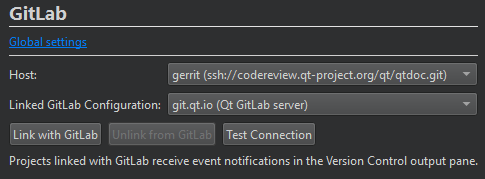
- Host 에서 GitLab 서버의 URL을 선택합니다.
- Linked GitLab configuration 에서 사용할 GitLab 서버 설정을 선택합니다.
- Version Control 패널에서 이벤트 알림을 수신하려면 Link with GitLab 를 선택하십시오.
GitLab 구성에 지정된 액세스 토큰을 사용하여 호스트와의 연결을 테스트하려면 ‘ Test Connection ’를 선택하십시오.
이벤트 알림 수신을 중지하려면 ‘ Unlink from GitLab ’을 선택하십시오.
또한 플러그인 활성화 및 비활성화, 버전 관리 시스템 설정, 일반적인 VCS 기능 사용, 프로젝트 빌드 및 실행, 버전 관리 시스템, Git 사용 및 GitLab을참조하십시오 .
Copyright © The Qt Company Ltd. and other contributors. Documentation contributions included herein are the copyrights of their respective owners. The documentation provided herein is licensed under the terms of the GNU Free Documentation License version 1.3 as published by the Free Software Foundation. Qt and respective logos are trademarks of The Qt Company Ltd in Finland and/or other countries worldwide. All other trademarks are property of their respective owners.
